


BEST One-Click Consistent Character Dataset Creator for AI Influencer Workflow With NSFW Support
- Official Discord: https://discord.gg/RnUHPzTkXH
Sample Generation Result of this workflow (60 Images): https://dri.me/KJbcva5r7PZQCiLvpbiq1qRyp7qIMf
- View all the generated Image along with the reference image to get an idea of how the final result will look like.
- On this example out of 60 Images I got 3 broken images and 57 Images were perfectly fine to use for LoRA training.
Author: Coolstrad
Version: Latest (as of February 2026)
Purpose: This workflow simplifies the creation of high-quality, consistent character datasets for AI influencers using ComfyUI. It's designed for ease of use, allowing you to generate organized image sets with minimal input. Perfect for training LoRAs or building AI-generated content pipelines.
## Overview
This is a streamlined, one-click tool for generating consistent character datasets. Upload a reference image, provide a character name, and run the workflow. It handles everything from image generation to organization, outputting results directly into a dedicated folder.
The workflow supports both SFW and NSFW outputs, making it versatile for various AI influencer projects. It leverages advanced models like Flux, Qwen, and SDXL to ensure high fidelity and consistency.
## Key Features
- One-Click Simplicity: No complex setup—just upload, name, and run.
- Consistent Results: Maintains character likeness across generated images, with minor variations based on input quality.
- NSFW Support: Capable of producing adult-themed datasets automatically.
- Organized Output: All images are saved in ComfyUI/output/datasets/<character_name> for easy access and management.
- Performance: Processing time depends on your hardware; optimized for standard setups.
- LoRA Compatibility: Datasets produced are suitable for training LoRAs with acceptable quality.
## Usage Instructions
1. Install Dependencies: Ensure ComfyUI is installed and configured.
2. Download Models: See the "Required Models" section below and place them in the appropriate directories.
3. Run the Workflow:
- Upload your reference character image.
- Enter the character's name.
- Hit "Run" and wait for completion.
4. Output Location: Find your dataset in ComfyUI/output/datasets/<character_name>.
5. Tips: For best results, use high-quality reference images. NSFW results are automatically done.
## Community and Support
Join our growing Discord community for AI influencer workflows, general AI image/video generation tips, exclusive workflows, and direct support.
- Discord Server: [Join Here](https://discord.gg/RnUHPzTkXH)
A vibrant space for insights, troubleshooting, and collaboration. If you encounter any issues running this workflow, hop in—I'll personally help you out!
## Notes and Limitations
- Face Consistency: The workflow excels at maintaining character features, but slight deviations may occur depending on the initial image quality. These are usually subtle and not noticeable in final outputs.
- LoRA Training: Datasets generated here produce LoRAs of solid quality—test and iterate as needed.
- Hardware Requirements: Works on most setups, but for Qwen models, choose the variant based on your VRAM (e.g., lower-bit versions for limited memory).
- Ethical Use: Always respect guidelines for AI-generated content, especially NSFW.
## Required Models
Download and install these models into your ComfyUI directories as specified. Links point to official sources.
### Flux-Related Models
- Flux Model: [Download](https://huggingface.co/Comfy-Org/vae-text-encorder-for-flux-klein-4b/resolve/main/split_files/diffusion_models/flux-2-klein-4b.safetensors) ComfyUI/models/diffusion_models/
- Text Encoder: [Download](https://huggingface.co/Comfy-Org/vae-text-encorder-for-flux-klein-4b/resolve/main/split_files/text_encoders/qwen_3_4b.safetensors) ComfyUI/models/text_encoders/
- VAE: [Download](https://huggingface.co/Comfy-Org/vae-text-encorder-for-flux-klein-4b/resolve/main/split_files/vae/flux2-vae.safetensors) ComfyUI/models/vae/
### Qwen-Related Models
- Qwen (Select based on memory): [Download Options](https://huggingface.co/unsloth/Qwen-Image-Edit-2511-GGUF/tree/main) ComfyUI/models/unet/
- Qwen LoRA: [Download](https://huggingface.co/lightx2v/Qwen-Image-Edit-2511-Lightning/resolve/main/Qwen-Image-Edit-2511-Lightning-4steps-V1.0-bf16.safetensors) ComfyUI/models/loras/
- Qwen Text Encoder: [Download](https://huggingface.co/Comfy-Org/Qwen-Image_ComfyUI/resolve/main/split_files/text_encoders/qwen_2.5_vl_7b_fp8_scaled.safetensors) ComfyUI/models/text_encoders/
- Qwen VAE: [Download](https://huggingface.co/Comfy-Org/Qwen-Image_ComfyUI/resolve/main/split_files/vae/qwen_image_vae.safetensors) ComfyUI/models/vae/
### SDXL Model
- Recommended SDXL Porn Model (or any compatible SDXL): [Download](https://civarchive.com/models/82543?modelVersionId=2043971) ComfyUI/models/checkpoints/
### Ultralytics Models
Download both and place in ComfyUI/models/ultralytics/bbox/ folder.
- Female Breast Detection: https://huggingface.co/ashllay/YOLO_Models/resolve/e07b01219ff1807e1885015f439d788b038f49bd/bbox/female-breast-v4.0-fantasy.pt
- Female Body Detection: https://civarchive.com/models/1816953?modelVersionId=2056142
Credits
- Original Creator: This workflow was developed solely by Coolstrad
For updates, feedback, or custom requests, reach out via Discord. Happy creating! 🚀
V2.0 MASSIVE UPDATE
✨ Consistent Character Dataset Workflow
This workflow helps you create a dataset for consistent character generation.
It is fully modular — if you need more than 16 images, simply duplicate the image group and paste as many times as you want.
➡️ Just remember to add/adjust your prompts for each new group!
📌 How to Use This Workflow
Load the face you want to replicate.
Run the workflow normally.
After the Qwen generation finishes:
Check the note attached to the right side of the Qwen samplers.
You must enable the Z-Image samplers group.
Press the Run button again.
🎉 Once everything completes, you'll find all generated images inside your output folder.
 This is the reference face image that I have used, the final results are attached on this versions post.
V1.0
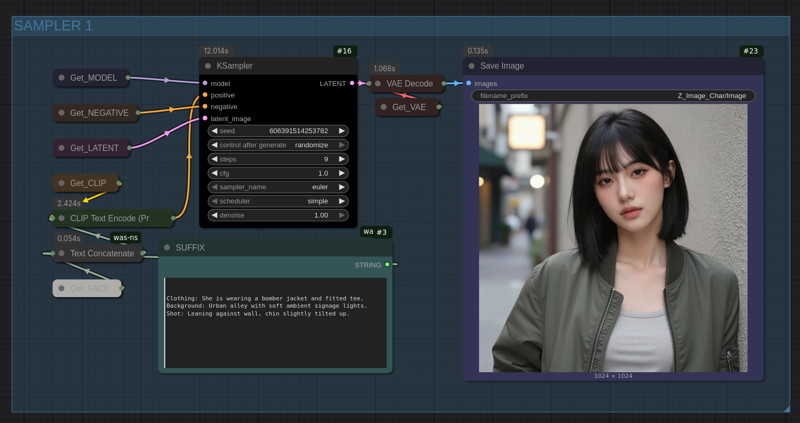
Using this ComfyUI Workflow you can generate base dataset for your consistent character. This is generated with [Z-Image-Turbo] Model. You need to add a face prompt and all the other things will be done by the workflow.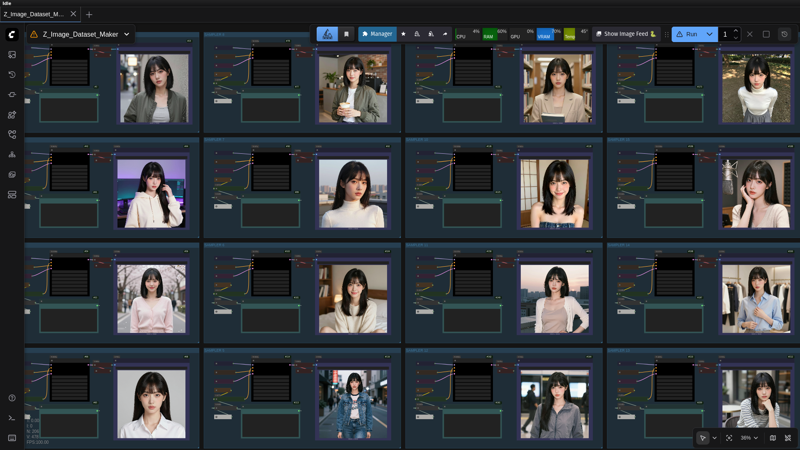
Description
FAQ
Comments (16)
hello!
is it consistent face only or body + face ?
The way the face prompt is written, you’ll get a consistent face and body. Check out the example images or you can directly run the workflow with my prompts as an example. You must create a LoRA afterwards because the consistency isn’t 100% perfect.
Thank you for this quick response, I will wait for the release of Z base before considering creating Loras, I read that there are quite a few errors with the distilled version:) In the meantime I will test this workflow, thank you again Coolstrad
@thierrys29200882 You’re welcome. I will be making the perfect workflow when the edit model is released, it would be the best model to make datasets
just create a high quality n*** image front facing standing in full view, use it and it will make everything easier, then take the dataset train a lora, i did yesterday and it worked like a charm
Thank you so much for this workflow..
I'm thinking of adapting this to cosplay with the Z Image Turbo model.
I hope it's easy to do! Thanks again!
You're Welcome. Let me know if you need any other help. We can connect if you'd like :)
If you are having an issue where the Z Image refining is way too strong, you can easily stop that by reducing the denoise to 0.20 instead of 0.30
Works great! Recommend going for around .2 denoising, seems to work better for me.
Yea, agreed that’s why I gave the last comment, 0.3 is just a bit more harsh.
Please link the models that you're using :)
You can easily download the model just by typing the exact name on google, all the model names are written on the model nodes.
That's what I did and got matrix shape mismatch errors. Which is why I'm asking.
@beepboopboop It’s probably because you may have installed the qwen image mode instead of qwen image 2509 search exactly qwen image edit 2509 Q6 gguf. You may get it.