⚠️Requires 9 custom node packs (10 custom node packs if using MMAudio)
⚠️ Uses GGUF Quantized Wan2.2 base model (for light weight or low VRAM)
⚠️ Uses Lightx2v distill loras for low steps generations
⚠️ Uses Subgraph
⚠️ Dense backend node processes
⚠️ Only tested in ComfyUI Desktop version
✅ UI Oriented workflow
✅ Switch between i2v/FFLF or t2v in one workflow
✅ 4-8 steps generations
✅ No Spaghettification
✅ Comes with other utility workflows
‼️Custom node ComfyUI-Swwan has been reported to cause problems in the workflow. (Make sure to uninstalled it, it has conflict with some of the switches in the workflow) thanks to all the users that help to troubleshoot this.
‼️Disable "Node 2.0" if you are using the latest ComfyUI Version.
🔆The latest ComfyUI Version have memory offloading of VRAM to RAM during video generation like block swap. (Blockswap currently not available on the latest version of ComfyUI for native nodes)
🍥Click Here(CivitAI Article) for Model/Lora Download links + Detailed Guide
Video posted above includes Embedded Workflow. (Download the video, drag into ComyfUI)
Merged videos will not load my main workflow.
Need ComfyUI-VideoHelpSuite custom node to open up workflow from video.
20/12/25 - 🟢V1.1
Fix Manual Scale - previously not scaling to the right resolution in megapixel for certain aspect ratio
Changed Video Upload format in Video Merger and Post Processing workflow from "Wan" to "AnimateDiff" - which will cause missing frames if frames are trimmed off.
Thanks to @Ifvin for discovering the above.
Fix Non-GGUF Workflows Default Model in Loader - previously accidentally swap i2v - t2v low models, causing i2v to generate different video from image used.
Added Volume Adjust to MMAudio subgraphs
All workflows will be included in one download files.
6/12/25 - Added 🎼 t2v/i2v/FFLF v1 + 🎼 i2v Only (+Batch) v1.0
Added MMAudio to main WF in separate download page.
Added/Updated 🎼i2v Only (+Batch) v1.0 with MMAudio WF. ("🎼i2v Only" downloads now contains WF with MMAudio and without )
Added MMAudio to Video 🛠️Post Processing WF.
Updated/Added Instructions for MMAudio installation/download/setup in (CivitAI Article).
Added Non-GGUF WF to all Downloads.
3/12/25 - Added i2v Only (+Batch) v1.0 Workflow - (⚠️ i2v Only)
Capable of generating batch videos with different images and different dimensions or aspect ratios from a folder.
Does both i2v with single image input or i2v batch images from folder.
Single input image i2v function like normal with after generation 🛠️Post Processing options editing following usage guide.
⚠️ Must set up all 🛠️Post Processing options before i2v batch videos generation. (Cannot edit or change 🛠️Post Processing options once generated)
2/12/25 - Added Extend t2v/i2v V0.01 Beta Workflow (WIP - Not perfect)
Capable of generating video and continuing in segments
⚠️t2v uses i2v model to extend/continue the video - Lora for t2v will not be able to work, as you will need to pass in i2v loras for continuation which are not implemented yet. unless the t2v loras are usable on both i2v & t2v.
⚠️More extensions/segments = more degradation to character/faces of the video (less coherent over segments).
⚠️FFLF is removed from the workflow due to conflict
⚠️ Only can pass in a single prompt/lora stack and durations are fixed at the moment.
⌨️Usage for 🟢Main t2v/i2v/FFLF v1:
Select t2v or i2v/FFLF Mode.
t2v: Adjust resolution for video
i2v: Drag and drop in the 1st image loader, choose to manually scale down image or disable it to use original image dimension
FFLF: Enable i2v mode and Enable FFLF and drag and drop image in the 1st & 2nd image loaders, choose to manually scale down image or disable it to use original image dimension (it will use 1st image dimension)
Edit/Add 🍏Prompts, add ✨Loras if needed.
Adjust ⌚Duration or just leave it at 5 seconds.
Set 🚶➡️Total Steps & 👞Split Steps. (4 Total/ 2 Split for Fast, 6 Total/ 3 Split for Good Quality, 8 Total/ 4 Split for Higher Quality)
Click on "New Fixed Random" in 🎲Seed Node.
Generate Video (▷RUN).
Repeat step 4 & 5 until you get desire video shown in 🎥Preview.
While using the same 🎲Seed and without changing anything that is not in 🛠️Post Processing, change/edit 🛠️Post Processing Options, Generate Video (▷RUN) again as many times and skip through KSampler.
Video generated will be in your output folder - 🗂️ComfyUI/Output
🌀To start on a new video project, disable everything in 🛠️Post Processing and set 📺Final Video Mode to 🎥Preview.
💡If you have lower VRAM
Click on the "ComyfUI icon" for the menu
Go to "Settings"
On left bar, go to "Server-Config"
Scroll to "Memory"
Look for "VRAM management mode" option
Select "lowvram"
Restart ComfyUI
📱The Workflows includes:
GGUF model loaders
Sage Attention
Lora Stackers
WanNAG ( to strengthen negative prompt when CFG is 1)
Auto input for FPS (based on Frame Interpolation and speed)
Post Processing:
Frame Interpolation
Upscaler with Model
Frame Trimming
Video Speed adjustment
Manual Adjust FPS (overrides auto fps inputs and speed adjustment)
Video Sharpening
Add Logo/Watermark
Save Last Frame
Frame Select
MMAudio (WF with MMAudio)
💽Download Files includes:
Main i2v/FFLF/t2v Workflow
Postprocessing for video (non-interpolated video)
Videos Merger/Joiner
Simple Megapixel Calculator
🧩Custom Node:
(All Custom Nodes are available in Custom Node Manager)
Open workflow, open up 🧩Manager, click on "Install Missing Custom Nodes", Select all and install, restart ComfyUI.
ComfyUI-GGUF (Manually search in the Customer Node Manager and install this, if it does not show up in “Install Missing Custom Nodes”)
rgthree-comfy
ComfyUI-East-Use
ComfyUI-KJNodes
ComfyUI-VideoHelpSuite
ComfyUI-essentials
ComfyUI-Frame-Interpolation
ComfyUI-mxToolkit
WhiteRabbit
ComfyUI-MMAudio (only for workflow that uses it)
🪞Extra Utility Custom Node: (not required)
ComfyUI-Crystools (add real-time graph in ComfyUI to monitor %usage of CPU, GPU, RAM, VRAM)

🚧 Progression on Video Extend on hold.
🖥️ My Hardware Spec:
♠️ RTX 3090 Ti 24GB - 64GB RAM
📽️ My Video Generation Stats:
🚨 Sage Attention Enabled
🖼️ 720*960 (0.66 megapixels - Scaled down from 1440*1920)
🚶➡️ 8 Total Steps + 👞 4 Split Steps
💠 Per iterations/steps ≈ 47-49 secs (5 sec video)
⏱️ 5 seconds video / 81 Frames ≈ 7.5-8 mins (455 - 480 secs)
🛠️ 💎Sharpen + 🦄Logo Overlay + 4x 🎞️Interpolation + 1.5x 📐Upscale ≈ 2mins (120 secs)
For 🎼MMAudio Reference:
🔗(NSFW) Dead-Simple MMAudio + RIFE Interpolation Setup for WAN 2.2 I2V
😀SeoulSeeker(CivitAI)
Description
Added 🎼MMAudio to main t2v/i2v/FFLF WF
FAQ
Comments (25)
Top workflow, i can see the work you put into this but the explanations aswell.
Thank you.
ur workflow is amazing, but i cant run it, i tried everything, new comfy installation, deleting from scratch and starting again but i received the same error:
''UnetLoaderGGUF expected str, bytes or os.PathLike object, not NoneType''
o used the exacly same model that u recommended and never works =(
okay, this the 1st time i see this error. make sure to install ComfyUI-GGUF custom node in the manager. i cant seem to find similar error online.
@Lannfield After hours of racking my brain, I discovered the problem. It's actually quite simple, but it defies my logic. I wanted to use the workflow only for I2V, so I had loaded only the I2V GGUF models for that purpose. I don't know if it's a bug in a module or a recent update, but what happens is that even if I'm not going to use T2V, I need to load the T2V files. Even disabling the T2V option, it gives an error if it's not loaded. For some reason, the directory in this workflow has to be filled in even if I'm not going to use T2V. I just downloaded and put it in the folder both HIGH AND LOW T2V GGUF and everything works fine. So, in short, for anyone having this problem, try downloading all the models even if you're not going to use them. Maybe this is obvious to those more experienced with ComfyUI, because I don't have much experience and I thought the workflows only pulled the models necessary for the task. So I don't know if it's a bug or just something obvious that everyone knows except me, haha. But anyway... Thank you for responding and making this awesome workflow available!
@coliy16794327 hey thanks for taking your time to troubleshoot it. If you are only using I2V with main work flow, just fill in the T2V ones with I2V models in the loaders. I tested it again, it work, you just need to change to T2V models to I2V Model. So at least there is something there.
is there any chance to make this workflow to work with the 14b models ? thanks :)
You mean a non gguf version ?
@Lannfield yes!!! a NON GGU version!
@CharlieBrown0115 okay, i will swap out the gguf node and add it to the download files later. will update you in this comment.
@Lannfield you are the best!!!
@CharlieBrown0115 added all downloads with non gguf wf :)
@Lannfield @Lannfield Hi, thank you for making the workflow, but I noticed something. In the Models / Distil Loras Loaders + Links section, for the i2v there are two loaders for high noise, and for the t2v there are two loaders for low noise, and this is causing an error for me.
@CharlieBrown0115 oh yea, i make 1 mistake. for the time being, you can enlarge the subgraph and at the left side will mention which is form i2v high or low. i will fix that and reupload soon,
@CharlieBrown0115 it should be fixed now. reuploaded the download files.
@Lannfield @Lannfield you are the best!! thanks again!!!
Wow this works great for i2v, but for some reason I don't see the toggle for t2v? it seems it should be a button based on the description but it's blank
If you have ComyUI-Swwan custom node install, most probably its conflicting with it.
@Lannfield Thank you so much! very easy to understand workflow thank you it helps out a lot as a beginner. (I see now you wrote that in your description, sorry for the redundant question)
The results from your i2v workflow look really great. I just want to double-check that I’m using the correct models in each node. Could you please take a look at the link I attached and confirm whether everything is set up correctly? Thank you very much!
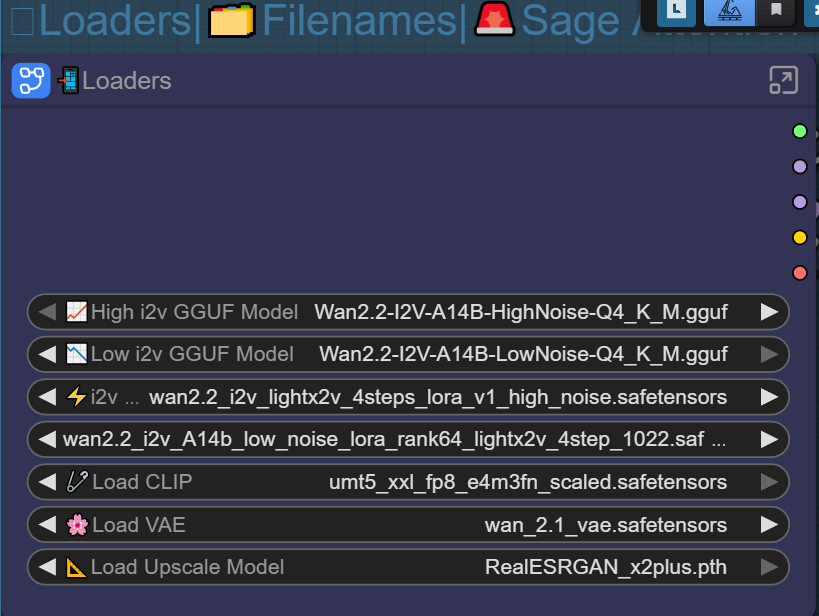
for the high distill lora, make sure to use "https://civitai.com/models/1585622?modelVersionId=2361379", im not sure if you rename it or using a different one.
am having trouble with the workflow, the first node unknown in "File names", "Loaders", is not been recognized in comfyui manager, another one in advanced setting right node, and another one below MM audio. i need your help
can you send me a screenshot and dm me, so i can look at it ? i will direct you from there.
This workflow outputs the best quality Wan22 vids that I have generated so far, very well done!
Also, one of the only workflows that worked on pressing the run button the first time :)
I2V is truly amazing! Thank you!
However, when I clicked the button for T2V, an error message appeared saying that I didn't provide the length and width values. I have no idea what's going on. Also, I haven't installed the Swann Node. Could the poster help me? Thank you.
I ran the workflow again. seems to work. I tried to reproduce the error but i couldn't. Im kina clueless as i have never seen that error before. If you can get give me the exact error msg, i might be able to help.