


🖥️Welcome to try out the open-source GPT4V-Image-Captioner, developed by my friend and me. It offers a one-click installation and comes integrated with multiple features including image pre-compression, image tagging, and tag statistics. Recently, we also launched the webui plugin version of this tool, everyone is welcome to use it!
🌍欢迎加入QQ群"兔狲·AIGC梦工北厂",群号 :780132897 ;"兔狲·AIGC梦工南厂",群号 :835297318(入群答案:兔狲)。Telegram群聊“兔狲的SDXL百老汇”,链接:https://t.me/+KkflmfLTAdwzMzI1
Quick Use Guide: Compatible with any SDXL standard base model. Weight 1, 8 steps, CFG 2. Different version names correspond to their respective adapted samplers.
极简用法:可与任何常规SDXL大模型搭配使用。权重1,步数8,CFG 2。不同版本名对应各自适配的采样器
This is a fusion LoRA model of SDXL LCM LoRA and SDXL Turbo LoRA. The inspiration for its creation came about when I was developing the LEOSAM HelloWorld Turbo+LCM version and discovered that the combination of these two technologies yielded the best image generation results.
As a result, I merged this fusion model, in which the merge ratio of LCM and Turbo LoRA has been optimized by me. The size of this model has been resized to rank 1, with only 12.3MB. At the same time, the optimal weight for LORA has been adjusted to 1. It's very convenient to use. Everyone is welcome to experience it!
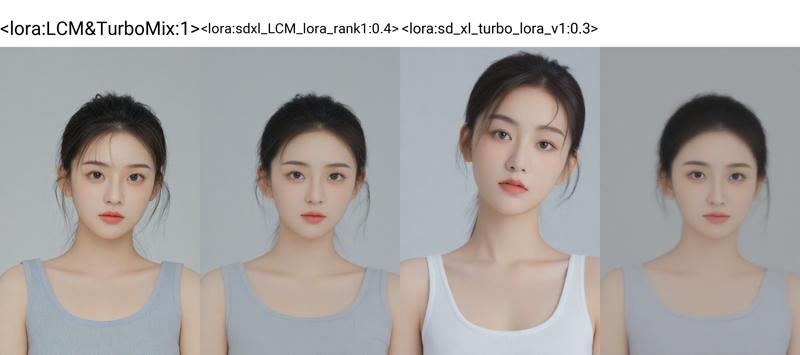
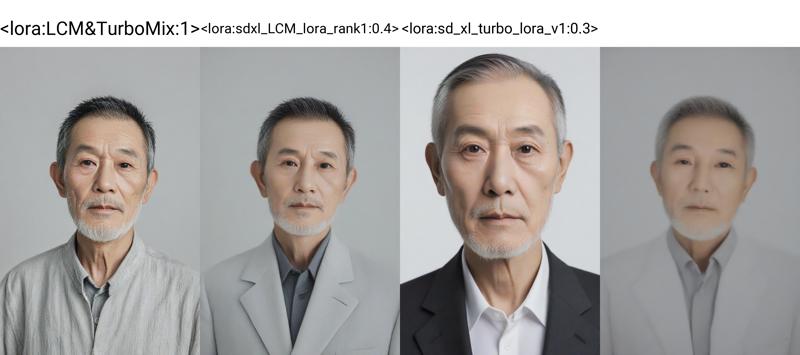
The following demonstrates the image generation results when using the Eular A sampler for 8 steps with HelloWorld 2.0 combined with LCM & TurboMix LoRA, LCM LoRA, and Turbo LoRA respectively.
It can be seen that LCM & TurboMix LoRA achieves the most balanced results between facial influence and image clarity.
The recommended parameters for generating images with this model are:
Sampler: Different version names correspond to their respective adapted samplers. The time needed for the different samplers to produce an image in 8 steps, as well as the quality of the image, varies. Please choose according to your needs.
LoRA Weight: Around 1
CFG scale: 2 (Important! It is recommended to have a CFG scale between 1.5~2.5)
Sampling steps: 8 steps (6~8 steps are acceptable)
Hires algorithm: ESRGAN 4x (Other upscaling algorithms can also be used, not a mandatory option. Please ensure that your GPU memory is sufficient)
Hires Upscale factor: 1.5x
Hires steps: 8 steps
Hires Denoising strength: 0.3
这是一个SDXL LCM LoRA和SDXL Turbo LoRA的融合LoRA模型,起因于我在制作LEOSAM HelloWorld Turbo+LCM版本时,发现这两种技术结合使用时,生图效果是最好的,因此我制作了这个融合版本的模型。
LCM和turbo lora的融合比例经过我的调节寻优,同时这个模型的体积已经resize至rank 1,只有12.3MB大小。同时LORA最佳权重已经调整至1。使用上非常方便。欢迎大家体验!
上方图展示了HelloWorld 2.0分别搭配LCM&TurboMix LoRA、 LCM LoRA、Turbo LoRA时,使用Eular A采样器采样8步时的出图效果。可以看出LCM&TurboMix LoRA拥有脸型影响和图像清晰度之间最平衡的结果。
本模型推荐的生图参数:
采样器:不同版本名对应各自适配的采样器。不同采样器8步出图的时间和画质不同,请根据需要选择。
LoRA 使用权重:1左右
采样步数:8步(6~8步均可)
CFG scale:2(重要!对于LCM模型,CFG scale建议1.5~2.5)
放大算法:ESRGAN 4x(其他放大算法也可以,非必须选项,请确保GPU显存充足)
放大倍数:1.5倍
放大步数:8步
放大降噪系数:0.3
2023.12.2 Update details for the Euler a.fix version.
The Euler a version has an issue where it doesn't display in the sdxl LoRA list of webui. The Euler a.fix version rectifies this problem by modifying the metadata. Additionally, the Euler a.fix version further optimizes the merge steps and proportions of LCM and Turbo.
Euler a版本存在Webui SDXL LoRA列表中不显示的问题。Euler a.fix版本通过更改元数据,修正了这个问题。同时Euler a.fix版本还进一步优化了LCM和Turbo的融合步骤和比例。
Description
The Euler a version has an issue where it does not display in the sdxl LoRA list of webui. The Euler a.fix version rectifies this problem by modifying the metadata. Additionally, the Euler a.fix version further optimizes the merge steps and proportions of LCM and Turbo.
FAQ
Comments (21)
丢到lora文件夹里,打开sd还是没找到,是要放到comfyui才能用吗
我刚更新了fix版本,这个版本可以正常在webui的sdxl lora列表里显示了
还找不懂就设置里面扩展模型里有选不隐藏
@LEOSAM 很不幸 在lora列表里还是看不到
Does it works on 1.5?
sorry, but this model is compatible with the sdxl version and cannot be used with sd1.5.
What do you need to do to use this in Comfyui?
In comfyui, you can use this model in the same way as you would normally use lora.
How do you get LCM benefits without either a checkpoint with LCM compatibility or LCM selected as the sampler?
效果很好
Unfortunately, getting error while trying to use with `huggingface` `diffusers` library:
```
ValueError: Checkpoint not supported because layer lora_unet_down_blocks_0_downsamplers_0_conv.alpha not supported.
```
yeah got the same error message
Same here
This works amazing, I was making the mistake of using it with SDXL Turbo models but then realised I just use it as a LoRa with any model. Amazing results!
This works great if combined with FreeU.
i'm not quite understanding what FreeU is. Seems like some code meant to be inserted into an existing sampler? That might be beyond my capabilities to implement without better instructions, if so
@shapeshifter83 You can get it as an extension https://github.com/ljleb/sd-webui-freeu
@bankenichi ooooo this looks promising, thanks for the link, i didn't know about this other github page
And what parameters do you use for FreeU?
@RetiredAndroid Check out this article by Envy, I pretty much copied his settings, for this and a couple other extensions https://civitai.com/articles/3148/envys-cauldron-05-my-image-generation-settings
In the end, I used FreeU for a while but found that it frequently leaned toward oversaturation and, contrary to the authors, DID in fact have a slightly negative effect on my generation speed. For me, FreeU didn't do anything positive. I used Envy's settings and played around a bit myself.
Details
Files
LCMTurboMix_Euler_A_fix.safetensors
Mirrors
LCMTurboMix_Euler_A_fix.safetensors
LCMTurboMix_Euler_A_fix.safetensors
LCMTurboMix_Euler_A_fix.safetensors
LCMTurboMix_Euler_A_fix.safetensors
LCMTurboMix_Euler_A_fix.safetensors
LCMTurboMix_Euler_A_fix.safetensors
LCMTurboMix_Euler_A_fix.safetensors
LCMTurboMix_Euler_A_fix.safetensors
LCMTurboMix_Euler_A_fix.safetensors
LCMTurboMix_Euler_A_fix.safetensors
lcm-turbomix-lora-only-12mb-8-step-sampling-effect-is-superior-to-using-lcm-or-turbo-alone.safetensors
LCMTurboMix_Euler_A_fix.safetensors
LCMTurboMix_Euler_A_fix.safetensors
LCMTurboMix_Euler_A_fix.safetensors
LCMTurboMix_Euler_A_fix.safetensors
LCMTurboMix_Euler_A_fix.safetensors
LCMTurboMix_Euler_A_fix.safetensors
Available On (1 platform)
Same model published on other platforms. May have additional downloads or version variants.