






🔧 Raz’s Toolbox
A modular collection of ComfyUI workflows and utility tools
Build it your way. Break it your way. Improve it your way.
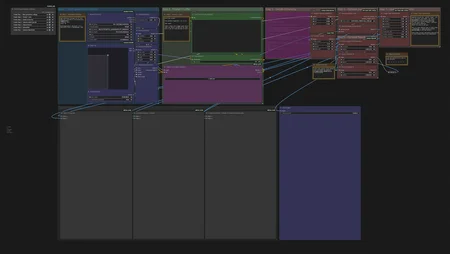
Raz’s Toolbox is not a “one-button magic workflow.” It’s a set of modular, plug-and-play tools designed for people who like to experiment, customize, and push their renders further without sacrificing speed or simplicity.
Each component can be used on its own or combined with others. You can merge them into your current workflow, replace specific nodes, or Frankenstein the whole thing until it screams. Everything is structured to be easily swappable, labeled clearly, and documented with notes based on how I personally use them.
🎯 Core Philosophy
Keep it simple
Make it faster, not heavier
Let the user decide how far to push it
Encourage experimentation, not restriction
This is meant for people who like control over their workflow, not for those chasing zero-click automation. Ideal for creators who build, test, train LoRAs, tweak batches, or just want more consistency without adding 10+ minutes per render.
🔍 Modular “Choose Your Setup” Style
You can:
✔ Add a single node block to your existing workflow
✔ Swap whole step sections (e.g., detail refining, upscale branch)
✔ Stack multiple tweaks and build your own version
✔ Or use the fully assembled example workflows as a starting point
🚀 Ready To Experiment
Take what you need. Ignore what you don't. Test, break, improve.
Raz’s Toolbox is here to give you building blocks, not rules.
Description
Mk. 1.1
Changed the order of some node to be more relevant
- Enhance details now does its job after the upscale and rescale to sharpen things up a little
- Added a reroute Node AFTER the resize nodes so you only need to move one connection
- Reroute node are now outside groups to avoid bypassing them
- NEW node Image Filter Adjustments for some quick post process tuning
- Added RunComfy links for more details about the nodes settings
Mk. 1
Upgraded Version of my Basic Workflow
Simple Upscale = was-node-suite-comfyui
Multiply Sigmas = comfyui-detail-daemon
Enhance details = comfyui-image-filters
Resize node = comfyui-logicutils
Slider 2D = comfyui-mxtoolkit
Lora loader, Comparison node = rgthree-comfy
Related Article:
https://civitai.com/articles/22740
FAQ
Comments (11)
Thanks for publishing this. Can you identify the custom nodes you're using in this workflow?
I'll try to make a list and add it to the model description.
In the meantime, you can check for any missing nodes with the ComfyUI "install missing nodes" button in the manager.
here is the list of nodes and the package names
Simple Upscale = was-node-suite-comfyui
Multiply Sigmas = comfyui-detail-daemon
Enhance details = comfyui-image-filters
Resize node = comfyui-logicutils
Slider 2D = comfyui-mxtoolkit
Lora loader, Comparison node = rgthree-comfy
I'm getting a Loop error. Updated all nodes. Any idea how to correct it?
i think i know what you mean, Try taking the reroute node of the optional resize section out of the group and leave it active (Bypassing it gave me the same error)
ill upload a bugfix later
@Razane Thanks. Unfortunately removing the reroute node didn't correct it. This is the exact error Comfy pops up with:
Loop (find_all_upstream/indx<@http://1************8/extensions/cg-use-everywhere/use_everywhere_utilities.js:196:73
find_all_upstream@http://1************8/extensions/cg-use-everywhere/use_everywhere_utilities.js:196:48
recursive_follow@http://1************8/extensions/cg-use-everywhere/use_everywhere_utilities.js:228:22
recursive_follow@http://1************8/extensions/cg-use-everywhere/use_everywhere_utilities.js:221:16
recursive_follow/<@http://1************8/extensions/cg-use-everywhere/use_everywhere_utilities.js:230:17
recursive_follow@http://1************8/extensions/cg-use-everywhere/use_everywhere_utilities.js:228:45
node_in_loop@http://1************8/extensions/cg-use-everywhere/use_everywhere_utilities.js:251:18
analyse_graph@http://1************8/extensions/cg-use-everywhere/use_everywhere_graph_analysis.js:135:29
init/app.graphToPrompt@http://1************8/extensions/cg-use-everywhere/use_everywhere.js:276:75
init/app.graphToPrompt@http://1************8/extensions/ComfyUI-Custom-Scripts/js/reroutePrimitive.js:32:36
queuePrompt@http://1************8/assets/index-D1rfh02W.js:390544:33
) - not submitting workflow
@YorNotReal its seems like a problem with the node ''cg-use-everywhere'' and i don't think i used it in my workflow.
i uploaded a new version of the workflow if you want to try it. (Hope it fix your problem)
@Razane Thanks! Finally got around to testing again and it looks like disabling cg-use-everywhere did the trick. I'll experiment more when I have time and let you know if there are any other issues. Great results so far!
@YorNotReal glad you found a workaround. Sorry again for not being more helpful haha.
Looks like we don't have an active mirror for this file right now.
CivArchive is a community-maintained index — we catalog mirrors that volunteers upload to HuggingFace, torrents, and other public hosts. Looks like no one has uploaded a copy of this file yet.
Some files do get recovered over time through contributions. If you're looking for this one, feel free to ask in Discord, or help preserve it if you have a copy.