


BAXLv3 is up now!
Focus on generalization ability, cover art style of most copyright characters without catastrophic forgetting / overfitting.
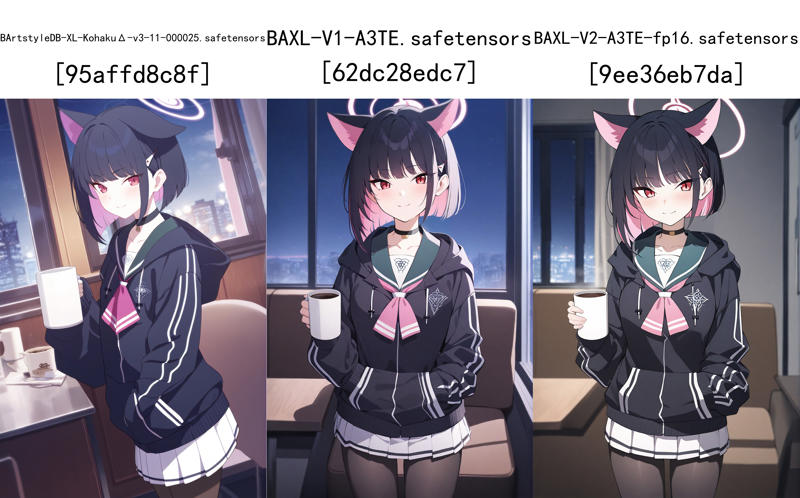 test img @QR0W_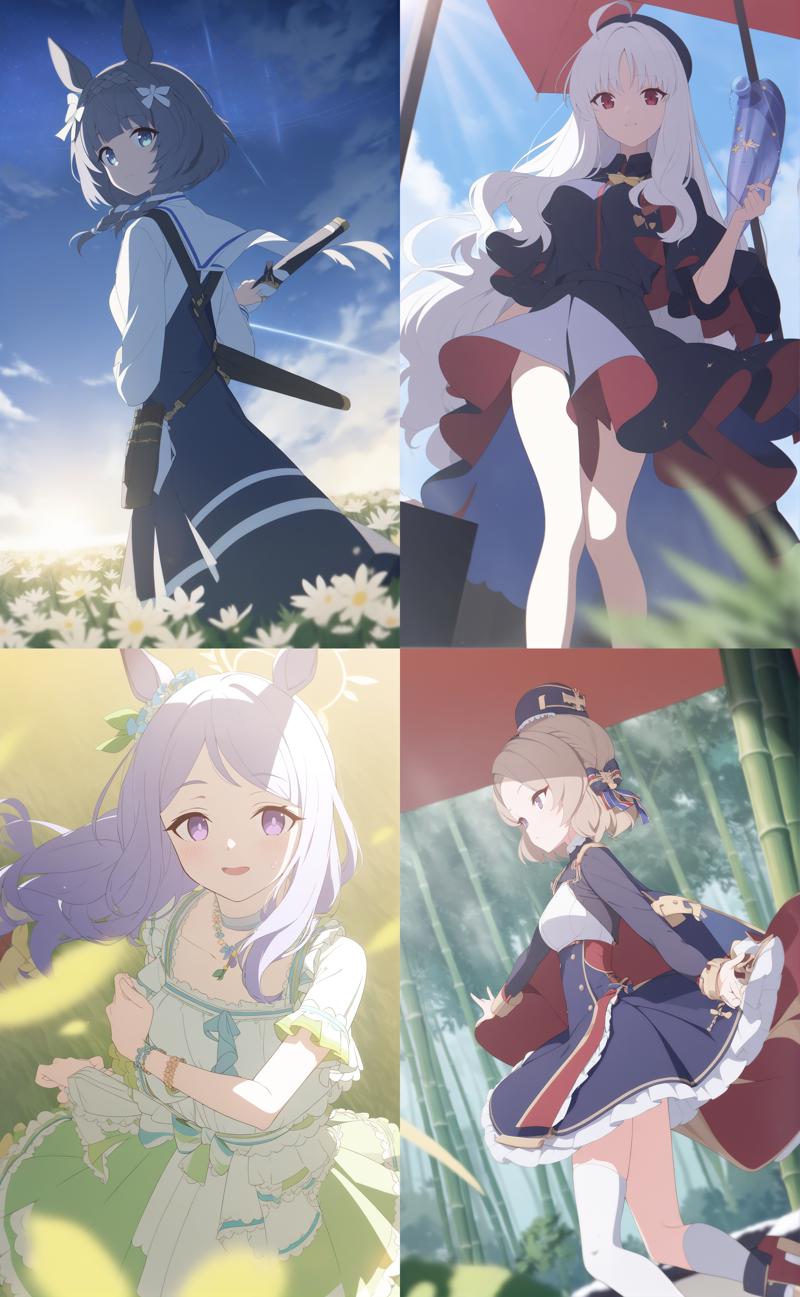
What you should expected from this update:
Better generalization
Closer to Blue Archive style
Beautiful glare
Much improved LoRA compatibility based on KohakuΔ.
What you should NOT expected from this update:
Better anatomy, always good hands and feet
easy to use
focus on given prompts (compare to previous version)
multiple person / nsfw support (this is not gonna get any close to pony.)
detailed background
How-to:
Prompting logic is same to KohakuΔ.
1girl, <character>, <general tag>, <quality tag>
Negative:
lowres, error, worst quality, low quality, jpeg artifacts, watermark, signature, username
Keep prompt clean and tidy. Suggest prompt length < 75 tokens.
Suggetion:
CFG: 4-7 (higher will have slightly better anatomy)
Sampler: Euler A @ 25steps
Resolution: 768 - 1792(ultrawide only), +32 each step.
Use DanTagGen.
Set a low temperature (<1)
Ban words:
sketch, comic, flat color, .*official.*, .*boy.*, mecha, no humans, text, pixel art, speech bubbleTotal tag length: short
Use Hires.Fix
Upscaler: DATx2
Denoising: 0.4-0.5
Use ADetailer.
face_yolov8n.pt
If you want generate typical color, put color scheme to at first.
What's difference:
Base model switch to KohakuΔ rev1.
Reason
Aesthetic rating which AniXL used is NOT friendly to Celluloid art style, quality / negative tags of AniXL are effortless, sometimes even drawback for drawing clean, thin lines. Also it seems like AniXL has some overfitted characters.
👆TBH, I haven't use same training methods on AniXL3.1 yet. Maybe it can be fixed by the final training config I use.
Meanwhile, KohakuΔ is undertrained, which means flexible, more friendly to fine-tune art style.
I have no idea how to tag like AniXL3.1, but I know how to tag like KohakuΔ, since I could get the exact same dataset from Hakubooru.
Better generalization & horizonal composition.
KohakuΔ rev1 is not good at anatomy & composition, due to lack of training time (dual 3090 bro, what you expected).
Due to Regularization, this fine-tune do make things better (especially horizonal image), but I'm not gonna lie you, BAXLv3-Δ is VERY EASY to generate bad hand / extra legs, get worse if the prompts have problems (too long / semantic repetition / immoderate tag order).
Regularization / Datasets Update.
Regularization Danbooru Dataset, class token=solo:
1000+ horizonal image
fav count > 30
tag with "1girl, solo"
1000+ vertical image
fav count > 30
tag with "1girl, solo"
artist who is celluloid art style & BA art style imitator
Dataset update to 0068 events CG, include 5th PV screenshots.
Training Details:
Image count: 574 without repeat.
min_bucket_reso = 256
max_bucket_reso = 4096
bucket_reso_steps = 32
train_batch_size = 2
gradient_accumulation_steps = 32
learning_rate = 7.5e-6 Unet only
lr_scheduler = "constant_with_warmup"
lr_warmup_steps = 100
optimizer_type = "Lion8bit"
min_snr_gamma = 5
Batch size = 2
mixed_precision = "fp16"
full_fp16 = true
optimizer_args = [ "weight_decay=0.1", "betas=0.9,0.95" ]
shuffle_caption = true
weighted_captions = false
keep_tokens = 0
caption_tag_dropout_rate = 0.1
Known issues:
halo/heterochromia/.*focus.*seems to be overfitted in some circumstances. Can be helped by put them in negative tags.Background is not stable, keen to draw something unnecessary even if you type
simple background, white background
License & Disclaimer
License:
Dislcaimer:
According to Blue Archive's Fanart Guidelines ( JP | CN ), this model shall not be used for any kind of commercial use, including but not limited to selling this model or merges of this model, selling image generated by this model or merges of this model, or 'paid member exclusive' for monetization platforms like Patreon/Fanbox/etc.
===========XLv2 INFO===========
TL; DR:
Based on Animagine XL V3, use Blue Archive's official artwork as fine-tune dataset for its art style. You are prohibited to use this model for any kind of commercial use. Please read the disclaimer below before you use this model.
How-to:
Suggest prompt order:
character name, 1girl, other tags, quality tags,
Suggest quality tags (please delete other quality tags in prompts):
flat_coating clear_color highres absurdres best_qualityDO NOT USE
masterpieceif you are generating genral images. It will ruin the flat coating.
Suggest negative:
nsfw, lowres, worst quality, low quality, bad perspective, bad anatomy, bad hands, text, error, missing fingers, extra digit, fewer digits, cropped, jpeg artifacts, signature, watermark, username, artist nameDO NOT USE
blurryas negative prompts.
Suggest Resolution: same to A3XL, but limited to 1600x900 vertical, horizonal is lower.
Higher resolution = Closer to BA style
CFG 5 Euler A step 25
You can treat this like Animagine XL V3, all tag still work at same methods.
LoRA based on Animagine XL V3 will work fine on it.
Suggest Upscaler: AnimeVideo v3
No color scheme training
Feel free to give feedback, I need your suggestion for further developments.
Disclaimer:
Animagine XL V3's license asked that merges of this model should be released as same permissions, which is allowed user to use generation service or sell generated images of the model.
But according to Blue Archive's Fanart Guidelines ( JP | CN ), this model (BArtstyle) shall not be used for any kind of commercial use, including but not limited to selling this model or merges of this model, selling image generated by this model or merges of this model, or 'paid member exclusive' for monetization platforms like Patreon/Fanbox/etc.
The license change of this model is permitted by Cagliostro Research Lab, the author of Animagine XL. Once again, I sincerely thank them for their understanding and dedication for open-source community. (Permission Source)
免责声明:
根据 Animagine XL V3 的许可证,基于该模型的衍生模型应以相同授权方式公开,即允许用户使用线上生成服务,或售卖该模型生成的图片。
但根据《<蔚蓝档案>同人创作指引》 ( 日文 | 中文 ),此模型(BArtstyle)不得用于任何形式的商业用途,包括但不限于售卖该模型及其衍生模型自身或其生成的图片,或Patreon/Fanbox等众筹平台的“订阅会员限定”服务。
该许可证授权范围变更得到 Animagine XL 作者 Cagliostro Research Lab 的许可。
在这里再次感谢他们的理解,以及他们对于开源社区的贡献。(授权来源)
===========XLv1 INFO===========
How-to:
This model is in ALPHA phase, pretty much undertrained, only works perfect for Blue Archive's characters.
You can treat this like Animagine XL V3, all tag still work at same methods.
LoRA based on Animagine XL V3 will work fine on it.
Suggest Upscaler: AnimeVideo v3
Still trained with color tags like BArtstyleDBv1, but seems not very effective.
Feel free to give feedback, I need your suggestion for further developments.
Training Details:
AdamW8bit
200 Images@1024x1024
200 epoch@batch size 1
UNET: 1E-5
TE1/TE2: 5E-6
Cosine with 15 Restarts
===========DBv1 INFO===========
How-to:
Positive Prompts:
Just like BArtstyle LoRA, color scheme still work, and I managed to make these typical color like
blue themeorpink thememuch closer to original data without overfitting.Natural Language + Low CFG (4.5-6) + Roll dices + cherry-pick > "quality tags"
From my test, about 30% image should be good enough at first glance. If you can't get similar result, check if there are any duplicate/conflict tags in your prompt, shrink it and lower your CFG.
Negative Prompts:
DO NOT USE FCKING LONG NEGATIVE PROMPTS UNLESS YOU KNOW WHAT ARE YOU DOING!!!
For randomly generate, simple EasyNegativeV2 is good enough.
You can try to add
glowing, 3d, painting \(medium\), photorealistic, nsfwin negative prompts if you think this model is still have too much CounterFeit artstyle, but I can't guarantee the effect.
Sampler: Euler A
step 50-100
Yeh, CHAD Euler A still better than Virgin DPM
Upscaler: AnimeVideo v3
step 10-15
Denoising 0.45-0.55
Base Model:
After 6 MONTHS wait, author has released a vae fix version of CFv3. Original version had a serious VAE issue that make all the LoRA of CFv3 is bit broken, even if you replace the VAE won't help. Strongly recommend to update if you use it.
It seems like it is the ONLY TRAINING model that is capable with NAI 1.0 LoRA. That means only this model is good for fine-tuning
Dataset:
200 images from Blue Archive's Official Artwork + flip, 400 in total.
TOTALLY OVERHAULED DATASET COMPARE WITH BArtstyle LoRA.
Highest resolution I could found, cropped to improve dataset quality
Use XnConvert Downscale to 1280x1280
Training Setting:
OPTIMIZER: AdamW8bit
SCHEDULER: Constant with Warmup
Warmup to 10% of total steps.
UNET LR: 1e-6
TE LR: 1.25-7
1/8 of UNET LR as suggestion
Stop TE Training at 50% of total steps.
EPOCH: 100
BATCH SIZE: 1
STEP: 40000
RES: 1280X1280
TIME: 10H27M
Description
Initial Release of BArtstyleXL, base on Animagine XL V3
FAQ
Comments (32)
这个模型,太强了
草 刚注意到是大佬…… 这个算是沾了Animagine V3对BA角色认知较强的光,一方面也是因为BA的画风在AI里是比较特殊的那种“不难,但就是不用微调还原不出来”的类型,NAI3很微妙的在这方面没法和A3比还原度
@4BEraser 刷c站看到这个模型效果确实很好
捕捉大佬
xlv1加载不出来啊,大佬有什么头猪吗()
没碰见过这种问题……你给的信息也太少了
@4BEraser 提示是 size mismatch for model.diffusion_model.output_blocks.8.0.skip_connection.bias: copying a param with shape torch.Size([320]) from checkpoint, the shape in current model is torch.Size([640]).
@MingC 直接把你的问题复制在谷歌上搜了,你该升级webui版本了
WebUI 1.3不支持SDXL
@4BEraser 感谢大佬
太强了,有生之年最满意的模型Σ(っ °Д °;)っ
还需要vae吗?
NONE VAE, its baked in apparently
shit that explains
为什么生成的角色经常是背光的,试了很多方法不能改善光影
Any image I try to generate just comes out bugged. Am I missing something?
don't use any vae, leave it blank
为什么生成的图片都会变成那种变色的蜡笔样子的图
我的也一样,重下了几次都是
这是对XL权重计算的问题,切换到webui1.8rc,启用emphasis no norm即可解决
分辨率太低了?我出512的图也是蜡笔一样,出1024的就是正常的BA画风
@liger 怎么设置 在哪切换 好头疼
@mingjushang185 在设置里搜索强调模式,设置为no norm
vae选无,旧版vae用不了xl
这里补充一个可能性,把VEA模式调整为无或者自动,这个模型不能有vea或者我没用合适的vea,有了在最后一步铁定变蜡笔,甚至报错
Why I can't use any Lora using this checkpoint, and also textual inversion isn't appear
This is an SDXL model. You can't use any lora or TI base on SD1.5.
@4BEraser I see that's why
请问为什么我加载不出来这个模型?其他同类型模型都可以加载
这是SDXL的模型。如果你载入不出来说明你webui版本太旧了。
大佬,这模型太夸张了,随便出图质量都高的可怕。
Details
Files
Available On (1 platform)
Same model published on other platforms. May have additional downloads or version variants.