
This is a collection of custom workflows for ComfyUI
They can generate multiple subjects. Each subject has its own prompt.
They require some custom nodes to function properly, mostly to automate out or simplify some of the tediousness that comes with setting up these things.
To install any required custom nodes, the best way is to get the ComfyUI Manager, then go to Manager, and click "Install Missing Custom Nodes". If you're still missing nodes, refer to the dependencies listed in the "About this version" section for that workflow
Recently updated workflows:
Latent Couple Pose (renamed from LoRA Latent Couple) - new workflow but user experience-wise it is very similar to Region LoRA and Region LoRA+, just using the newer, better methods that allow you to hook LoRA models to conditioning areas so everything can be done in 1 sampling rather than having each area be sampled separately. If you used those before it's going to be basically the same. This workflow makes Region LoRA, Region LoRA+ and Interaction OpenPose workflows redundant by being able to do everything they did all-in-one but better and as such they will be discontinued.
Latent Couple - updated to work with current ComfyUI and custom node versions. Added LoRA support. Since this has area-conditioned LoRA now it was confusing to keep the above workflow name as LoRA Latent Couple so that was changed.
Reworking Latent Couple I realized the two active workflows are very similar at this point and could be combined into one without much issue, however I ultimately decided against it to avoid adding pathing logic and keep the workflows more focused.
Here's a demo video of using Latent Couple Pose:
Latent Couple is temporarily marked as deprecated as I work on an updated version.
Please download from the model version, not "Update Notification Push" as I delete and recreate it every time I release a new version to push notifications and deleting a version removes statistics, reviews and comments made on it.
Latent Couple vs Latent Couple Pose
At this point both of these workflows are very similar and only differ in that we use the OpenPose ControlNet for additional guidance in Latent Couple Pose. The additional complication it seems to have at first glance comes from the fact that by default we try to first generate an image to pass through an OpenPose Preprocessor to get the ControlNet image without needing to load any external assets which requires adding on a basic T2I workflow at the start, but this can be easily replaced with an image loader for a prepared pose image.
The Pose version is capable of generating more precise images in more complex scenarios, however the same complex scenarios are harder for the preprocessor to accurately extract pose data from so paradoxically letting the AI run more loose with the more basic Latent Couple can return better results by pure chance. That is comparing to using the default method of extracting poses from an image in the workflow, but providing a pre-made pose from an OpenPose editor for Latent Couple Pose will always be superior. I wanted to integrate such an editor into the workflow as it would be a massive improvement, especially if we could supply the initial poses and a background image (as stick figures can be hard to judge properly) in the workflow, but sadly not a single one seems to be properly maintained anymore.
Workflows:
Latent Couple
Allows for more detailed control over image composition by applying different prompts to different parts of the image.
From my testing, this generally does better than Noisy Latent Composition.
This is pretty standard for ComfyUI, just includes some QoL stuff from custom nodes
Noisy Latent Composition (discontinued)
Generates each prompt on a separate image for a few steps (eg. 4/20) so that only rough outlines of major elements get created, then combines them together and does the remaining steps with Latent Couple.
This is pretty standard for ComfyUI, just includes some QoL stuff from custom nodes
Character Interaction (Latent) (discontinued)
First of all, if you want something that actually works well, check Character Interaction (OpenPose) or Region LoRA. This doesn't, I'm leaving it for archival purposes.
This is an """attempt""" at generating 2 characters interacting with each other, while retaining a high degree of control over their looks, without using ControlNets. Extremely inconsistent and unreliable.
We do this by generating the first few steps (eg. 6/30) on a single prompt encompassing the whole image that describes what sort of interaction we want to achieve (+background and perspective, common features of both characters help too).
Then, for the remaining steps in the second KSampler, we add two more prompts, one for each character, limited to the area where we "expect" (guess) they'll appear, so mostly just the left half/right half of the image with some overlap.
I'm not gonna lie, the results and consistency aren't great. If you want to try it, some settings to fiddle around with would be at which step the KSampler should change, the amount of overlap between character prompts and prompt strengths. From my testing, the closest interaction I've been able to get out of this was a kiss, I've tried to go for a hug but with no luck.
The higher the step that you switch KSamplers at, the more consistently you'll get the desired interaction, but you'll lose out on the character prompts (I've been going between 20-35% of total steps). You may be able to offset this a bit by increasing character prompt strengths.
Latent Couple Pose
This should come after the next section about Character Interaction (OpenPose) and Region Lora, but this description is long enough as is and it's more visible up here, and the workflows below are deprecated anyway.
This workflow employs very similar methods to those described below and images showcased there also apply here. The main difference is that we're no longer using Regional Sampling in favor of newer and much superior LoRA hooks which allow for the whole image to be sampled at once instead of having to sample each LoRA area separately.
Character Interaction (OpenPose) (discontinued)
Another method of generating character interaction, except this time it actually works, and very consistently at that. To achieve this we simply run latent composition with ControlNet openpose mixed in. To make it more convenient to use, the OpenPose image can be pregenerated, so there is no need to hassle with inputting premade ones yourself. As a result, it's not too complicated as compared with a normal generation. You can find instructions in the notes in the workflow itself after importing it into ComfyUI.
From a more technical side of things, implementing it is actually a bit more complicated than just applying OpenPose to the conditioning. Because we're dealing with a total of 3 (or more!) conditionings (background and both subjects) we're running into problems. Applying ControlNet to all three, be it before combining them or after, gives us the background with OpenPose applied correctly (the OpenPose image having the same dimensions as the background conditioning), and subjects with the OpenPose image squeezed to fit their dimensions, for a total of 3 non-aligned ControlNet images. For that reason, we can only apply unchanged OpenPose to the background. Stopping here, however, results in there being no ControlNet guidance for our subjects and the result has nothing to do with our OpenPose image. Therefore, now we crop parts of the OpenPose that correlate with subject areas and apply that to the subject conditioning for each subject before combining them into the final conditioning. Only then can we generate the final image.
The following image demonstrates our resulting conditioning:
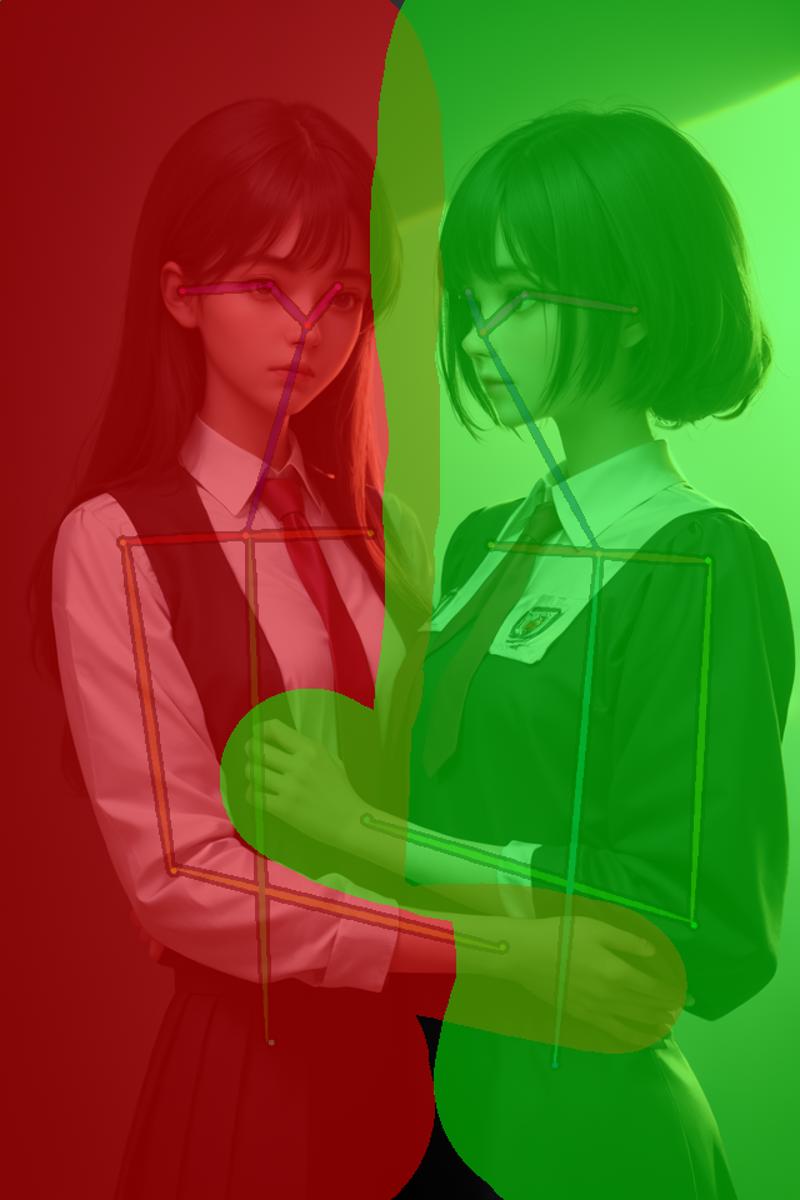 btw the workflow will generate similar ones for you :)
Background conditioning covers the entire image and contains the entirety of the pose data.
Subject 1 is represented as the green area and contains a crop of the pose that is inside that area.
Subject 2 is represented as the blue area and contains a crop of the pose that is inside that area.
The image itself is generated first, then the pose data is extracted from it, cropped, applied to conditioning and used in generating the proper image. This saves you from having to have applicable OpenPose images on hand.
And here is the final result:

This includes a second pass after upscaling, face restoration and additional upscaling at the end, all of which are included in the workflow.
A handy preview of the conditioning areas (see the first image) is also generated. Ideally, it would happen before the proper image generation, but the means to control that are not yet implemented in ComfyUI, so sometimes it's the last thing the workflow does. Sadly, I can't do anything about it for now.
Some more use-related details are explained in the workflow itself.
Region LoRA/Region LoRA PLUS
As the name implies, these workflows will let you apply Lora models to specified areas of the image.
You can, for example, generate 2 characters, each from a different lora and with a different art style, or a single character with one set of loras applied to their face, and the other to the rest of the body - cosplay!
How does Region LoRA differ from Region LoRA PLUS?
Region LoRA is limited to 2 regions - you draw a single mask, the masked area is region 1, everything else is region 2.
With Region LoRA PLUS you can have as many regions as you want, but you need to draw the region for every single one of them (much like in Interaction OpenPose)
Therefore, if you only need 2 regions, the base version is simpler to use, and guarantiess that the regions will be aligned perfectly.
Additionally, the PLUS variant currently can't use region sampling after upscaling as there are some crucial nodes missing for now and a workaround would massively complicate it.
How does it work?
The secret are the Regional Sampling nodes from Impact Pack and Inspire Pack by ltdr.data. It allows us to generate parts of the image with different samplers based on masked areas. That means we can put in different Lora models, or even use different checkpoints for masked/non-masked areas. This is the central piece, but of course, it's not actually as simple as just using that. The full workflow is as follows:
First, we generate an image of our desired pose with a realistic checkpoint and pass it through a ControlNet OpenPose Preprocessor:
 The next step is in a Preview Bridge (another node from Impact Pack), which is essentially a preview image node with image and mask output that you can draw masks on. This is where the the above image ends up. Once it is there, we stop the image generation, and open this image in the MaskEditor, where we can draw a mask over one of the characters like so:
 Next, we crop the controlnet image along the mask boundries and apply it to the region's conditioning. Thanks to the controlnet, our image will remain consistent in perspective, and we can achieve interaction between characters in different regions. These region masks also determine the sampling regions that are responsible for the clean LoRA separation.
Final Result:
 Left:
Left: Description
Don't download. Civit removes comments/reviews/stats when deleting a version and it makes no sense to keep up outdated workflow versions up so I just switch out the files, but that doesn't register as an update so I delete/repost this instead.
FAQ
Comments (37)
missing this node
I am having the same issue
Fixed. I made some custom nodes once while experimenting with them and that group node was using one of those, and I forgot to replace it.
Hi ! I'm very interested in this workflow, but i don't manage to load the "Impact scheduler adapter". Of course i got the Impact suite and tried to update it. Any advice ? Thanks by advance
It could be from inspire pack (same author) too, can't remember which at the moment. You need both either way for all my workflows. If you have both and it still doesn't work then I don't know...
I assume this is with Region LoRA PLUS? In that case you should be able to just remove the node and connect the primitive with the scheduler options to all the subject nodes. You'll lose the ability to use AYS schedulers, but that's it.
EDIT: fix found. Just needed to connect the pipes from subject 3 to the 1st pass in group II
I'm getting this error after setting group 2 to always. My mask preview is filled.
Error occurred when executing FromBasicPipe_v2: FromBasicPipe_v2.doit() missing 1 required positional argument: 'basic_pipe' File "D:\p\ComfyUI\ComfyUI\execution.py", line 151, in recursive_execute output_data, output_ui = get_output_data(obj, input_data_all) ^^^^^^^^^^^^^^^^^^^^^^^^^^^^^^^^^^^^ File "D:\p\ComfyUI\ComfyUI\execution.py", line 81, in get_output_data return_values = map_node_over_list(obj, input_data_all, obj.FUNCTION, allow_interrupt=True) ^^^^^^^^^^^^^^^^^^^^^^^^^^^^^^^^^^^^^^^^^^^^^^^^^^^^^^^^^^^^^^^^^^^^^^^^^^^ File "D:\p\ComfyUI\ComfyUI\execution.py", line 69, in map_node_over_list results.append(getattr(obj, func)()) ^^^^^^^^^^^^^^^^^^^^
The loras i add in red,green and purple subject nodes do not do anything. Neither if i add the loras as a prompt like <lora:example>. However the normal prompting works just fine, and i can add loras to the base scheduler just like normal. It's just the loras in the subject nodes that seem to be broken somehow.
edit: i think i get it. i was running base only steps because that was the only way i could get a picture. running with 2 base steps makes comfyui just spam a bunch of 1 steps over and over again and producing nothing but noise.
edit2: i managed to get it to produce actual pictures with loras by using the same sampler in group 2 and 3, but its extremely slow
This method is very slow, yeah. I'm glad you've got it working. This workflow essentially runs a very long series of 1step advanced KSamplers with inpainting. The actual number of steps you're doing is somewhere around the [set steps] * [the number of regions] + [base steps] and there's also some additional time in between each step to switch things around.
Unfortunately, to my knowledge as far as using LoRAs goes, this is the only way for now.
IPAdampters I think can get some similar results, but IDK, I haven't really tried them too much.
Someone on the Comfy Summit presented a project that allowed for properly constraining LoRAs to regions of the image like you can do with prompts, so once that's finished we'll be able to ditch such cumbersome workarounds like this one.
@Bocian Yeah i'm excited that we will one day be able to actually to use different loras for different people in the same image. I just hope that day comes sooner rather than later.
can you make a video of how to use it?
I'd also be interested or at least a high res image of the workflow that shows the settings of each node based on the current version of the workflow. I have it "working" but the image quality is really bad. I'm not talking composition because that just takes a few tries to it to come together but the images are very grainy. It has to be my chosen models and settings. I'm just not getting anywhere with my experiments. TIA!
One setting that improved things is adjusting the opacity setting for each subject. I thought it just affected how you draw the mask but this impacts the generated image. By default, it is set at .50. That was producing some really blurry, almost impressionist images. I lowered it to .25 and now things are coming into focus, literally. If I set it at 1 for either subject, they disappeared.
I messed up my laptop recently and It's still in service and I don't know if I'll have the time once I get it back. I'll still need to update the workflows a bit first, but I'll try to put something together when I can.
@herbtarlacwkrp I'm having problem getting clear picture from the 1st pass as well. I remember getting better image with the 2 mask version though. Not sure what went wrong.
So following up on that instructional video thing... I have my laptop back finally but they failed to fix it and I don't really have anything capable of running SD (4GB VRAM is best I have rn, and I was going on 8 before so I wasn't great already) so it's probably going to be a while before I can do anything :(
I'm getting this error :
Error occurred when executing RegionalSampler: '>' not supported between instances of 'str' and 'float' File "ComfyUI_windows_portable\ComfyUI\execution.py", line 151, in recursive_execute output_data, output_ui = get_output_data(obj, input_data_all) ^^^^^^^^^^^^^^^^^^^^^^^^^^^^^^^^^^^^ File "ComfyUI_windows_portable\ComfyUI\execution.py", line 81, in get_output_data return_values = map_node_over_list(obj, input_data_all, obj.FUNCTION, allow_interrupt=True) ^^^^^^^^^^^^^^^^^^^^^^^^^^^^^^^^^^^^^^^^^^^^^^^^^^^^^^^^^^^^^^^^^^^^^^^^^^^ File "ComfyUI_windows_portable\ComfyUI\execution.py", line 74, in map_node_over_list results.append(getattr(obj, func)(**slice_dict(input_data_all, i))) ^^^^^^^^^^^^^^^^^^^^^^^^^^^^^^^^^^^^^^^^^^^^^^^^^^^ File "ComfyUI_windows_portable\ComfyUI\custom_nodes\ComfyUI-Impact-Pack\modules\impact\special_samplers.py", line 490, in doit noise = rp.touch_noise(noise) ^^^^^^^^^^^^^^^^^^^^^ File "ComfyUI_windows_portable\ComfyUI\custom_nodes\ComfyUI-Impact-Pack\modules\impact\core.py", line 148, in touch_noise if self.variation_strength > 0.0: ^^^^^^^^^^^^^^^^^^^^^^^^^^^^^
Thank you in advance.
Yeah, this is a new thing. I can't fix it right now as my laptop is in service, but it's easy enough to get rid of yourself. So there was an update to one of the nodes in the Subject group nodes that added 3 new widgets, but it sets the values all wrong on them. They should be at the bottom of the Subject nodes:
-variation_seed
-variation_strength
-variation_method
If any of them is set to 'NaN', just set it to some numerical value like '0' or whatever options the third one has so they all have legal values and it should all work.
Error occurred when executing Bounded Image Crop with Mask: index is out of bounds for dimension with size 0 File "D:\Comfy\ComfyUI\ComfyUI\execution.py", line 151, in recursive_execute output_data, output_ui = get_output_data(obj, input_data_all) ^^^^^^^^^^^^^^^^^^^^^^^^^^^^^^^^^^^^ File "D:\Comfy\ComfyUI\ComfyUI\execution.py", line 81, in get_output_data return_values = map_node_over_list(obj, input_data_all, obj.FUNCTION, allow_interrupt=True) ^^^^^^^^^^^^^^^^^^^^^^^^^^^^^^^^^^^^^^^^^^^^^^^^^^^^^^^^^^^^^^^^^^^^^^^^^^^ File "D:\Comfy\ComfyUI\ComfyUI\execution.py", line 74, in map_node_over_list results.append(getattr(obj, func)(**slice_dict(input_data_all, i))) ^^^^^^^^^^^^^^^^^^^^^^^^^^^^^^^^^^^^^^^^^^^^^^^^^^^ File "D:\Comfy\ComfyUI\ComfyUI\custom_nodes\was-node-suite-comfyui\WAS_Node_Suite.py", line 11999, in bounded_image_crop_with_mask rmin, rmax = torch.where(rows)[0][[0, -1]] ~~~~~~~~~~~~~~~~~~~~^^^^^^^^^
I just have no words, I made a mask, but I still have the same mistake...
I really need a vedio
It works up to Group II.
The preview image of Group II also shows well.
But Group III is not working properly.
There does not seem to be any error indication in the log.
What are the possibilities that the image cannot be generated?
The following is the log↓↓
got prompt
Failed to validate prompt for output 6696:5:
* HypernetworkLoader 6247:4:
- Required input is missing: hypernetwork_name
* LoraLoader 6483:7:
- Value not in list: lora_name: 'None.safetensors' not in (list of length 267)
* LoraLoader 6698:7:
- Value not in list: lora_name: 'None.safetensors' not in (list of length 267)
* LoraLoader 6484:7:
- Value not in list: lora_name: 'None.safetensors' not in (list of length 267)
Output will be ignored
Failed to validate prompt for output 7017:13:
Output will be ignored
Failed to validate prompt for output 6671:10:
Output will be ignored
Failed to validate prompt for output 7017:14:
Output will be ignored
Failed to validate prompt for output 7019:
Output will be ignored
Failed to validate prompt for output 7018:
Output will be ignored
Prompt executed in 0.72 seconds
skill issue
@LostInTheBackrooms
Exactly.
Why can't I?
Can't LORA be divided by area?
@dendeeeen It can*
*I don't think a working implementation has been released yet (there was a demo shown on the ComfyUI summit)
Until that releases, to my knowledge the only options are doing it like this or through some IPAdapter hacks (probably less hacky than this tbh)
The errors you got mean that you don't the hypernetwork and lora loaders requested a non-existing item. ComfyUI is kinda dumb on that front and doesn't just let you set none in these to not load anything and been with all strengths set to 0 it will complain if it can't find the file specified. Just go through all these loaders and pick any option you have available. You may neet to get some hypernetwork if don't have one just to please the loader there. Frankly I should remove those probably, though there is at least 1 series of checkpoints (cornflower) that rely on a hypernetwork for the intended result.
Not guaranteeing it will work after that. my laptop I used for SD is busted and I don't have anything else with enough VRAM, so I can't work on any of this anymore, at least for the time being.
Cant get any of the workflows to work. Getting errors in almost every node. Unsure why these are working.
mising nodes
I tried RegionalLoraPlus and LatetnCouple, none of them worked. :(
I was unable to maintain it for last half a year due to my laptop dying. I have a 3090 now so I'll be able to redo it all but it will take time and I'm quite busy right now so nothing soon.
Missing OpenPose Preprocessor in Group II Conditioning. Tried ControlNet Auxilary no go. Also missing:
ConditioningStretch(In group node 'workflow>Upscale (image/cond/-CN)')
workflow>Upscale (image/cond/-CN)Remove from workflow
workflowUpscale (image/cond/-CN)
workflowOpenPose Preprocessor
Error: MathExpression|pysssss
invalid syntax (<unknown>, line 0)
same problem here
@facosu2530 It's broken due to updates. Right now group nodes have been f'ed beyond repair and there is no intent from the ComfyUI team to do anything about this as they're deprecating the feature to replace it with subgraphs once that's ready. Until then I'm not touching anything this complex.
extension nodes are sometimes misaligned when the version of a node is updated, making it difficult to see errors in the combined node.
furthermore, if the file name is not in the same hierarchy or file name as the author, such as CheckPointy, LoRA, or HyperNetwark, an error will occur if you do not enter or modify the file name one by one. (Problem in terms of versatility).
In my case, I took apart everything that was combined and fixed where the problem occurred in the spaghetti state and it worked.
im new to Comfy so I have learned a lot from this workflow.
Rubbish, Full of red nodes.
Comfy keeps breaking everything with updates and it takes too long to fix every time and even basic features I need to do something are still not implemented. I'm done with maintaining this until ComfyUI is in a better state.
@Bocian Don't care about this comment, it's full of hate, the node error is not your fault, you did a great job
@XingYeLN well that comment helped me learn about ComfyUI and how people deal with that kind of situation