


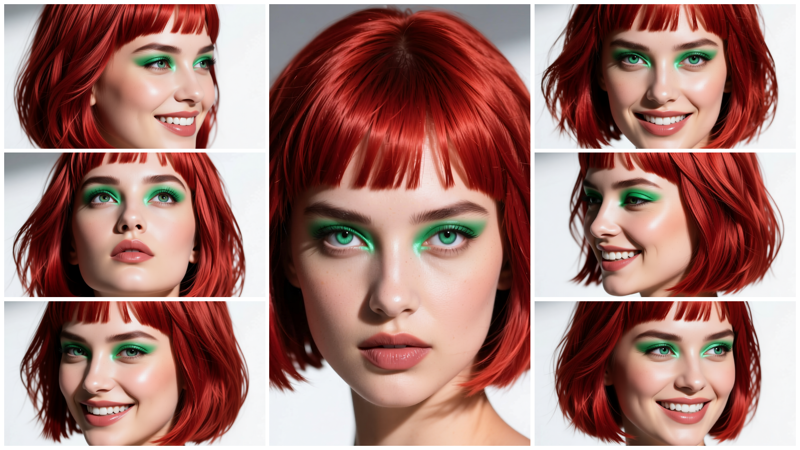
This is a quick workflow I was already working on last summer. I decided to complete it as it was almost ready. And to make it cleaner, I used subgraphs (although I am not a big fan of them).
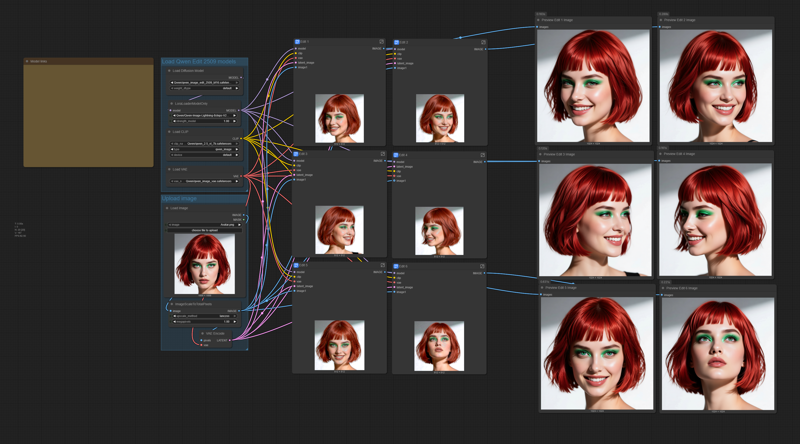 The workflow is self-explaining. You will have all the links to the model files in the workflow.
Just load the portrait you want to replicate, and modify (if you want, and the way you like) the 6 positive prompts. Do not use negative prompts, they are useless in the workflow.
Try to use the best quality photograph you can for the loaded portrait, and try to load an image with a resolution larger than 1024x1024. The workflow will resize it.
You may use the output images for training a LoRA, just generate as many different poses and expressions as you may need for training.
You can also use the workflow to create consistent images, the only limit is your imagination (as KelevraQuakenstein pointed out in the comments, thanks mate!).
This workflow was tested on a Rtx 5090 GPU, if you have a smaller GPU and have out-of-memory issues, you can try to use the FP8 model for Qwen Edit 2509 model and the text encoder:
If these are still too big, you may need to try the quantized GGUF models.
Description
FAQ
Comments (12)
This is precisely what I needed, thank you for sharing this.
I slightly modified the workflow to add four extra edit boxes, making a total of 10. I also suggest replacing 'girl' with 'subject,' as it works just as well and can be applied to both male and female characters. This eliminates the need to edit the prompt based on the subject's sex. For an accurate profile shot, I use Left-Profile headshot of the subject. And: Right profile headshot of the subject. I also added emotions to the other boxes: anger, confusion, and sadness.
For added images of the various angles, I also use the following workflow I modified using the 360 orbit lora. https://civitai.com/models/2053449/360-degree-i2v-video-creator-image-extractor
You can also mirror the images using Microsoft Photo, adding to the data set.
Again, thank you. This will save me a considerable amount of money when creating datasets. /Bow
Happy you liked it. Yes, you are right, it can be used for anything, not just headshot portrait, but for any "consistency" need. You just need to modify the prompts as you said. I kept only 6 edit boxes as I did not want to make it too "slow and heavy", as it uses very big models files.
My friend, this is not simply a face replicator, but a consistent character dataset creator.
The only limitation is the individual's imagination. Thanks to Qwen, you can pose the subject, etc.
Great job. /Bow
Where can I find those nodes? I can't install them; they don't appear in the manager
@kennethjmp For me, they were already installed. I would try updating comfyui to the latest version first, as this may resolve a few problems.
I always click on "update all." Once it prompts you to refresh the page, click on the help tab, and make sure you're running the latest version.
@KelevraQuakenstein Yes, I have the latest version. It also says the node was removed from Comfy. If you could tell me the node's name, I could install it. I would appreciate it!
@kennethjmp I'm sorry, I wish I could help. Usually, I click on 'manager,' then the 'custom nodes' in the workflow tab, and it shows me the nodes in use. This time, it's showing me nothing. Perhaps @Tenofas Can help you.
Again, my apologies.
@kennethjmp these are all ComfyUI core nodes, there is no custom nodes in them. You probably, even if you updated ComfyUI, are still using an old frontend. In the last year ComfyUI does not update the frontend automatically, but you need to do it by yourself. If you have an old frontend version, you won't be able to see the subgraphs nodes. Check your frontend version.
@KelevraQuakenstein update all may not work for the frontend... he should check the version and update it if it's old.
@kennethjmp check here: https://docs.comfy.org/troubleshooting/overview#frontend-issues
I read your notes in the email you sent out regarding this workflow.
I'm happy to report that even with the modifications I made, including the extra nine edit boxes, it works great on both of my 5080s and 4090.
It does admittedly run slower on the 5080s, but no out-of-memory errors.
Thanks for sharing this info.