


Xcards All-In-One (very all in one)
This wildcard collection is the result of several months of consolidating wildcards from Civitai, free online sources, some ChatGPT, and they have been edited, or are new creations, by me. In order to make them more coherent and adapt them for SDXL models.
This is an imperfect list (but clean and well maintained) that I have spent a long time combining and adding new wildcards. I've reduced at least 150 text files into 1 mega file. I will continue to add and edit this yaml file to make everything more streamlined.
Feedback is very appreciated!
Final Version
The Final version has more additions & changes than all previous releases.
⚡️ Added new wildcards to GirlType section (2G)
⚡️ Added many new wildcards & combos to Clothing section (3C)
⚡️ Added many new wildcards to Pose section (4P)
⚡️ Added several new wildcards & extensions to Location section (5L)
⚡️ Added new card "Devilish" to Cosplay section '8F'
⚡️ Added several Body Chain wildcards to Bondage section (9B)
⚡️ Added many new wildcards to Modifiers section (cyber/cinema/photo)
Many wildcards were completely overhauled.
Re-phrased many wildcards using more popular words
Rearranged & combined wildcards to consolidate/simplify
Added clarity to abbreviated & vague prompts
Added many new unique wildcards with interesting concepts
A long wildcard with detailed descriptions of body jewelry/chains
Thesaurus assisted list of adjectives for upscale/grungy locations
Lists of experimental phrases for cinema and photography styles
Many Cyberpunk/futuristic styles for outfits, aesthetics, genre, makeup
All changes were adapted and added to the "Split" version.
Also included:
XcardsPrompts.yaml- a combination of all previous prompts and new additions
Race.yaml- A shortcut to the ethnicity wildcards
AltRace.yaml- A shortcut to the "Race2" ethnicity combinations
Changelog Final.txt
Install Dynamic Prompts to use this wildcard collection.
Dynamic Prompts for A1111 and Forge
https://github.com/adieyal/sd-dynamic-prompts
Comfy Node
https://github.com/adieyal/comfyui-dynamicprompts
Prompt PostProcessor:
Forge/A1111
https://github.com/acorderob/sd-webui-prompt-postprocessor
Comfy Node
https://www.runcomfy.com/comfyui-nodes/sd-webui-prompt-postprocessor
Xcards does include some cards that will add negative prompts when certain variables are selected. Like "small breasts" prompts will automatically send a negative for "large breasts" with this extension installed.
Wildcards Included In-Depth
NSFW makes up the majority of the collection. Sorry, I just love it.
Quality tags, mood setting tags, complete prompts for starting and end of prompt. There is a large collection of these in here.
Girl types: many ethnicities, detailed descriptions of anatomy, skin & tone, ages, beauty, tags for 1 or multiple people, many categorized expressions.
Huge clothing options including BDSM, fancy, casual, slutty, etc.
Poses: categorized range from simple gestures to full descriptions of NSFW acts.
Locations include public places, mystical, simple backgrounds, lagoons, many home room variations.
A whole section for Alt/Emo/Goth culture, look, identity, style, tattoo, piercings.
Randomized lists of NSFW Danbooru tags, separated by sex act.
Cosplay, so much cosplay, including genre and makeup.
Prompt modifiers and helper tags that cover entire range of various quality, style, genre, artistic range, lighting, etc. tags. All in one wildcard entry that can be pasted at start or end of your prompt.
Editing The File:
The yaml file is laid out in an easy to understand and edit format. Each line starting with:
|1:: is an optional weight you can change to increase/decrease selection frequency. Change it to |1.6:: to increase how often it will be selected, or |0:: to disable it entirely. A range between 0 & 3 is good.
I've added instructions inside the file that explains how to change or add new entries without breaking anything. Every section is clearly labeled and separated, so no confusion is possible. Adding an entirely new wildcard is simple. Just copy a card within the section you want a new addition, and just paste it where you want it, then change the words.
Using Excel to multiply a line by dragging a cell downward makes it easy to format. Paste the spaces and line weight " |1::" in the first cell, then drag it downward as far as you want. Paste the new list of words/phrases you are adding into the 2nd column. Copy and paste both columns into a text file.
Then Find & Replace using this shortcut \t in the "Find" area, and leave the "Replace" area blank. It will remove all extra spaces that occur when copying from the Excel file.
At the top of the yaml file is short explanation of the spacing structures you need to adhere to, so the new entry won't break the parsing. Follow that layout if you wish to add an entirely new Main section, preferably at the bottom of the yaml file. (just above the "neg" section is best)
Screenshots (far from a complete list):
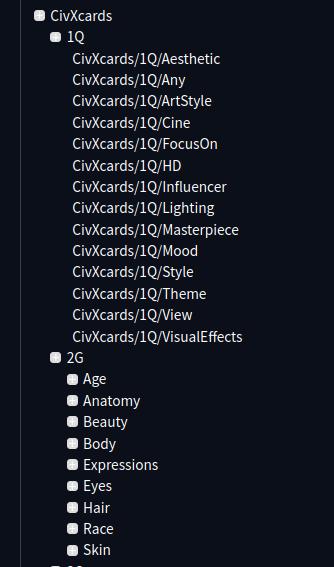
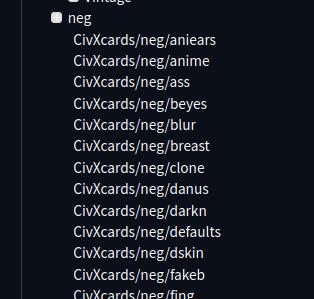
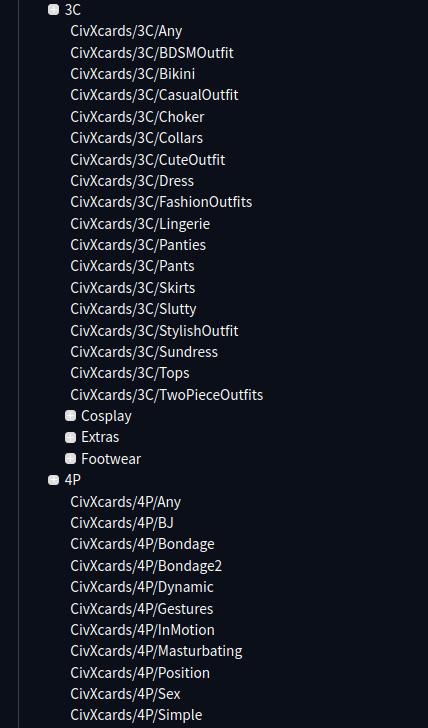
The cards are named "Xcards", I labeled the version in this screenshot as "CivXcards" to keep testing versions separated in the Forge webui. All screens included in a single yaml file.
These screenshots are outdated. The selections have changed...don't worry. More was added, nothing was removed.
Description
Split from the main, all yaml files are standalone:
XQualityTags.yaml
XGirlType.yaml
XClothing.yaml
XPose.yaml
XLocations.yaml
XGoth.yaml
XCosplay.yaml
XBound.yaml
XMods.yaml
FAQ
Comments (2)
Loved 2.0 and lucky me I checked for an update and you just posted one. Keep up the great work and thank you.
Would need 500 token for full potential, poor sdxl.
The best card on the site. Thanx.
Looks like we don't have an active mirror for this file right now.
CivArchive is a community-maintained index — we catalog mirrors that volunteers upload to HuggingFace, torrents, and other public hosts. Looks like no one has uploaded a copy of this file yet.
Some files do get recovered over time through contributions. If you're looking for this one, feel free to ask in Discord, or help preserve it if you have a copy.