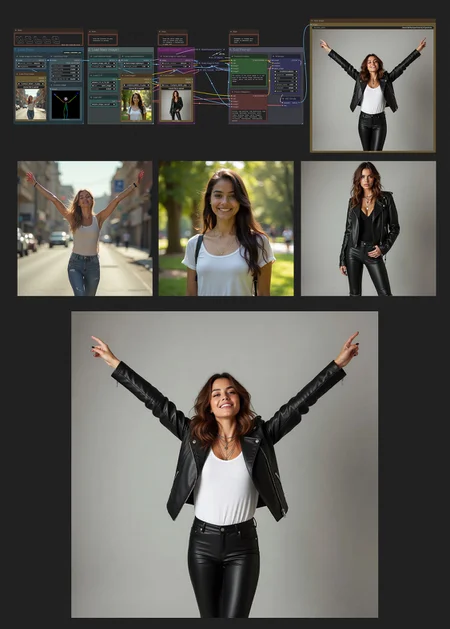
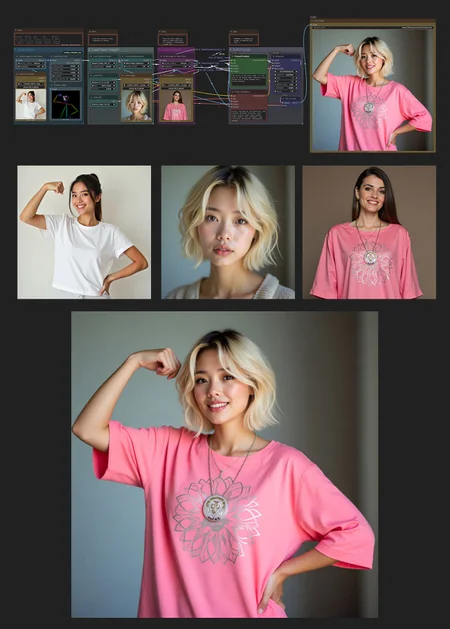
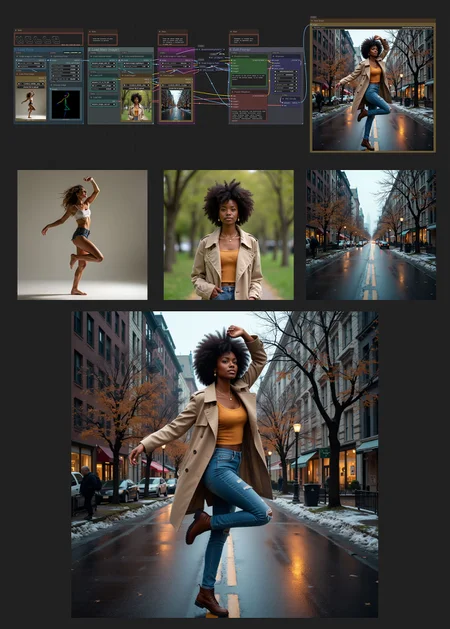
A very simple workflow that can take the pose of an image and give it to a person, also edit it with an additional image to add or modify something, and you only need 8 steps, thanks to the LoRA.
Things you need:
And 8 steps LoRA:
OpenPose node, which you already must have in your ComfyUI:
comfyui_controlnet_aux
Remember, if you have a GPU with more than 8 GB VRAM, you can always ditch the LoRA and use more steps and CFG for better results.
The file you'll download has the JSON file and a PNG, so you can drop whichever you want.
Have fun!
Description
FAQ
Comments (11)
It's a cool workflow but after some tests I had mixed of good and bad results on the face swapping. The outfit was a bit off as well. However prompts adjustments fixed the outfit mismatch. During my test I used images of different aspect ratios, so that probably has some influence on the results. Thanks for sharing though.
you probably can use qwen vl to make the character stay more consistent
Is there a way to reduce the strength of the controlnet pose? I find that a pose will adhere very well from the source image. This is ok if the body sizes are similar but not ok if the body sizes are totally different.
there's some nsfw lora for this?
it takes a few tries but when it works, feels like magic !!! thank you
is there a way to feed an environment to this too?
not in a manner to copy paste the character onto the environment image as is, but to adjust the background environmenr in respect to the camera angle
Hi, I'm not sure of what you mean. You want to use an environmental image and recreate the angle of it on another image? But with no person?
@gabrielx imagine you wanna regenerate your examples you have in this post in a subway that you have the image of, and you want to dictate the angle too in generation
@Pdidi you can type somewhere in the positive prompt "rotate camera 45 degrees to the right" or something like that, it "should" move the angle, and if it's not rotating the camera, you can add to the negative prompt "preserve the camera angle" to force it to move.
for some reason I can't seem to install
SDPoseOODProcessor
SDPoseOODLoader
I just can't find it
This workflow is old, you may have to install the custom mode manually, for that one here: https://github.com/judian17/ComfyUI-SDPose-OOD I should probably design an updated workflow with the latest Qwen Edit model too, since this one is old too.