


PinaColada1.0.Rv1
This model is based on Coconut2.0_classic.
This model has been upgraded to photorealism and, with the right approach, can produce amazing results. She also has a good understanding of furry artists, anime artists and photographer names. Understanding of the prompt is at the highest level, you can forget about prompt gymnastics. Remember, this is a merge: the style of some artists may be lost or not fully reproduced due to a bias towards realism. However, this is even better, you don’t have to worry about copyright.
I also want to note that the model works well with the AnimateDiff module and I highly recommend using Improved Humans Motion Module or Improved 3D Motion Module. Other modules produce complete garbage, or produce barely moving videos when working with this model.
Don't forget to add (anthro)/(furry)/(feral)/(human) to positive or negative, since with a hard prompt the model can generate hybrids instead of specific characters. The tag "female" also leads the generation towards furries, while "girl" tries to draw a human girl. The same is true for men. For the same reasons, try not to use "perfect face, beautiful face" tags: this also humanizes the character, so it is recommended to use "snout" instead, or add "human face" to the negative with more weight. Tag "ugly" in the negative will also try to draw a human, lol.
If you want make semi-furry, use tags "semi-furry, half furry, monster girl, hybrid, human, human with furred body, bare belly, bare chest" and other in positive. Don't use female and male, just "boy, girl". To avoid hybridizing the face and make it more human, use tags "pretty face, beautiful face, flawless face, human face, detailed eyes, large eyes, smirking, beautiful girl, amused beautiful, feminine".
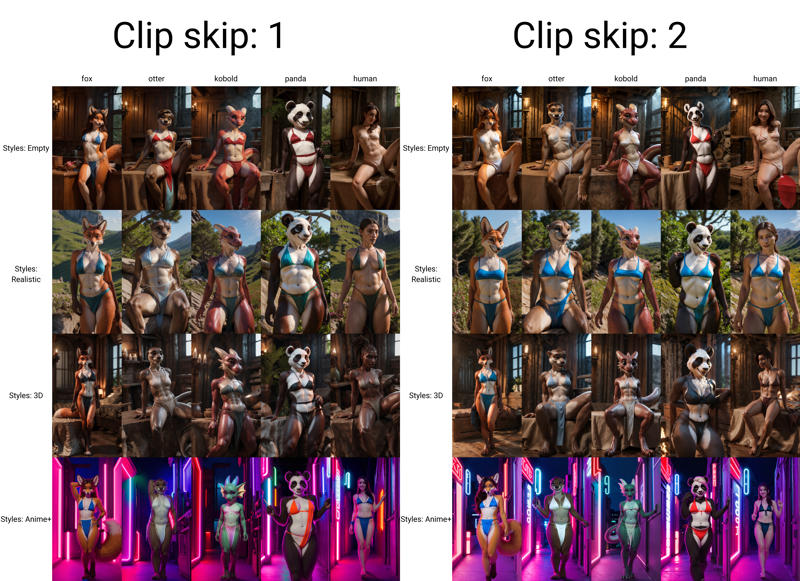
Recommended settings:
DPM++ SDE Karras or DPM++ 2M SDE Karras, 20-120 steps, 768x512 or 960x540, CFG Scale 4-8;
DPM++ 3M SDE Karras, 20-120 steps, 768x512 or 960x540, CFG Scale 2-4;
Hires.fix 4x_foolhardy_Remacri or LDSR, Denoising strength 0.35-0.45, SD VAE vae-ft-ema-560000-ema.safetensors
PinaColada1.0.Rv2
A new version. More realistic, now without creepy faces of people. Of the minuses, due to the increased detail, you will have to do imprompt gymnastics, so that it would reveal furries, and not hybrids of humans and demihumans. In the future, models with higher entropy will be posted for those who are ready to sacrifice detail for less pain with the prompt.
I recommend using the following prompt to reduce your suffering, but it is not a panacea.
Positive:
your prompt
BREAK
detailed fur, realistic fur, neat limbs, glistering fur, detailed fingers, detailed snout, detailed eyes,
masterpiece, detailed lighting, detailed shadows, realistic lighting, realistic shadows, warm soft light, subsurface scattering, light rays
Negative:
(human, human face, human skin, human hands, smooth skin), (hair:1.2), /(poorly drawn limbs/), multiple limbs, missing tail
For animations:
Steps: 60 and higher, Sampler: DDIM, CFG scale: 7-9, Size: 512x512 or 768x512, VAE: vae-ft-ema-560000-ema-pruned.safetensors, 'motion_module': 'improvedHumansMotion_refinedHumanMovement.ckpt', 'video_length': 32, 'fps': 8
Don't forget to read my guides:
"How to make your prompt great again" - A realistic upscaling guide.
"Mr Prompters" - also for this model, a helper bot was written for SillyTavern, which will help you write a prompt if you are a happy owner of a GPT-4 key.
"How to make your generations great again" - Acceleration of generation to cruising speed and other little things guide.
Description
FAQ
Comments (41)
What models are in this merge?
This model is based on Coconut2.0_classic.
this is probably 1 of the best i have used, but i have a problem , it generates excellently on the on site, but when i downloaded it, it mainly generates black images
when googled why it would make black images there was a result claiming it had to do with a NSFW filter so i tested that and it seems like that might be the case,
i don't know the 1st thing about code, is there anything you can do to fix it?
In Stable Diffusion Automatic 1111 it's disable by default. U can try change VAE.
Check stable-diffusion-webui\blocked_prompts.txt maybe here blocked tags
and check \stable-diffusion-webui\blocked_negative_prompts.txt
@YukiLaneige i dont use webui i use dream textures on blender , it finally is able to use safetensors in the update that dropped this month
@ffoff That's where you should have started, I can't read minds) Unfortunately I can't help with that, either your blender addon has NSFW checker or my model just doesn't work with that addon.
@YukiLaneige ok , blender has a setting that lets you watch it make the image being made but once its done its black, blender doesn't seem to have a setting to turn off NSFW checker, and most other models i downloaded are able to make NSFW no problem but a few have made black before, but i wanted to use yours so bad i googled the issue
the thing i found on google said there was a way to change the code to make it work , but i dont know anything about opening code, so if i figured i'd ask,
sorry i wasted your time, have a nice day
@ffoff That's okay, I have plenty of time this weekend. Have you tried both the "full" and "pruned" versions?
@YukiLaneige yes i have
Fix: Stable Diffusion Black Image issue - AI Home (aipromptshome.com)
here is a link to the thing i found on google i hope its helpfull
@ffoff Unfortunately this only works in relation directly for SD, the dream textures addon is not mentioned. Because that's where the main problem. I can upload the model in ckpt extension, maybe it will help.
@YukiLaneige i hope that works
@YukiLaneige thank you very much that seems to have actually worked really well
@ffoff Great! So the main problem was that "dream textures" still doesn't work with safetensors)
@YukiLaneige ok now i'm confused it seems it only works when 1st istalled. i loaded a different save now its back to black images
@YukiLaneige and now that i think about it the safetensor version also only worked properly when 1st installed as well
@YukiLaneige i seem to have found a way to make it work and it works on both safetensor and pickle
in blender there a couple options that give extra text boxes , so as long as i keep NSFW tags out of main prompt line i can get it to work
seems like it only works with the option that gives the most text boxes, but thats way better than not working
@ffoff Perhaps it’s worth looking on the Internet for other blender addons that use neural networks for rendering more stably?
@YukiLaneige after more testing i find myself even more confused black images seem totally random becuase i had some images come out fine even with NSFW tags and some just black out them image when complete, i wish people understood the tech would use dream textures for blender so that finding solutions would be easier,
i'll try to remember to look into the nueral thingy,
thank you again for trying to help me solve this
Bake a VAE version please?
>Bake a VAE version please?
It's already baked. Either you didn't download model and test it or you're having trouble with generating. If you have problems with the second one, then most likely you set the CFG too high, read the description, everything is written there.
>Also, did you by chance make a way to shorten snouts?
This is mentioned in the model description. More precisely, this is rather a problem, since the model likes to go into character hybridization, although not much.
>I prefer a bit more human features like the Masume Monster Girls.
If you wish, you can do at least Taurs, Arachne(bad idea, use lora, lol), semi-furry and others, but this already depends on your prompt gymnastics.
@ffoff You know black images matter too lol. that means you are missing something required if your trying to do sd 1.5 models. hope that helps.
He won't see it, you made a new comment thread)
@YukiLaneige was hoping he would see it as I see others comments on discussion on website..
@Dark_Phantom do you use Blender, and would you be able to help figure it out?
@YukiLaneige normally you'd be right, but occasionally i check the images people post under your ai model and happened to spot my user name
I used to use blender but only for my alcoholic drinks :P jk.. I use paint shop pro 7+ and other techniques to modify images. blender kinda complicated for my failing brain sadly. I used to use blender at one time..
I prefer simple tools like websites that allow manipulation of images aka backgrounds & image layers ect.
@Dark_Phantom its fine , you seem like a fun person, so enjoy your fun day
i still find Coconut ultimate realistic much better, even through its much more unruly
I would like to hear your opinion, I’m interested in what attracts you to the Ultimate model and what you don’t like about the PinaColada model)
lets see if i can post links here:
as you can see out of all pictures Coconut ultimate realistic is the most detailed model especially for genitals. also i love about it that the same prompt end up really different characters from other models which are more or less pretty same.
while you are at that blog you can check other posts. all of them are made with Coconut ultimate realistic model.
you should especially check the houndoom post. while the feral creation may not be your cup of tea, you have to agree that the houndoom butt is one of the most detailed and unique furry works created by AI
through the houndoom will be my last creation using almost fully Coconut ultimate realistic. its just too much hassle and it took me 14 days of editing. from now i will first use other models and then use ultimate realistic to redo/finish it.
@Denatural I don't like the comparison, it's based on only one type of prompt) But I got the general idea, although, as far as I know, Pinacolada makes models more realistic, while CUR goes more into 3D and semi-realism. But I'm more amused by the fact that people like a model made in a drunken stupor more than models that were more thoughtfully made)
Most realistic model I've tried by far, but it really really struggles to generate non-horribly deformed canine penises. I've been messing with this model for the past couple of days and nothing I've tried has really helped at all. I hope in the next version this problem can be fixed.
Also the eyes could use some improvement too.
The problem is probably not in the model, but in the prompt, because the model generates canine penises normally. Try to use "detailed canine penis, realistic canine penis, (knot), animal genitalia erect" in positive and "(human penis, horse penis)" in negative, it should help. I even uploaded two artworks to refute what you're saying)
@YukiLaneige I changed so many things in my prompt to try and fix this before, but nothing worked. I will try again with your suggestion soon and report back.
@YukiLaneige I changed a few things in the negative prompt and it mostly fixed it, still a few problems sometimes, but I guess it mostly was my fault. I'm going to rate the model 5 stars now. Also, do you have an estimate on how long until the next version of the model will be released?
@vilor626 Eyes are a problem with most models, here I can only advise to use LORA, or fix with inpaint/hands.
@vilor626 Советую использовать boring_e621_v4, and bwu, dfc, ubbp, updn - they're very good at correcting anatomical flaws.
The next model won't be out for a while yet, I don't plan to pursue this further just yet.
@YukiLaneige I use the negative embeddings you suggested already plus a few more, but thanks anyways. Your model is really good and I encourage you to continue working on it, no rush though.
This is one of the best furry models I've found.
Details
Files
pinacoladaFurryMix_pinaOlada10Rv1_pruned_fp16.safetensors
Mirrors
Available On (1 platform)
Same model published on other platforms. May have additional downloads or version variants.