


These versions are currently only effective for single-person portrait photos.
A fully automated, batch adaptive upscaling pipeline—no manual intervention needed. Just drop your pre-cropped image sets into the input folder and hit “run” to process them all at once. It can losslessly upscale from 240p to 4K, or from 480p to 8K.
This is arguably the strongest portrait restoration and upscaling workflow available, combining the best features of all the leading models. I guarantee you’ll achieve outstanding results.
------------------------------------------------------------------------------------------------------
✨ If your local VRAM is insufficient, you can experience it directly on this online platform without needing to deploy it.
Just click below and you can start experimenting right away, free and in one click:
👉https://www.runninghub.ai/post/1963968536693587969/?inviteCode=rh-v1216
Register with my invitation code, and you will receive 1000 RH coins upon your first registration, which is enough for nearly 100 image generations or about 30 video generations.🎁
------------------------------------------------------------------------------------------------------
✨ This new release provides two Workflows for options:
1. “direct_upload_batch_image” lets you upload any number of images of any size directly through the ComfyUI interface.
2. “Upload batch images from the folder” works the same as before: you create a folder inside the “input” directory and drop in the images you want to upscale.
Feel free to choose whichever method you prefer—both yield good results.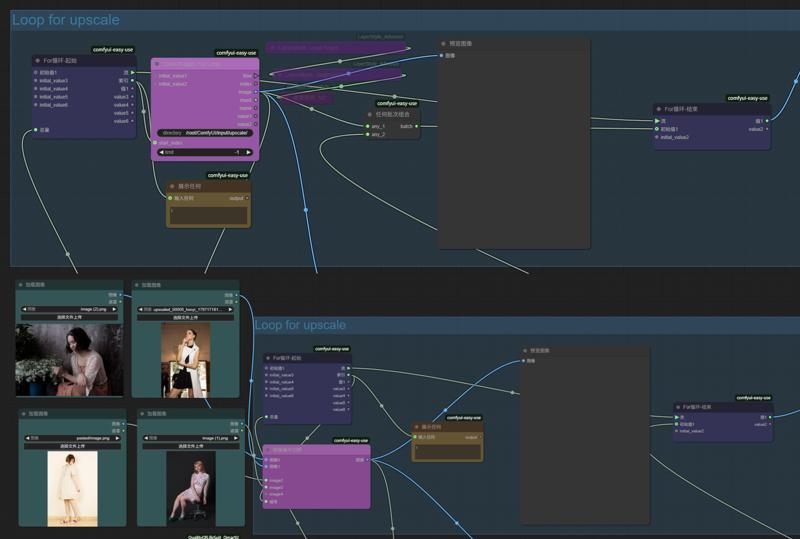
🎯 How to Use:
1. Pre-crop the images you want to upscale to the desired dimensions.
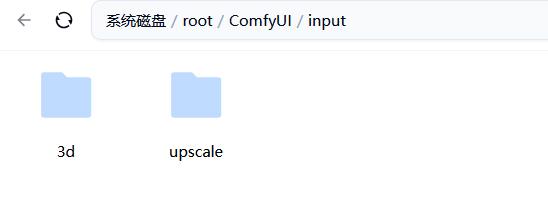
2. In ComfyUI’s input folder, create a new directory and drop your images into it.
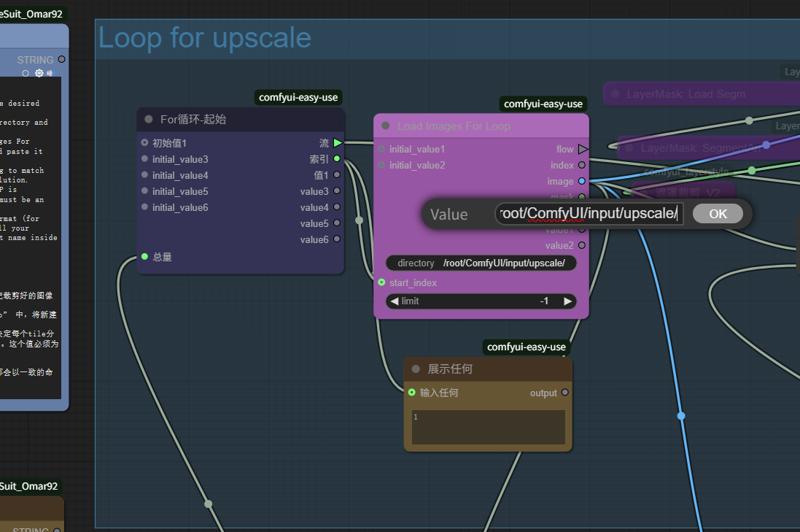
3. Refresh ComfyUI. In the purple node“Load Images For Loop”,copy the folder path you just created and paste it into the directory field of the purple node..
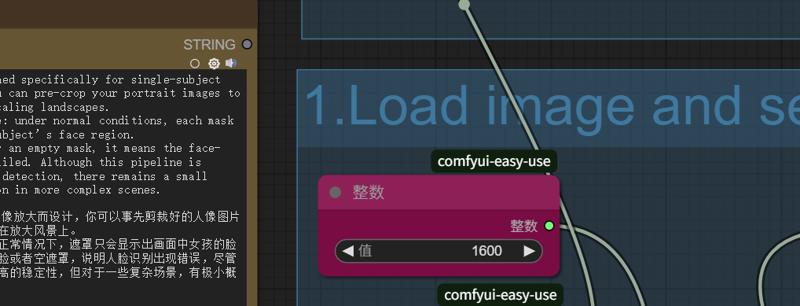
4.Adjust the value in the red-highlighted setting to match your GPU’s VRAM. This number specifies the resolution. allocated to each tile block. A setting of 1600 P is recommended for 20 GB or more of VRAM.The value must be an integer multiple of 64.
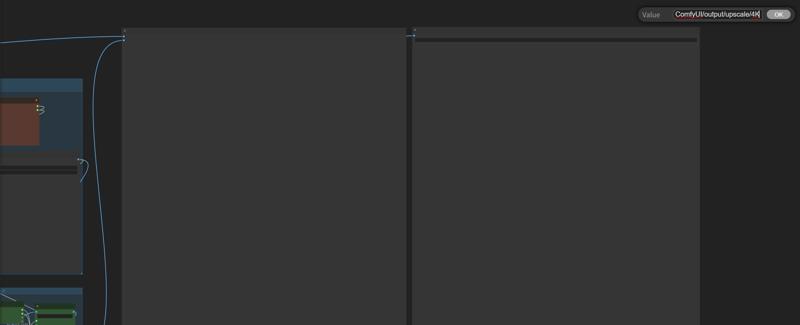
5. Change the save-image name to a path-style format (for example: …/…/output/upscale/4K). This way, all your upscaled outputs will be saved under a consistent name inside a new subfolder of the output directory.
✨Tips:
I. Domains Where This Upscaling Pipeline Excels
①Highly compressed yet otherwise undamaged blurry thumbnails (as low as 240p), which it can restore up to 4K—automatically fixing illogical details so that every element looks natural and true to life.
② Slightly blurred full-body shots (360–480p), which it can losslessly upscale to 6K–8K.
II. Cases Where It Might Also Perform Well
① Images with dirt, smudges, or mild detail distortion
②Pictures full of noise
III. Domains Where It Struggles
①Old photograph restoration
②Images whose native pixels have been badly corrupted
③ Pictures riddled with irregular, malformed color noise
④High-definition images in which the face region alone has a native resolution exceeding 1024P.
IV. How to Check If Native Pixels Are Intact
Open the image and scroll with your mouse wheel to zoom out until you can just make out the subject. Take a screenshot at that zoom level—its resolution will approximate the image’s true, effective native pixel count.
✨Model Checklist:
PixelWaveTurbo - Excellent images in 5 steps! - 03 | Stable Diffusion XL Checkpoint | Civitai
https://huggingface.co/SG161222/RealVisXL_V5.0_Lightning/blob/main/RealVisXL_V5.0_Lightning_fp16.safetensors
https://huggingface.co/camenduru/SUPIR/blob/main/SUPIR-v0Q.ckpt
https://openmodeldb.info/models/4x-FFHQDAT
https://huggingface.co/Comfy-Org/Wan_2.2_ComfyUI_Repackaged/blob/main/split_files/diffusion_models/wan2.2_t2v_low_noise_14B_fp8_scaled.safetensors
https://huggingface.co/Kijai/WanVideo_comfy/blob/main/Lightx2v/lightx2v_14B_T2V_cfg_step_distill_lora_adaptive_rank_quantile_0.15_bf16.safetensors
✨RAM release node:
https://github.com/LAOGOU-666/Comfyui-Memory_Cleanup/
Description
This new release provides two Workflows for options:
1. “direct_upload_batch_image” lets you upload any number of images of any size directly through the ComfyUI interface.
2. “Upload batch images from the folder” works the same as before: you create a folder inside the “input” directory and drop in the images you want to upscale.
Feel free to choose whichever method you prefer—both yield good results.
A fully automated, batch adaptive upscaling pipeline—no manual intervention needed. Just drop your pre-cropped image sets into the input folder and hit “go” to process them all at once. It can losslessly upscale from 240p to 4K, or from 480p to 8K. This is arguably the strongest portrait restoration and upscaling workflow available, combining the best features of all the leading models. I guarantee you’ll achieve outstanding results.
FAQ
Comments (14)
Has anyone managed to get this to work? Looks really good, but I keep getting "TTP_Tile_image_size float division by zero" errors.
The V1 version works just as well, but you need to manually set the tile division and the total number of pixels. This automated version has a logical flaw. I will replace the workflow with a new version soon.
The newly replaced version of workflow has no logical issues at all. You can try downloading it again
@zakakki @zakakki Thankyou so much for replying and updating the workflow. I did manage to get to the final step so it completed the Seedvr2 upscale complete with the face upscale which looks amazing. After that though I hit a wall on the final step.
# 😺dzNodes: LayerStyle -> Processed 1 mask(s).
# 😺dzNodes: LayerStyle -> Processed 1 mask(s).
# 😺dzNodes: LayerStyle -> CropByMask: Box detected. x=673,y=404,width=680,height=688
# 😺dzNodes: LayerStyle -> CropByMask Processed 1 image(s).
!!! Exception during processing !!! Node 292.0.0.3.0.0.294 says it needs input image1, but there is no input to that node at all
I'm also getting lots of random division by zero errors but I don't think it's related to image size as I tested various images and sizes, it seems to be related to the face masking, and seems to happen on pictures that are close up shots, regardless of size.. here is a view of the error during processing.
DWPose: Using yolox_l.onnx for bbox detection and dw-ll_ucoco_384_bs5.torchscript.pt for pose estimation
DWPose: Bbox 2749.68ms
DWPose: Pose 56.09ms on 1 people
!!! Exception during processing !!! float division by zero
Sorry if I'm bothering you!
@DaveTheRave5 I’m not sure where the problem lies either. I’ve tried every size and aspect ratio, and images that are nothing but face close-ups all run fine. However, for most bust-and-below shots, you really need to extract the face and enhance it separately. Maybe I’ll switch to a more fault-tolerant method and put out a dedicated version just for face close-ups.
@zakakki Thanks for getting back. I'll get there.. It's a great workflow.. Lots of new things to learn. Thanks
@DaveTheRave5 This should be the final update for automatic upscaler. I'm not sure if there are still any bugs, but if there are still issues with this latest version, it might be that the comfyui plugin is not smart enough or the facial recognition model is not powerful enough. I'll have to try another approach.
@zakakki I will check this out. It's just interesting to see how far upscaling has come in the last 12 moths, which was the last time I went down this rabbit hole. Lots of new tools and methods to explore. Reall impressed with some of the methods outlined here. I haven't even been able to get the wan section working yet, but I'm sure a tiling style wan 2.2 method will be awsome as it is a really powerful image generator that's superior to SDXL, Flux..etc IMO...
Getting this error:
SeedVR2
cannot access local variable 'keep_vae_loaded' where it is not associated with a value
Does anyone has a solution?
Thank you for the excellent workflow!
The main issue is that the second mask detection often fails, resulting in errors quite frequently.
That is to say, the first mask is generally effective, isn't it? This is the facial recognition method with the highest tolerance rate that I can find so far. If the success rate of the first mask is relatively high, then the reason for the failure of the second mask might be related to the excessively high resolution
I have updated the latest workflow for each version, removing the recognition part of the second mask. As long as the first mask is recognized correctly, the entire workflow will not have any issues, and at the same time, the problem of misalignment when pasting back onto the face has been solved
@zakakki Yeah, it seems like higher resolution or poor aspect ratios can make things less stable.
Thanks for improving the workflow!
thanks for sharing this, tested it on a 5090 for a few hours and i really like the results but i have few issues if u don't mind can i DM you, instead of spamming them here in comment?