Doggystyle POV
Fresh from a break, first epoch I test and... voila!
Versions
MiniMax H3
Now in MiniMax H3! Gotta figure this detail thing out though, parts can be mushy...
WAN2.2
Minor caption updates, identical set to One.WAN. Native 2.2 is cleaner...
POV doggystyle sex,
The beautiful {Russian|French|Swedish|Swiss|Austrian|Dutch|English|America|Californian|Siberian} woman with very long {blonde|bright blonde|brown|dirty blonde} hair is fucked by a{a African|a Asian| Latin} man from behind,
She is naked {except for a {blue|red|black|white} {bra|shirt}|}.

They are on a {white|red|blue|yellow|orange|multicolor|purple|teal|black} {bed|ottoman|couch}. Her face, expressing (sexual pleasure|surprise|pain|love|), it turned away and to the side.

Lighting is {bright and even|soft}, view from above
One.WAN
Another opportunity to make some WAN training mistakes, launched it before bed and woke up to see it taking 170 seconds per step XP. Fixed the bucket and then got through 40 epochs in a few hours, resulting in this!
Added two new clips I had, tightened captions but all in all this was a breeze as my process matures and my workflow is finally suitable for my lack of patience :P
One
Pre-vacay I'd already collected 8 clips of this. I quickly captioned it, tailored the buckets to match and trained. I extracted 5 epochs to test, started with epoch 90. It hit and hit and hit some more, with nothing more than the usual bad render here and there. Not sure I'm even going to test the other checkpoints I set aside since this one seems to be working super well.
Let me know if you disagree and why!
Wildcard Prompt
POV doggystyle sex seen from above

The beautiful {Russian|French|Swedish|Swiss|Austrian|Dutch|English|America|Californian|Siberian} woman with very long {blonde|brown|dirty blonde} hair is bent forward while the {African|Asian|Latin} man is thrusting into her vagina from behind.

She is naked except for a {blue|red|black|white} {bra|shirt} exposing her {big|round|tight} ass.

They are on a {white|red|blue|yellow|orange|multicolor|purple|teal|black} {bed|ottoman|couch}.

Lighting is {bright and even|soft}.
Training Notes (HYV)
How I select epochs
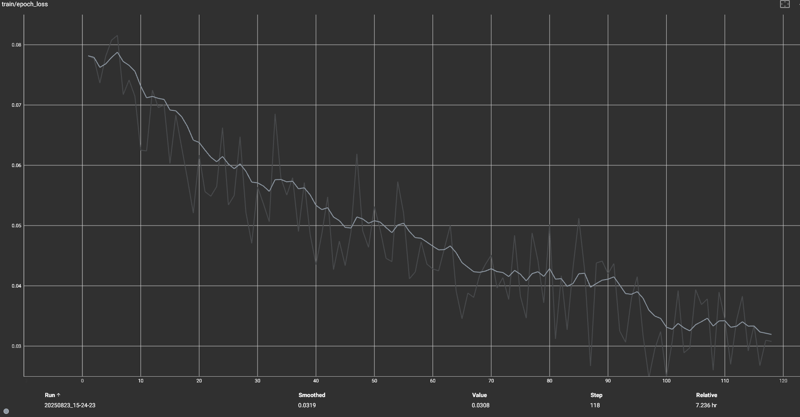 Above is the epoch loss curve in Tensorboard. It's taken me a long time to start 'seeing' these properly, the trends, the plateaus, the squiggles...
Note epoch 90, which is at the tail end of a plateau (flattening). I've trained more than 20 LORAs and the sweet spot is almost always somewhere between 0.03 and 0.05 loss. The loss does decrease to closer to 0.02, but that's where I find generalization suffers and overfitting rears it's ugly head!
My training runs always start bumpy for ~10 epochs, decrease steadily for another 20% of the run, plateau a bit for ~10%, then decrease again for another 20-30% of the run. This plateau, before the last drop towards 0.02 is typically where I've found good results in terms of stability and generalization.
For this run I also extracted epochs 65, 75, 95 and 100, but 90 was my first choice because it appeared just before the drop to overfitting (or so I assumed). I still haven't tested the other checkpoints, but again, 90 works so well, why bother?!
Disclaimer
Resper rendsponsibly.
Description
FAQ
Comments (12)
I am not a Newbie actually, but all your LORA's do not work in all my WAN-Workflows... Do you have workflow examples? NOT hunyuan, but wan...
Same for me. All the Lora does is make the default generation look burned in. I'm using the built in ComfyUI workflow
Try the workflow attached to the videos in the showcase, just drag them onto ComfyUI!
Or load up this one!
https://civitai.com/models/2087071/az42up-wan-cowgirl
if things look burned in, turn down the weight a bit... but my workflow proves one way of using them... lemme know!
@WhatTheGuy when you say built in comfyUI workflow, do you mean the ones embedded in my showcase videos or ones provided by ComfyUI?
@WhatTheGuy or show me your workflow
@az420 I mean the built in Nodes from ComfyUI, so no WAN Video Wrapper or other custom nodes. No lighting, Tea cache or other stuff
@WhatTheGuy I'm using the built in Wan 2.2 template from Comfyui, minus the regular high/low node loader that comes with it, replaced with GGUF loader, and LightXT2V 2.2 4 step. His 2.1 models work fine in my 2.2 workflow. Can even add flaccid penis lora for extra girth, etc.
If you have burned in results make sure you have the correct high/low models and loras in their respective loaders, and also make sure whatever companion loras you are using are adjusted properly, low noise loras generally are the ones that need to be lowered in strength to reduce artifacting, I also noticed that the dicks_epoch_100 seems to burn the crap out of concept loras, use flaccid penis lora if that's the case, it looks better anyway, generally I find it's other loras that are at fault.
@WhatTheGuy any luck with mine?
https://civitai.com/models/2087071/az42up-wan-cowgirl
OUTSTANDING!!!! Works well with other lora's...
PLEASE FOR THE LOVE OF GOD INSTRUCT ME ON HOW YOU GET A LORA TO FOLLOW MOTION!!!! Is it the prompting? The quality of the video sample?? PLEASE PM ME, I BEG YOU!
OHHHH... also. For some weird reason your Lora will also do POV BLOWJOBS- Don't know how but it did it by accident once then I adjusted my prompt to call for it and- it works.
Thank you Sir!
Assuming you're capturing enough frames from a well clipped video file, my strategy is to identify a single short phrase that I want to lock into the concept. Then, I do not describe the motion at all in captions, I just let the key phrase absorb all that motion, and everything in the scene that I am 'not' describing. Remember, when training, you caption a key, modifiers and anything else you DON'T want to show up unprompted. I hope that helps :)
@az420 Okay... do you use a ratio of images to video? I think I read somewhere its 1:4 - one video to 4 images?
@soundgate I've only used images in a LORA once. I actually started video only and haven't evolved that yet. I've been thinking about doing some simpler concepts though where images might make sense.
The reason I think people like to use images is because you can have higher resolution ones and still fit in VRAM. My hardware lets me keep videos at relatively high res, and I use two buckets per batch, a low res high frame one and a high res low frame one.
Details
Files
Available On (2 platforms)
Same model published on other platforms. May have additional downloads or version variants.