

Wan 2.2 Inpainting Workflow with Full Res (A1111 only masked inpainting analog) with Auto Stitching
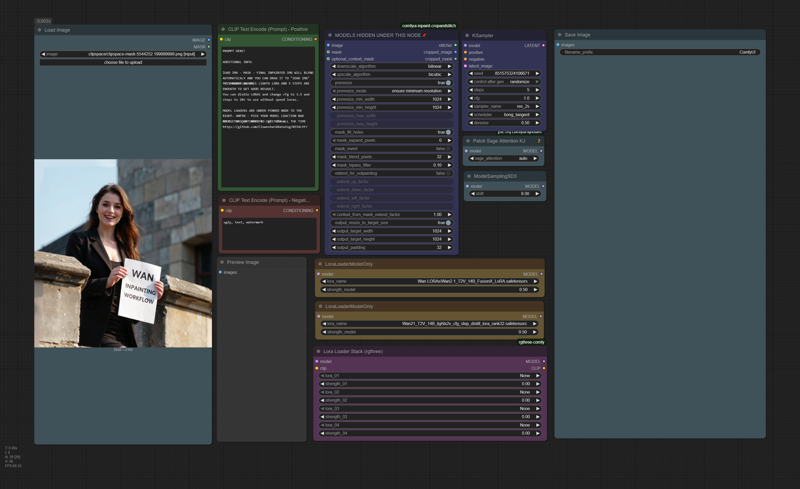
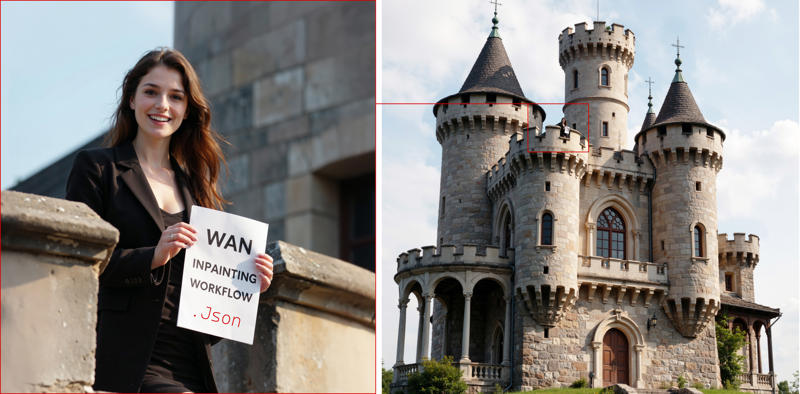
Description
Wan 2.2 inpainting
FAQ
Comments (15)
I tried some basic inpainting, but it doesn't seem to function as it should for me. The masked area is regenerated, but it doesn't adhere to the prompt at all for me, and it also seems to know what was underneath in the first place, because I get similar items back, as there were in the original.
Am I doing something wrong or do I misunderstand the purpose of this workflow?
Play with denoise if your not getting what you want.
Saw your Reddit post(s) showing high resolution, highly detailed images, but this does nothing for people that don't know exactly how it's supposed to work already. Needs explanation and examples on what image needs to be uploaded, how it should be masked, etc. The example seems to show a final result, not what should be uploaded into that node and it shows nothing masked and doesn't explain what or how it should be masked? Are you supposed to black out with pure black color to mask? This needs to be explained if it's going to be understood and useful to the majority of people.
there is instruction in the prompt node. You upload img - mask it with mask editor - generate. I dont know what else i should explain to make it simpler.
protector131090 99.997% of us have no clue what mask editor is or where it is or how to use it. https://docs.comfy.org/interface/maskeditor
protector131090 step 1 for us dummies is to delete what you wrote in the prompt area, so that we could write a prompt. Whatever instructions were provided there are unknown to us. Instructions should be in a separate text box, not in the prompt box where it's going to be immediately deleted/overwritten by most users.
civitai7_ i dont think you can embed whole video tutorial in a workflow. I mean if you cant right click on an img to open mask editor - chances are - your at the wrong website or you need to watch some tutorials on youtube first. your 99.9% numbers are way off.
You lost us 3 words into the explanation in the prompt area. 'Load img - mask'. You can't assume anyone knows how to mask. I've used ComfyUi for maybe 2 years and had no clue to right-click on the load image node and that would have a mask editor option. Also, model nodes hidden under other nodes where dummies are supposed to notice that to begin with, then be able to unpin it, move it out of the way to find the hidden model nodes, change the models, move the other node back on top to cover them again and repin it? I know how to do that stuff, but model nodes hidden under another node? Didn't notice it and never would have thought to look for it, because I've never seen that before in my life. Not built for the masses, although I can understand that it may be a mostly 1 time use setting where you'd set your models then never want to see them again while using the workflow, but it's not simple and masses friendly.
civitai7_ nah man, Using comfy for 2 years and dont know you can right click or how to move nodes - that does not seem right. Even i know how to do this and im very stupid with those things. I uploaded v2 of the workflow. Those model loaders are not hidden anymore. But anyways like i sad - what do you want me to do? write a book in the note on comfy ui? video would help but there is no way to embed it in comfyui workflow and my YT Chanel with tutorials got deleted by YT for some reason. Anyways - you really need to watch some tutorials on comfy. i know its not easy but A1111 is dead and comfy is the only was to use those models.
protector131090 You didn't read what I wrote. The 2 years was about the mask editor. I would bet the very vast majority of ComfyUI don't mask anything, never have, and never would expect a mask editor to be accessed by right-clicking on a load image node. If anything, we'd expect it to be a separate node or to upload a separate premasked image. As far as unpinning and moving nodes, I said I knew this.. but newbies don't. And again, the vast majority of users wouldn't expect necessary nodes to be hidden under other nodes that need to be unpinned and moved out of the way to access them.
And no, didn't need to write a book. I explained what would have been more masses friendly. Not hiding the models nodes, not putting instructions in the prompt where they'll be immediately deleted by many users.. making instructions a separate text box, and not assuming people know obscure options and settings just because you know them. 'Load img - mask'.. OK, you lost 99% of users already. Mask how? Where? Better instructions would be explaining the basics as you did in a response here. "mask it with mask editor".. OK, great, now what and where is mask editor? 99% need to go search that instead of just saying 'Upload image, then create your mask using Mask Editor (right-click on the upload image node to find it), create prompt, generate.'. That would reduce most confusion, assuming that works. And still 1 sentence
protector131090 you also wouldn't need to embed a video if you did a video tutorial. You can just put the YouTube video link in the instructions text box after a slightly more detailed, much more useful text description
Low effort upload that doesn't help anyone understand anything. How do we use this compacted, collapsed, obfuscated workflow? I can certainly clean it up and figure it out, but that's not really what a workflow shared on CivitAI like this is for, is it? Low effort, low value post.
- hiding nodes behind pinned nodes is poor form for a workflow meant to be instructional
- collapsing mission-critical inpainting nodes and hiding them behind a pinned node is poor form for a workflow meant to be instructional
- renaming a mission-critical node (Inpaint Crop (Improved)) that many may have never encountered before is poor form for a workflow meant to be instructional
- why Convert Mask to Image -> Convert Image to Mask deadend?
This workflow is made to be simple. If you like noodles and compilation things - this workflow is not for you. Why do you care if i renamed or hidden nodes you dont need to even see? What do you even want to do with those nodes? There is literary a description in the Prompt node on how to use the workflow. This not workflow meant to be instructional - this meant to be easily used without 5000 nodes all over the place. If thats not your thing - dont use it. If you can make your own - just do it, why are you even criticizing other ppl workflows. This is for those who dont. For those who want things simple.
Not sure why everyone here is trying to be mean to you, the workflow is great and very easy to understand! Thank you for sharing!
I have No idea. Glad it works for you.