
About
This is an I2V workflow created for Wan2.2.
By utilizing the high reliability of the start frame of the “FLF2V” mechanism and connecting the video output created in the loop processing, it is possible to generate videos of any length.
This workflow uses "start_image" and "end_image" for FLF2V node.
If you want to use "start_image" only, download similar version.
Features
Express one scene in a single prompt line. The number of prompt lines you set will be the number of scenes (number of loop processing times).
[IMPORTANT]
There are rules for writing prompts. Please use the following format:
The final frame image file must be prepared in advance.
Write that path in the prompt below (4th element).
duration (seconds) | character action | camera work | filepath of "end_image"(separate each item with a “|” symbol)
The number of frames per loop (Length) can be expressed by the following formula and the number is variable for each loop.
(Duration [seconds] × FPS) ÷ (Frame interpolation count + 1) + 1If the number of loop iterations is high, issues with color changes in the reference image may occur. In such cases, adjust the value of “🔧 Image Desaturate.”
Note
I have confirmed that the difference between the input frame and output frame via Ksampler is not constant, and if they do not match, the output image will be degraded.
Example)
30fps/1sec -> In:31/Out:29 (Mismatch)
30fps/2sec -> In:61/Out:61 (OK)
30fps/3sec -> In:91/Out:89 (Mismatch)
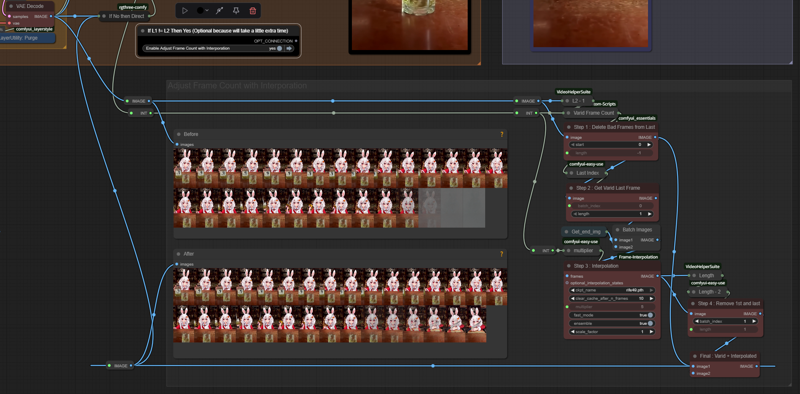
For this reason, I have prepared a mechanism to adjust the frame count (see image below).
I believe this allows me to express my unique personality.
Description
FAQ
Comments (7)
Thanks for the workflow. What technique are you using to create the last frames, modifying the subject, but keeping the background similar?
As mentioned in another question,
The final frame works on the assumption that the user has prepared an image file in advance.
Please write the path to the image file in the fourth element of the prompt.
flux context
@Usako_USA the problem is we don't know how to generate a similarly close enough final frame that is similar to first frame. Any tips?
Many thanks! Wonderful workflow.
Could you perhaps provide some guidance on how to generate the final frame using the first frame?
The final frame works on the assumption that the user has prepared an image file in advance.
Please write the path to the image file in the fourth element of the prompt.
Any idea why there's a grey/white flash a couple of frames before the last frame? I've seen others mention it. Still can't find a fix though.