


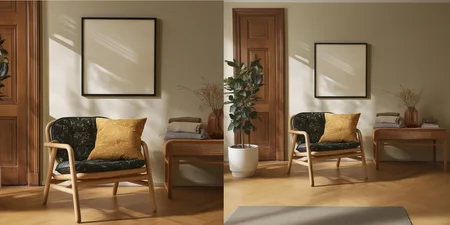
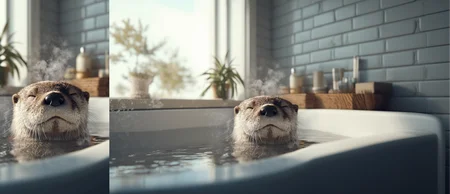

After dozens of experiments I’ve settled on the version that’s giving me the most reliable zoom‑outs. I tried training separate LoRAs for extreme, large, and medium zoom levels, but those models were too unpredictable—so I’m sticking with this single “all‑rounder.”
Known caveats
Out‑paint artifacts – some images pick up chunky/pixelated edges in the newly generated areas.
Human close‑ups – very tight crops of faces, hands, or bodies can warp badly.
No precise zoom slider – you can’t tell it “zoom out 10×”; results vary, so experiment.
How to prompt
Use the base prompt below, then bolt on whatever you’d like to see in the expanded frame. Example:
Zoom out and keep the visible subject exactly the same in position, scale and appearance. Expand the canvas evenly in every direction and fill all new areas with a natural continuation of the scene, matching the original lighting, perspective and photographic style. You can change the target latent image size different from your source image size. For example; if your image is vertical, you can expand/apply the zoom out horizontally. Feel free to check the example images.
LoRA also works with Nunchaku workflows.
That’s it—give it a spin and let me know how it works for you!
LoRA trained with fal.ai Flux Kontext LoRA Trainer, with 70+ pairs, 0.0003 LR, 3000 steps
Description
FAQ
Comments (19)
on this LoRa I get the message: ERROR lora diffusion_model.final_layer.adaLN_modulation.1.weight shape '[6144, 3072]' is invalid for input of size 196608
with other LoRa this did not happen. ComfyUI.
But it works somehow.
Same here with size setting: 1024x1024 and it does not matter if I give a 1024x1024 or a 512x512 input image.
Hi, by any chance, are you using Nunchaku workflow in Comfy UI? I patched the LoRA and you should not be getting this error, that's weird. Can you try downloading this one and let me know the results: https://huggingface.co/reverentelusarca/flux-kontext-zoom-out-lora/tree/main
Genzo93 Its not about your input image, its about the loras format. can you share your workflow with me so I can try to replicate this issue and hopefully try to fix it
reverentelusarca The link has exactly the same lora as here on civitai. I don't use nunchaku, I have a pretty simple workflow.
LbhMan can you check this repo and let me know about if it works for you: https://github.com/RamonGuthrie/ComfyUI-RBG-LoraConverter
Same problem...got it working using the workflow from your other lora.
@reverentelusarca did the conversion. I'm getting another errors:
lora key not loaded: norm_out.linear.lora_A.weight
lora key not loaded: norm_out.linear.lora_B.weight
lora key not loaded: proj_out.lora_A.weight
lora key not loaded: proj_out.lora_B.weight
I'm using flux1Kontext_flux1KontextDevFP8.safetensors, BTW
Great! Can you please share a png with a workflow.
Thank you
Its regular flux kontext workflow, just add a lora loader node between checkpoint loader and clip nodes.
following is my another lora, just download any example image(except the first combined one), and drag n drop into comfy, then simply change the lora to this zoom out lora:https://civitai.com/models/1753109/flux-kontext-character-turnaround-sheet-lora
I've discovered a method that has a high probability of controlling the distance. If the model strength is set to 0.4, the screen will recedes a bit. If it's set to 0.8, it will recedes significantly and may even be severely deformed. Let's test it out and see.
actually dataset is pretty diverse between different crop/zoom out pairs, but please let me know about your experiment results!
Outstanding work 👍
* * * Workflow * * *
https://civitai.com/models/1831687/flux1-dev-krea-kontext-nunchaku-my-20sec-workflow?modelVersionId=2107703
Nude girl test ↓ ↓ 🧜♀️
https://civitai.com/posts/20015217
@reverentelusarca
Is there any way to control the generated part?
I added more than 10 prompts and it would affect the original image content or even destroy the result.I'd test different Weight / cfg, thanks
im afraid not. i tried to add at least the zoom level identifier, but results was not good
reverentelusarca v1.0 is already outstanding, kindly spend sometime to improve 😎
much appreciate ❤️
I'm afraid I'm getting "lora key not loaded" in a Nunchaku workflow.
anyone tested with Nunchaku?
All photo I posted at here are created by Flux kontext nunchaku (svdq-int4_r32-flux.1-kontext-dev.safetensors) .
screenshot a problem and upload to somewhere, I can help to check
or just ask ChatGPT, most problem I go fix with AI chat
Using regilar flux1Kontext_flux1KontextDevFP8.safetensors here. Can't get it to work Ok even after converting with ComfyUI-RBG-LoraConverter.
At high weight > 0.5 I'm getting "lora key not found", looks like LORa kinda works, but the image is getting heavily distorted. At weight 1 it's total mess
Details
Files
Available On (1 platform)
Same model published on other platforms. May have additional downloads or version variants.