ATTENTION! This is my third Wan 2.2 LoRA and is mainly for experiment and sharing ideas about training a Wan2.2 LoRA.
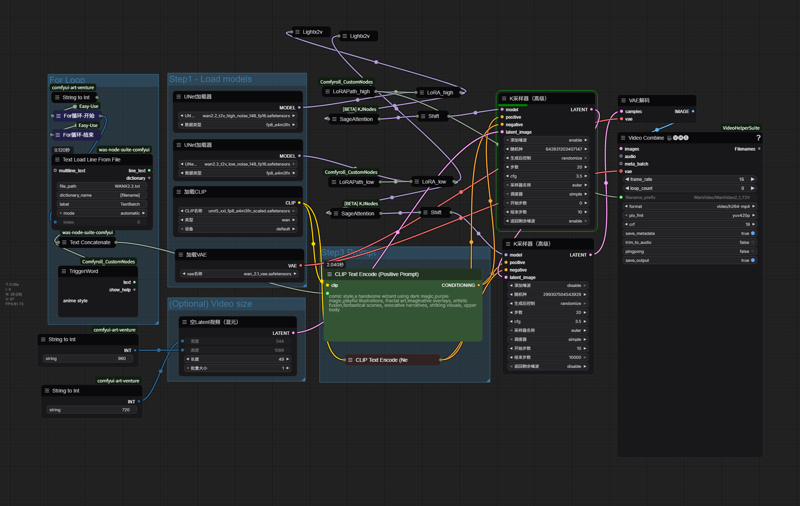
ComicBook-Wan2.2-T2V-A14B. You can use MediaInfo to check the generation info in the video. The workflow I used is the official one but adding sage attention and LoRAs after loading the ckpt.
If you love my work, you can buy me a coffee : https://ko-fi.com/ghostshell
UPDATE VERSION-2.0
The effect I tested is crazy. Sample videos are generated in [720,960].
wan22-style7-comic-sel-high-2-000040.safetensors is for high noise
wan22-style7-comic-sel-low-4.safetensors is for low noise
The Image below contains the Workflow.
VERSION-1.0
ComicBook-Wan2.1-T2V-14B. You can use MediaInfo to check the generation info in the video. The workflow I used ComfyUI-WanVideoWrapper.
LoRA strength suggestion(to balance the movement and the style) : 0.85. It is trained by images, most of the time the style works ,but sometimes it doesn't.
I uploaded an article of my experience of training Wan2.1 LoRA (Both I2V & T2V): My Personally Training Experience of WAN:Starting with Data.
Description
Wan2.2 Version,unzip the file and put high lora for high noise, low lora for low noise
FAQ
Comments (4)
you mentioned low and high models but where are those? only 1 i can see
wan22-style7-comic-sel-high-2-000040.safetensors is for high noise
wan22-style7-comic-sel-low-4.safetensors is for low noise
The link of download is a zip file. Unzip the file, and you will see two loras in it.
@_GhostInShell_ May i ask why you do that? Why not upload both here? The way you do it makes your Loras difficult to Organize since Lora Manager (a must have Tool for ComfyUI) cant manage those files (since not linked to civitai) that means everything has to be done manualy, and thats a pain in the rear, would be great if you would rethink that approach, and just upload the files here like everyone else. Thx
@Highlandrise exactly