


IllustriousNXT_XL_v2.0a by klaabu
Special thanks to Jebbanyale483, Roxin ,larrydallas123126 and Futurabbit
klaabu_IllustriousNXT_XL_v2.0a is a fine-tuned evolution of the Illustrious anime model, built for creators who demand sharp detail, strong prompt control, and versatile style coverage. This version improves overall fidelity, boosts knowledge of artist styles and art genres, and maintains full text encoder strength — giving you responsive, high-impact results with both tag-based and natural language prompts.
🎯 Core Features
• Fine-Tuned Base: Improved anatomy, lighting, and output consistency
• Style Awareness: Enhanced recognition of popular artists and art styles
• Prompt Flexibility: Accepts Danbooru tags and natural language equally well
• LoRA Friendly: Fully supports LoRAs for characters, bodies, faces, and aesthetics
• Encoder: Retains full text encoder with updated token awareness (trained up to 2025)
• Resolution: Native support for 512×512 to 1536×1536+
🛠️ Recommended Settings
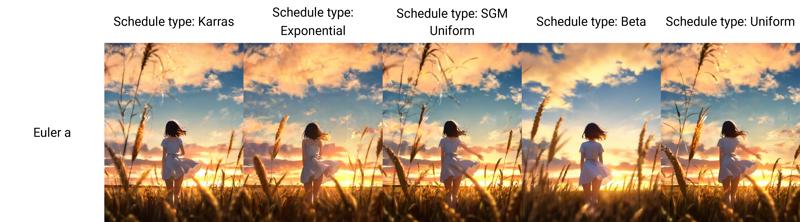
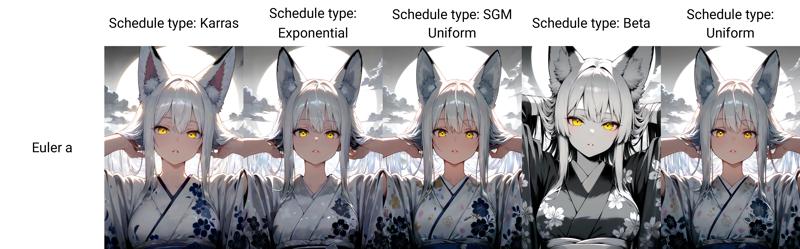
• Sampler: Euler A or DPM++ 2M SDE, Schedule type: SGM Uniform
• CFG Scale: 3 – 7
• Steps: 25 – 35
• VAE: Optional
🧷 Suggested Positive Tags
(masterpiece, best_quality, ultra_detailed, expressive eyes, clean shading)
🚫 Suggested Negative Tags
(worst_quality, jpeg artifacts, watermark, child, blurry, malformed hands)
Safety Tip:
Use strong negative prompts to avoid unwanted content and keep generations clean.
🧪 Best Use Cases
• High-quality character and scene illustrations
• Art-style experiments and aesthetic LoRA testing
• Visual novel assets, covers, and expressive portraits
Leave feedback, share results, or tag me with your outputs — I'm continuing to refine and improve based on what the community creates.
IllustriousNXT_XL_v1.0 by klaabu
klaabu_IllustriousNXT_XL_v1.0 is a high-performance, anime-focused checkpoint built on top of IllustriousXL.
It’s been fine-tuned for stylistic flexibility, LoRA compatibility, and sharp prompt responsiveness, enabling both tag-based and natural language workflows.
This release focuses on strong prompt adherence, vibrant colours, controlled shading, and recognisable character fidelity — ideal for both character illustration and concept design across multiple anime styles.
🎯 Core Features
Optimised For: Stylised anime generations, tag-heavy control, expressive facial detail
Prompt Style: Accepts both
Danbooru tag-styleandnatural languageLoRA Support: Highly compatible with both expressive and concept-specific LoRAs
Token Awareness: Trained with knowledge cutoff early 2025
Resolution Range: Native support for 512×512 up to 1536×1536 and beyond
🛠️ Recommended Settings
Sampler Euler A
CFG 3 – 7
Steps 20 – 35
VAE not required
🧷 Suggested Positive Tags
(masterpiece, best_quality, amazing_quality, etc.)
🚫 Suggested Negative Tags
worst_quality, low_quality, blurry, jpeg artifacts, text, logo, child, young
Safety Control Recommendation:
Generative models can occasionally produce unintended or harmful outputs.
To minimize this risk, it is strongly recommended to use the above negative prompts which incorporates additional safety mechanisms for responsible content generation.
🧪 Best Use Cases
Single-character compositions
Stylised portraits or full-body shots
Scene-based illustration with vibrant tone mapping
Experimental testing with new aesthetic LoRAs
Drop feedback, sample generations, and test results in your preferred channel or tag me directly.
I’m actively refining this model based on community feedback — let’s push it further.
Description
FAQ
Comments (20)
use webui only?
@powderworld217 will be available tomorrow. I've made a bid so everyone can use it on site
@klaabu It doesn't seem to work properly in ComfyUI.
Would it be possible to check if it's compatible?
Or is there another way to set it up?
@powderworld217 I'm not sure what you mean by its not working in Comfy properly. Can you please expand? FYI the cover image is made in Comfy
@klaabu I used the recommended settings
Positive Prompt: Recommended Settings P + "1girl, portrait, standing"
Negative Prompt: Recommended Settings N
I tested both CLIP Encoder and SDXL Text Encoder, with Clip Skip values between -2 and 0.
However, most of the output images have heavy noise, severe color distortion, and strong blurring.
I tested square resolutions ranging from 512 to 1536, but the issue persists.
Interestingly, some images do generate fine, while others are corrupted with noise under the same settings.
For node configuration, I tested both of the following setups:
1. Model Loader → Empty Latent Image → CLIP Text Encode → KSampler → VAE Decode
2. SDXL Model Loader → KSampler → VAE Decode
Even after re-downloading and testing again, the output is still noisy.
The colors are misaligned, and the image appears warped and smeared, as if it's melting or flowing.
@powderworld217 i have limited experience with Comfy, but -
-Use SDXL Text Encode + SDXL Conditioning,--Don’t touch Clip Skip — just leave it alone on default 1
-What is that "font used" LoRA? Try without it,might be corrupting output?
-No need for extra VAE Decode — it’s baked into the model
-Use Euler a for testing — clean, stable
There is no custom nodes required, use exactly the same setup like you would use for standard SDXL t2i.
Please let me know if the issue persists. Also feel free to join my discord, I'm available there to help on the go, if not, someone else will :) link in bio
Very good, but not consistent enough with the limbs, hopefully it gets better and better!
@joshdaisc449 thank you for the feedback! It will get better!
It gives poor quality with Fooocus 2.5.5. A lots of noise and artifacts. How to fix?
Hi @ipivaxul ,please read the info on how and what settings to use. EULER A - ETC.
@klaabu I try to set “Sampler” to “euler” or “euler_ancestral” (there is no “euler a”). Scheduler is karras by default. The option “CFG Mimicking from TSNR” is in range 3 – 7 (I didn't find CFG option in web interface). 30 steps. Suggested negative tags are used. The problem is that the image contains multiple poorly drawn objects. For example, for the query "cat" I get tens of poorly drawn cats or catgirls.
@ipivaxul Im not sure, it sounds like you have some options turned on that are not needed. Take an inage from showcase and PNG Info in focus. Generate and see the result.
The model is probably more like 5 models in one — and I mean that in the best possible way.
There’s so much you can do with it, and if you’re open to experimenting, you’ll get some amazing results.
Euler A is usually the best sampler, and if things start looking too chaotic, bumping up the CFG often helps a lot. 🎨🧪✨
In terms of prompt interpretation and expression, this is by far the best checkpoint model I've ever used. It's truly a phenomenal model
❤️
Original angles, poses, colors, scenes. Better physics knowledge compared to other models. Overall good average quality. Someone really knows how to make model better without making it a "portrait generator".
@Shio_N thank you ! I'm currntky developing updated version and adressing commin issues. Please feel free to reach out through Discord to get early access to this model ❤️
This has become one of my favorite checkpoints. It's extremely versatile on its own, yet it offers far more possibilities when blended with additional models. Kudos and thanks!
@larrydallas123126 thank you so much for the support! I'm currently developing next version of it. Feel free to reach out through Discord to get early access :)
Details
Files
Available On (1 platform)
Same model published on other platforms. May have additional downloads or version variants.