

UPDATE:
I've been getting better results with the lightx2v lora distill from kijai (https://huggingface.co/Kijai/WanVideo_comfy/blob/main/Wan21_T2V_14B_lightx2v_cfg_step_distill_lora_rank32.safetensors), which makes the 2 sampler setup obsolete because this works great at CFG 1, so this is just a quick update if anyone wants to use lightx2v with the same workflow layout and settings that work for me.
ORIGINAL:
I've seen people talking about using 2 samplers to increase the movement/quality of CausVid, but no one's posted a workflow yet so I thought I'd share, because I've been impressed with the results.
The basic idea is using the KSampler Advanced which lets you split the generation into 2 or more samplers with a start and end step, you generate the first 3-6 steps using a lower CausVid strength and high CFG, then send the latent with leftover noise to a 2nd sampler to do the rest of the steps at a higher CausVid strength and low CFG.
I've kept the workflow simple, it's adapted from the workflow I typically use for my Wan videos. Should work fine with any of the 720p/480p I2V models, adjust the sliders as necessary.
I'm not sure what the best combination of sampler/CFG/steps/CausVid strength is yet but this one seems to work well, let me know if you find any improvements.
Description
FAQ
Comments (90)
Thank you for this but is there any way I can change the width and height under the Resize Image? They are greyed out and for my 16gb vram the workflow seems to struggle with 720p.
Yeah there's a slider for the resolution under the model loader on the left, or disconnect it and set it manually
@definitelynotadog thank you for the fast reply but I only see a "Height (General)" blank node connected to the 720p settings, which upon fixing it shows up to be a slider with a value set of 20, but as soon as I hover my cursor on it, the value and slider disappear, leaving the Slider node blank.
I tried updating comfy UI and the nodes included in the workflow but to no avail.
Had to disconnect the slider as you mentioned and set the values manually.
@Dbooya Ah ok, I haven't updated to the latest comfy frontend version because it broke some things for me. But yeah just remove the sliders if they don't work for you.
Well, it's a good try. It is indeed the first one that worked for me using causvid.
However, my older workflow with teachace and other stuff is still faster.
Edit: Actually works and seems pretty fast!
May I ask which one you using? Cause this workflow is indeed the first Causvid one that isn't static to me, but always looking for faster solutions.
@Dbooya I rectify what I said (I guess). I was getting 1000+ seconds with causvid against 800ish from the teacache + torch compile + skip layer.
Comfy crashed and now I'm getting around 400 seconds. That's pretty good for 97 frames.
Anyway, the non-causvid one I THINK is this one https://files.catbox.moe/a8j0ei.json
Model load, loras, PatchModelPatcherOrder, TorchCompileModelWanVideo, WanVideoTeaCacheKJ, SkipLayerGuidanceWanVideo
Ah cool, I was going to ask how you were getting faster without CausVid! I get 480p 81 frames in about 1:30 with this. You can add teacache etc. to it but it will lower quality I guess.
The best causvid workflow by far imo. I couldn't get my own I2V workflow working reliably so this saves me a lot of time. Thanks!
Would you please add a upscale node for this workflow?
I prefer to keep this workflow simple so you can easily add/tweak to your needs. It should be straightforward to add an upscaler after the samplers.
可以基于kijai的模型和组件建立一个相同效果的工作流吗
can first frame/last frame be included into this?
Use WanImageToVideo (Flow2) instead of WanImageToVideo
@mad_pony_interactive941 Is there an example, screenshot or else, available?
At a small increase in inference time the movement is improved immensely, Thank you!
Appreciate the effort, but for me it looks to take slightly longer than a flow I currently use with Tea Cache. I did a run using your flow then quit Comfy and re-opened and did another run with what I have been using. Not sure if it's my PC (3060 12GB & 32GB RAM) or something else - not matching settings somewhere.
Created an 81 frame video at 368x512 (manually entering width and height in the resize image node), 12 steps. I tend to create small due to generation times and then upscale later if it's decent. For me was 561 seconds using this flow and 495 using my other.
Omg, this is the fastest, best prompt adherent and with apparently good Lora response workflow I've tried so far, still running tests but am very impressed with initial results, thank you so much for sharing.
Is there any tips you can give for the shift after CausVid Lora?
I tried using it but only degraded quality.
I think if you use shift you have to lower the first CFG. I've found some loras work better with CFG 3-4, others 6-7, so it takes a bit of experimentation. I was getting a lot of movement without shift so I disabled it.
This works loads better, thanks. I'm struggling to get facials to work with this though, either none visible or just a small amount.
I'll keep messing with settings.
Using two KSamplers causes facial features to disappear, or it's a diffusion issue.
Amazing workflow <3
I was bored and added sageattention, teacache, cfg, and slg. They all seem to work fine, and I haven't noticed any degradation. I can get an 81-frame video in about 300 seconds.
coool. could you share?
Share pls
please share
Yes I'm also interested, if possible
@suphansli686 Double click the blank area to add these nodes from below besides ones you already have. This order seems to work for me.
[CheckpointLoader]
↓
[Patch SageAttention KJ]
↓
[Patch Model Patcher Order]
↓
[TorchCompileModelWanVideo]
↓
[Power LoRA]
↓
[WanVideo Tea Cache (Native)]
↓
[That Blank Node Thing above the dual samplers]
@suphansli686 Also sageattention node wont work unless you have it installed in your comfyui, it's a little rough to install for on windows tho so a reddit/youtube giude will be your best bet. The teacache node should be plug and play
300 secs for 81 frames for a 480 or 720p video? 1x1 or 16x9? And what graphics card?
@Kiefstorm im using 16gb getting the same amt of time at 400x720 res (9x16) at 81 length 16fps. also using the right gguf model makes a huge difference if you're running out of memory. the wan2.1-i2v-14b-480p-Q4_K_M.gguf is very optimized for 16gb gpus. so you can choose the right one for your gpu. i think there some that support as low as 8gb of vram
teacache with causvid lora ??? lmao...rtfm
@bhopping thx soooooo much!
this is very nice. thx
For some reason it stays stuck at 0% :(
it's probably torch compile, it's very slow the first run. try running a short low res video through for compilation.
Im having trouble installing UnetLoaderGGUFDisTorchMultiGPU
I think you also need one of the GGUF nodes for that. It should say which one on the Github page.
look for ComfyUI-MultiGPU in comfy Manager. that did the trick for me
I tried to replicate the idea with Kijai's nodes and I get good results, but a lot of time wasted on model loading and unloading.
Try the "WanVideo CFG Schedule Float List" node if you're using Kijai. It lets you scale down CFG after the first few steps. Doesn't offload the lora though, so I don't think its quite as effective.
I'm having trouble with output quality. It seems like the first two frames are always the same, but with higher brightness. It's like fog or steam, that vanishes in like 3 frames (with interpolation). Im only having this issue on this workflow, but can't really find a solution.
Any suggestions?
Works really well besides that though!
Try to lower the strength of the causvid lora.
How can I make the video longer?
You can just yoink the nodes from this workflow https://civitai.com/models/1598638?modelVersionId=1828060
Just copy and paste the nodes from the "Video From Last Frame" section to your workflow and connect the end of it to the resize image node when you want to use it
@bhopping THX
@bhopping That looks very complicated to me. Can you please make a version for your workflow?
Works great on 4070 12GB. 800 X 448, I2V, 57 frames, 3X interpolation, 6 steps unipc, 212 secs. Couldn't get sage attention, teacache, torch compile to work with Causvid properly...
yeah same, teacache skips almost all the steps and torch compile causes garbled output. I think sage should work though.
teacache will never work for causvid lora, just think about how both work. ppl only copy/paste without thinking. you can use "Patch Sage Attention KJ" + his torch node for extra speed. check google were to find.
Any recommendation settings for a 2070 super 8gb 32gb ram?
Not same Result...
I used your workflow, made a screenshot from the Image you used in the Video and start the Workflow. Result is a slow motion with mostly no movment.
Try adding prompts like, fast movements, rapid motion, jumps quickly, etc. Also adding loras important is you want specific motion like the breast bounce lora for example but I'm sure you already know that much
@bhopping thx for answering, im using my own workflow that worked fine. was curious about this 2 sampler workflow and tested it shortly. i personal have no problems with motion in my workflow. it just simple: for i2v or v2v use cfg 1.20 with causvid lora. for t2v use cfg 2. you can check this, use cfg 1 and have mostly no motion you descriped, use 1.2 and see the difference. some ppl use 1.67 cfg for all.
@reuteradrian84618 same here. I often put cfg up a little bit for more "action"
Reversion theory workflows
Can anyone use this workflow with teacache or make it even faster?
Im unable to import the workflow, either by dropping it in the workflows folder and going via the sidebar, or by dropping it into the browser window. Gives a long list of validation funkies and doesnt open.
Finally, it worked for me
This is a fantastic workflow. Is there any chance you can make a version with start and end frames? That would be the best thing ever
Dude just add an IFB node and a save image node it will take you five seconds.
Hey I've got some weird grey blue at the edges during the start of the video any ideas how do i fix it?
I don't see here any difference in the results with my main workflow, the videos just got the same movement and speed generation
can someone help me it looks cartoon like anynone knows how to fix ?
Amazing workflow. Thanks!
I'm getting a "Value not in list: lora_name: 'wan\Wan21_CausVid_14B_T2V_lora_rank32.safeten" error, do I need this LORA to use this workflow?
Yes you need to download lora. And chose it again in nodes.
Great WF . Works like a charm on 3080 Ti.
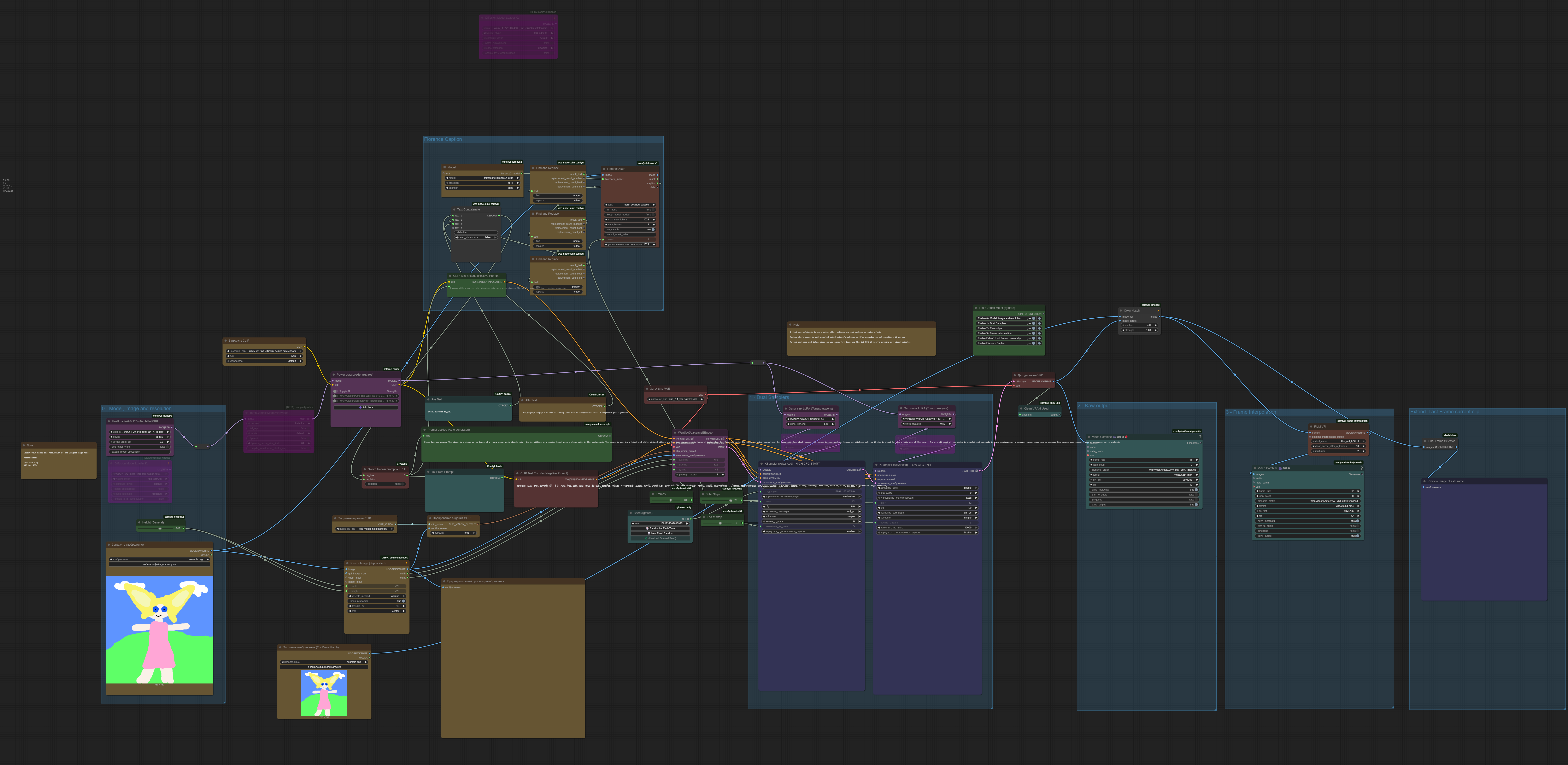
I made this additional changes:
1. Added Florence Caption
2. Color match
3. Last frame so i can continue from that
I'm curious, how do the videos improve with your new workflow configuration?
@CharlieBrown0115 well
1. This just to help creating prompt. I am lazy describe what on picture. I didn't compare results on this one.
2. Videos change brightness idk why, so this one looks on original image and apply original colors
3. This one helps to prolongue video.
Thats how it looks for me. Its messy so no judging =)
https://i.ibb.co/vC55NMbK/workflow.png
This is output
https://civitai.com/images/82327148
@GFrost I noticed video changing brightness and lowered lora strength and that took care of it. It could be coming from one or more of those, in my case a movement lora. Lowering the strength both kept my subject and surroundings consistent with the start image, and I still got the movement. The lora that was only for adding dancing was physically altering my subject as well as the brightness of the scene, oddly.
@GFrost @GFrost can you sahre your worrkflow? please ??
Dudes, my results are in slow motion. I tried put negative prompt and positive prompt like "Fast motion" and "slow motion" - no effect. Shift doesnt give effect. Is anyone have an idea how to resolve this?
Are you doing 420P? Try setting fps to 24?
@delta45424155 Yeah it makes video faster but shorter. What i need is so video has faster animation within 5 sec.
@GFrost okay. so set frames to 24x5. If it can;t handle that; add on a module that saves the last frame and use that frame as your loaded image to render the rest.
I am using kijai's WanVideoWrapper. How can I integrate your 2 sampler into my workflow?
been struggling to find a wan workflow that works for me, this is perfect. 5 minutes with 16gb vram and results are great. thank you <3
Same here. This is banger.
I have no idea how this wizard technology works, but wow are the results amazing. I setup the Total Step as low as 6 and the results are astonishing. My usual setup takes 10 minutes to make one video, with this it takes around 4 minutes.
I have an RTX 5090, and I got better results by configuring the KSampler with dpmpp_2m, the scheduler set to normal, and using the maximum number of steps, which is 20. The higher the number of steps, the more detail the video has. (I'm not sure if it can be increased further?) I set the CFG to 6.
In my tests this causes some slight flashing / color shift halfway through the video. Sometimes it is barely noticeable. Sometimes it is more noticable
add color mtch node and connect it to input image
@GFrost it wont stop color from shifting lol
@TurboCoomer Yeah but with that it is much less noticable.
You literally need 150GiG of GPU Memory to use this workflow, worthless
I use it with 3080 Ti 12Gb + Sage
I'm using it with a 4080 12 GB and it works great.
I use it with a 5070ti with 16gb
i am generating in 3 min in my Asus gaming laptop