






If you like what I do, consider buying me a coffee~ https://ko-fi.com/budace
I also started a Telegram channel where I share random generations that I make: https://t.me/InflaitableWonderland
Model 9.0 Update
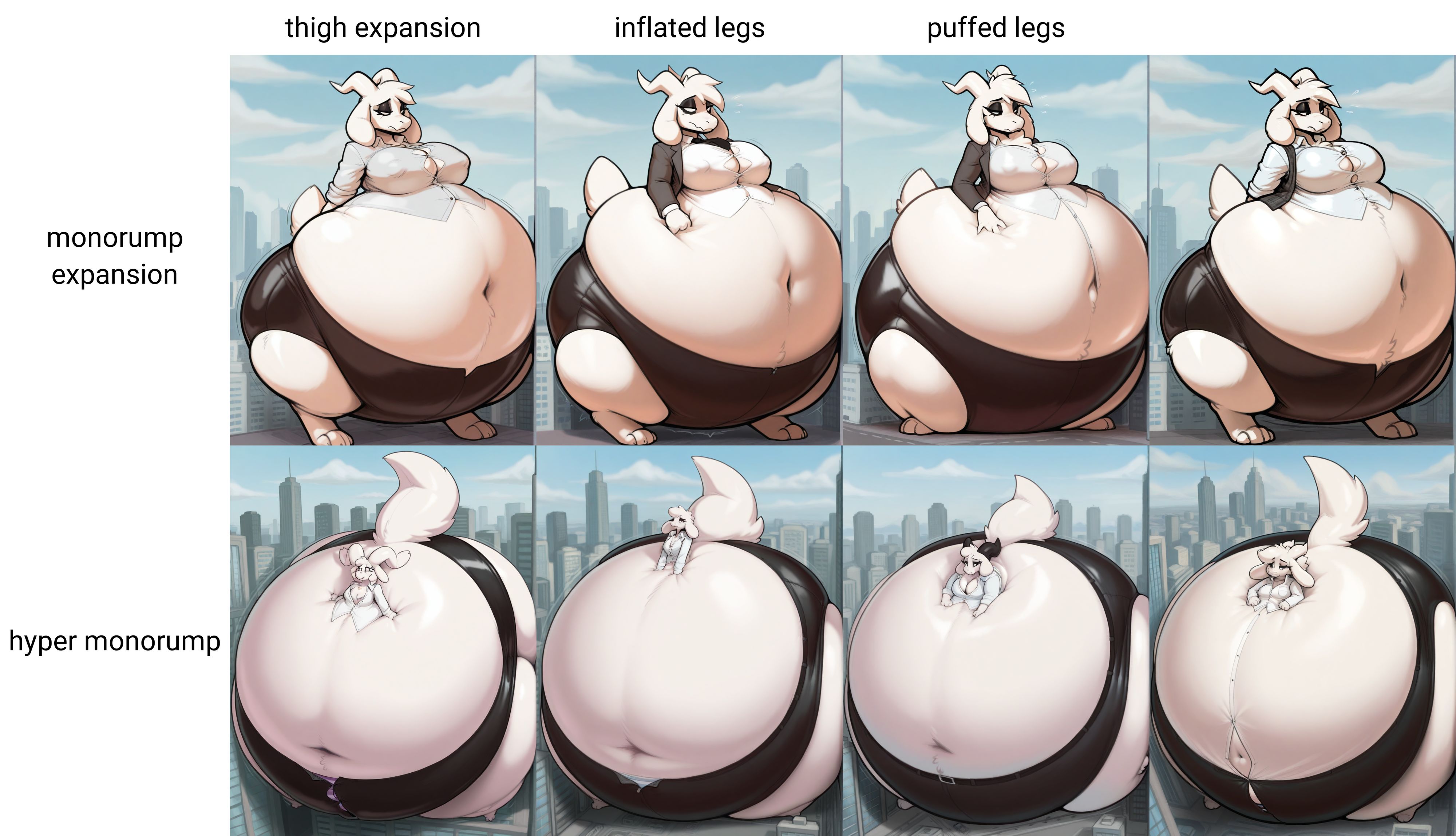
I did some major changes to a lot of the tags because I think for this whole time I have been competing with existing checkpoint knowledge of the more common concepts like breast expansion. I really didn't want to but I changed a lot of the tags with the whole l33t speak thing. The examples grids should show all the new tags but for people who actually read the description I'll list everything here too.
Breasts:
b00bexpansion, hyperb00bs, blimptits, boobwall
Butt:
assexpansion, hyperass, blimpass
Belly:
0verwe1ght, b3llyexpansion, hyperb3lly, blimpb3lly
Thighs:
th1ghexpansion, hyperth1ghs, blimpth1ghs
Hips:
h1ipexpansion, hyperh1ps, blimph1ps
Full Body:
b0dyinflation, sph3ricalinflation
Those are pretty much the only tags that changed. Thinks like monorump and head inflation are still the same because those are already concepts outside checkpoint knowledge. I try to give examples with the rest of the modifiers in the image grids. but if I get enough comments I'll list those down here too.
Model 8.0 Update
I did some pretty heavy editing of the dataset so I consider this a new overall version. I think these are getting much better at preserving checkpoint styles and letting character details come through. It gets a little muddy with the more niche concepts but you can kinda get around that with more detailed prompts.
Core inflation concepts
I tried training in each concept on its own by tagging them as they appear in the training data. I added a little bit of size control with the size tags. You can mix and match any of the different body part concepts but I would not recommend mixing the size tags that come with them.
Inflation concepts:
Breasts
Hips
Thighs
Butt
Belly
Size tags
Expansion
Hyper
Blimp
Each concept above can be mixed and matched any way you like. The only thing to keep in mind is that the blimp sizes don't have a space in the word. This was to prevent the AI from just making images of actual blimps XD. Also the ones for breast and butt are Blimptits and Blimpass because those roll off the tongue better. Also since breasts are the biggest focus for most expansion art, those get a fourth size with Boobwall
Secondary concepts:
Body inflation
Spherical inflation
Head inflation
Monorump expansion
Hyper Monorump
Living Inflatable
Body inflation and spherical inflation are for that full body inflated look. Body inflation is for that puffy look that happens just before the subject fully rounds out. Supplimental tags for these are inflated arms, inflated legs, puffed arms, puffed legs. Inflated and Puffed can be mixed with pretty good effects but they work best together. I used "puffed" for that "donut" limb look but if used the word "donut" the AI would just throw actual donuts all over the image XD. I don't recommend using hip or butt tags with either of these but who knows it might still work. I tried to make this model as customizable as possible.
I split monorump into expansion and hyper because I have images that have very wide range of sizes. The leg tags work really well with those too.
Living Inflatable has quite a few supporting tags as well. Permagrin is one for that painted on smile look. For nozzles and handles I tried to tag separate areas but sometimes the AI still throws extras in. For handles on the hips use hip handle. For nozzles I tagged in a few different areas, navel nozzle, hip nozzle, nipple nozzle, tail nozzle
Finally there's a few other ancillary concepts I tried to tag but they are wildly inconsistent. I tried to tag in different looks for weight and floaty. Heavy, weightless, and buoyant. Each concept responds to those a little differently, but it still needs work.
There's Lip Expansion for some nice thick juicy lips lol
I tagged in a few floating concepts as well. Like floating on its own works well, but there's also floating on back, and floating on front. But those are a little inconsistent still. This model is a never ending work in progress lol.
__________________________________________________________________________________________________
Model 7.0 update
I had to completely rebuild the dataset again. I tried adding tags for clothed and nude to prevent things like nipples showing up on shirts and stuff like that. As always the core concepts are shown in the grid images.
For more info on the core tags and other concepts trained into this model keep reading below~
__________________________________________________________________________________________________
Model 6.0 update
Please expand and read the full description.
This update is kindof a reboot. Overall I think it performs way better but there's still some oddities I need to fix but I've been working on this for a month and I just want to post what I have XD. Like I don't know why it wants to keep putting inflatables in unfinished houses. But anyway, tags remain mostly the same as below.
Monorump and head inflation work much better on Pony here than my SD1.5 models. But Pony still has trouble separating the hyper and blimp tags. Still needs work but I'm pretty happy wit this one.
__________________________________________________________________________________________________
Model 5.0 update
For reference. The way my version naming should read is the number like 05 is the 5th major revision of the dataset itself. The name like Polyfur is the checkpoint I trained this version on. The e010 part is how many epochs I ran training.
Anyway on this model I made a major change in adding monobutt as a tag for a new fun shape. Also other fun tags I tried training in like "torn topwear" and "torn bottomwear" altho it's still a bit inconsistent. Also more expression tags trained in like "looking down at self"
Also got tired of e621 models when I try to specify "three-quarter view" 90% of the time it defaults to a rear view. So I tagged "front three-quarter view" and "rear three-quarter view" so experiment around with those.
I'm still not 100% happy with how this one turned out but I've been playing around with settings and training methods for a month now and I just wanted something to show for it. It still does the basics REALLY well.
Hide
Description
I pruned and changed the dataset enough that I consider this a whole new version. I haven't had much luck training against Noob specifically but this lora does work with Noob checkpoints pretty well.
FAQ
Comments (13)
This is so easy to use with clear keywords, I love it. 10/10, thanks!
I wonder if it's possible to have customizable head size for this lora in the future.
Any suggestions on how to get a 'blimp' size? aka the body is overinflated and huge where hands/feet/hand are small and sunken into the body?
spherical inflation would be the main tag for that. I have tried to train in sunken hands/sunken feet as tags but it's very inconsistent still. It is a priority in the next update.
Take your time~<3 I'm just grateful this model can do monorumps 70% of the time, it just needs the blimp prompt triggers aka huge round body with small sunken arms/legs thats almost hard to see, and it'll be the perfect inflation model~
@budace I would like to know this myself; mostly because in attempting to train the blueberry lora I find the hardest concept for a model to emulate is the proper 'size' feeling. Curious if you'd overcome that with more data since it seems like you used well over 2500 images for this. Did you tag them all yourself or did you autotag and then go back to tag your specific tags?
@LostIdeas Sunken hands/feet tags work much better in version 9.0. I think if you're going for just one thing you could maybe train in a more granular size scale. I haven't done mine because I have over 20 different concepts all in one model and coming up with a scale for each would either make training cumbersome or confuse the training. And yes I tagged each image by hand. I only added body part and size tags, and a few support tags, like expressions or arm/leg shapes on the full body concepts. Next update I do I will see what happens if i combine my own tags with more detailed stuff from an auto tagger. But even with the auto tagger I will need to still prune bad tags from each image.
@budace thank you for the info! I'm surprised at how good the results are if you're just tagging the things you want in the data. So you're saying you didn't tag things like hair color or clothing or anything? I may have to try that. Also, what were your dimensions/alpha ranks? Did you keep them at 32/16 or did you increase it to add more knowledge? Furthermore, can you tell me the learning rate you used? The reason I'm asking such specific questions is that usually it's a bit of a black box; so someone who's gotten such good results makes me want to try similar settings and see if I see any changes in the results.
@LostIdeas A lot of the information is in the file name because I never remember to change that before uploading lol. ND is net dim which I set at 16 and NA is net alpha which I set at 32. Learn rate is default 1e-4, and I train at batch size 2
@budace thanks for the info! Given me a lot to work with here. Guessing this means you didn't use prodigy, since you'd normally set that learning rate to 1 if you did. Again, thanks, this gives me a lot to experiment with.
@LostIdeas I have given Prodigy lots of chances but I have never been a fan of the results at all.
Getting those sunken arms and legs is a bit difficult
Yeah it's new to the model so I didn't have much art to reinforce it. I hope to make it stronger in the next update~
Details
Files
Available On (1 platform)
Same model published on other platforms. May have additional downloads or version variants.