

==========================================
Prompt Suggestion
Movie Still Generation
Positive Prompt:
upperbody/fullbody realistic photo of
Negative Prompt:
anime, cartoon, graphic, text, painting, crayon, graphite, abstract, glitch, deformed, mutated, ugly, disfigured, noise background, worst quality, worst anatomy, distortion, low quality
cfg: 4
sampler: dpm++ 3m sde
steps: 30
Text Generation
Positive Prompt:
blurry foreground with text "{text}" {main subject}
Negative Prompt:
worst quality, worst anatomy, distortion, low quality
cfg: 4
sampler: dpm++ 3m sde
steps: 30
==========================================
20240515 version 3.0
Trained with movie still images, manually picked up aesthetic images.
Improve "Chinese", "Traditional cloth", etc
This version finally achieve the shadow and lighting effect of what I want.
So, version jumped to 3.0
Something got nerf due to this training:
text ability
hands
eyes
Might fix above with new fixing in further version.
20240510 version 2.6
This version is trained on generated images by 2 pass workflow, pixart-sigma2openxl2.5
Mainly improved shadow and light
Maintain the same level of text generation as before
Fixed "borning" standing pose due to version 2.5 training
20240504 version 2.5
Creative photo was added as a stylish tag.
The following version would continue improve this tag.
20240502 version 2.4b
Slightly improve text accurate. Most of time would be improved compare to 2.4a. But a few time the 2.4a still better than 2.4b.
Adjust photorealistic generation.
please read the suggestion of 2.4a for text generation.
2.4c might be a dpo on top of 2.4b.
20240428 version 2.4a
Focus on text generation, suggested prompt for text generation:
Positive Prompt:
blurry foreground with text "{text}" {main subject}
Negative Prompt:
worst quality, worst anatomy, distortion
cfg: 3.5
sampler: dpm++ 3m sde
using align your steps: 10
not using align your steps: 30
Reminder: version 2.4a is alpha of openxl2.4. It might have many version based on 2.4.
20240425 version 2.3e
Improve shadow and light
Improve face detail
20240423 version 2.3c
restore clip to version 2.2 which perform better
20240422 version 2.3
Trained with PAG generated images from version 2.2
Improve structure, anatomy, skin color etc
Might slightly impact the text generation.
20240417 version 2.2
mainly improve fingers
slightly improve shadow
20240415 version 2.1
Adjusted skin and shadow
slightly improved anatomy
20240412 version 2.0
Fully retrained from sdxl base, multi round training
dataset:
a few anime images, fashion images, filtered pickscore dataset, 4k video captures, cosplay photo, nvidia inthewild dataset, etc
Trigger words:
anime artwork, fashion photo, cosplay photo, raw photo, cotton doll, woman, man, etc
To achieve realistic images, please use raw photo of at the beginning and don't use something like unity, cg, etc
To achieve cute image, might try to add cotton doll to get a shape of cotton doll
To generate woman, please use woman rather than 1girl. It would usually generate a girl when using 1girl.
Merged list:
sdxl dpo lora
openxlv1.4
--kohaku alpha and beta
No animagine v3 and pony diffusion in merge
Please beware, chinese woman, chinese traditional cloth, something related to chinese race extended weird sdxl chinese biases. It would be improved in further version. But now, please don't use this tag to generate realistic image.
20240323 version 2.0 beta
20231229 Version 1.4 Human Preference Improvement
Finally, before 2024 version 1.4 is made.
Trained with pickapicv2 dataset with 4000 filtered dataset.
Aims to improvement the aesthetic, realistic, pupil, shadow and light, composition etc.
It is a overall improvement compared to old version.
If any want to use turbo version, I suggest use the turbo lora or lcm lora with is more efficent than I merge with the lora or model.
Appreciate comment or image post. Thank you.
20231201 Version 1.3 Turbo Merge And Female Faces Adjustment
Merge with SDXL Turbo to provide quality output with 10 steps fast generation.
Adjust female face details such as shadow, lips, contour, etc
Openxl v1.3 turbo suggested generation config:
Steps: 10
Cfg: 1~5 suggested 2
Sampler: dpmpp_3m_sde
Scheduler: sgm_uniform
Full version output would be slightly different than the turbo.
It is suggested to use turbo version as a fast generation and full version for the quality.
20231128 Version 1.2 Realistic Shadow and Eyes Generation Improved Version
Mainly adjusted the realistic shadow and improved realistic eyes generation. Reduce the affect of mixing anime model.
20231127 Version 1.1 Hands and Anime Improved Version
Version 1.1 is the first version merged with anime model aims to improved anime style.
All merged checkpoints would be added at end of description.
Aside of anime model, another big improvement is the hands generation.
It trained with a few of hands dataset using llm for captioning.
Carefully fine tune and tested with various checkpoint and
Merged with a lora using LECO tech from their recent paper.
Test result:
70% exactly 5 fingers in 100 generation of waving hands test.
Test prompts:
Positive:
good hands, photograph of a beautiful woman waving hands for her boyfriend
Negative:
pool drawing hands, unfinished drawing hands, sketch, abstraction, anime
Road map:
Finished:
Hands Generation v1.1
Anime Style v1.1
Realistic Shadow v1.2
Eyes Generation v1.2
SDXL Turbo Merge v1.3
Female Face Adjustment v1.3
Further Development:
Faces
Pose
Expression
Age group
Specific Anime Character
Cosplay Costume
Artstyle
===========================================================
Training Method:
The newest update has used various training method, including:
Quality training from Meta emu
Descriptive caption from Openai Dalle3
Direct fine tune
etc
The training dataset didn't include any image from nijijourney. I don't like the niji style much.
This checkpoint aims to as an improved version of SDXL which could provide various style.
User Instruction:
Aspect Ratio:
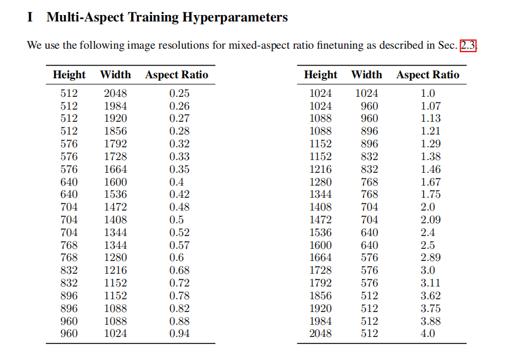
SDXL standard aspect ratio, please avoid to use 512*512, 512*768 those SD1.5 width height to generate images.
Prompt Style:
[Style word] [description] [supporting word]
It is recommanded to use above format to generate image in certain style.
Because SDXL is capable to generate in various style, it should state the style before your subject to control the image style.
If it is not enough to generate certain style, please use neg prompt to state the style you don't want.
For example:
Pos:
photo of an anime pikachu playing basketball in a realistic wordon, a closed laptop on a desk, detailed background
Neg:
white background, 3d render
It is not suggested to use a huge combination of negative prompt which used in SD1.5.
You might want to try with or without the negative prompt to see the different.
Classifier Free Guidance (CFG):
It is recommended to use 2.5~5.5 cfg.
Sampler:
It is recommanded 3m sde gpu.
Scheduler:
It is recommanded karras.
Steps:
25~40
Just try it for various prompts and please share the image🖼️ and feedback📓 if you like it.
Thank you❤️.
Contact Method:
Wechat:
fkdeai
===========================================================
Merge List:
20231127 version 1.1
Kohaku-XL beta 6.9
https://civarchive.com/models/162577?modelVersionId=203416
Kohaku-XL alpha nyan
https://civarchive.com/models/136389/kohaku-xl-alpha
SDXL Cross Style Hand Fixing Lora
https://civarchive.com/models/211577/sdxl-cross-style-hand-fixing-lora?modelVersionId=238349
Description
FAQ
Comments (21)
I like the turbo
更新的好快,赞
Interesting take. So 1.3 have the previous "features" of the 1.2 and 1.1? Or we need 1.2 and 1.1 for specific tasks?
1.3 inherited from 1.2 and 1.1. In current state, 1.1 might be better on anime but 1.3 is generally better than pervious.
1.3 > 1.3 turbo > 1.2 > 1.1 on quality.
Thanks a lot for the answer!
I have concerns about the latest version with "improvements to female faces". Have you tested this version with character loras? Likeness is important for me so I need checkpoints and other loras to be friendly with each other.
@lucidzachary473 The latest version is 2.0 beta which is less burned face in the model but it is a beta version. I have tested with my own face lora and it worked well. If you want more likeness you might do a second pass with image2image from the first generation.
A big compliment to you! The model is really fast and delivers high quality results. Even on a 1060 6GB, an image is generated in less than a minute. 🔥
thanks
...THAT IS NOT TURBO VERSION.
That is LCM version alike.
Turbo version should works with 1 STEP ( from 1 - to 4 exactly )
It is merged with turbo not lcm.
@xiaozhijason so is not working as turbo sdxl .... what is meaning calling this one like that? Steps is far more similar to LCM. ;)
@xiaozhijason The worst is people have false assumptions seeing name TURBO as is NOT model using technique ADD which was used under SDXL TURDO model....where 1 step is ok.
It sounds like false advertisement... I do not like it at all.
@mirek190 I stated that it is Turbo Merge Version. I think it is clear enough. If you want to go with 2 steps generation. You might try to use the full version with turbo lora which could provide 2~4 steps generation.
@xiaozhijason You know TURBO model is using something similar to GANN?
Even 1 step is enough and generation takes 0.1 second.
I tested TURBO model even on CPU where I got picture in a second .. on CPU!
Do you think that modes is so fast and precise like a real TURBO model?
Those models not based on ADD should be called differently .
@mirek190 it's not a fully trained checkpoint as OP stated so you can't expect it to fully act as the Turbo base model. Merged models tend to be slightly less time efficient than the base. But at least this merge works as fast as any of the other merged turbo model. So, it does passes as a Turbo Model Checkpoint.
@ElCuajero yes should be called turbo_merged and still leave "turbo" name for real turbo models ;)
@mirek190 it always said that it was a merged checkpoint. I don't get what your fuss is all about.
@ElCuajero sorry - you added turbo merged. SO IS OK.
I made some grids of all currently uploaded turbo models. all but the base model and jib's need atleast 3 steps for a decent image, and anything over config 2 tends to be either very cartoony or blurry/other artifacts. also almost no difference between 1 step and 2 steps.
(step check 1-4, cfg1)https://civitai.com/posts/929205
(cfg check, 4steps)https://civitai.com/posts/929178
(same model order as pervious grids, cfg 1 steps 3) https://civitai.com/posts/929237