mmaudio will slow down cuda usage on the consequent generations.. i already git pulled the custom node... nodiff
1.3 is now 1.3.1, i removed GIMMVIF and swapped the sharpen node for another one since those were causing issues with ram
Consider this workflow as a control panel, if you don't like the design, just don't download. Here a screenshot:
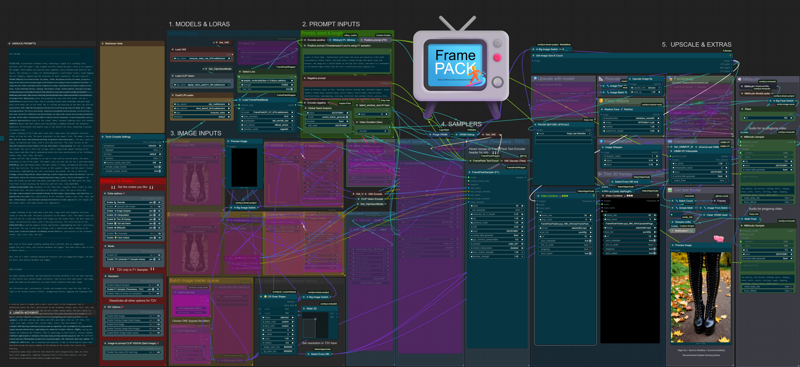
v1.3.1
Updated resize image node
Added batch loader for start image input
Added Video To Extras Option
Added isolated face refiner step
Added MMaudio section (it will load the model to vram)
Added visual resolution/aspect ratio selector for T2V
Changed frame trimming nodes
Removed GIMMVIF interpolationf for film_net_fp32
Sharpen image swaped for sharpen MTB
v1.2.1
added GIMMVIF interpolationn (ds_factor (downscaling) at 0.25 can increase interpolation speed buy with a slightly quality trade-off)
added wildcard process node
Added v1.2
cleaned prompt inputs and model loaders,
added CLIP VISION for helping image details in positive prompt (download)
added vram purge management nodes,
also made external common inputs for length and latent_window_size
Used kijai's workflow, customized and added
upscaler with model and rescaler
interpolation with sharpening
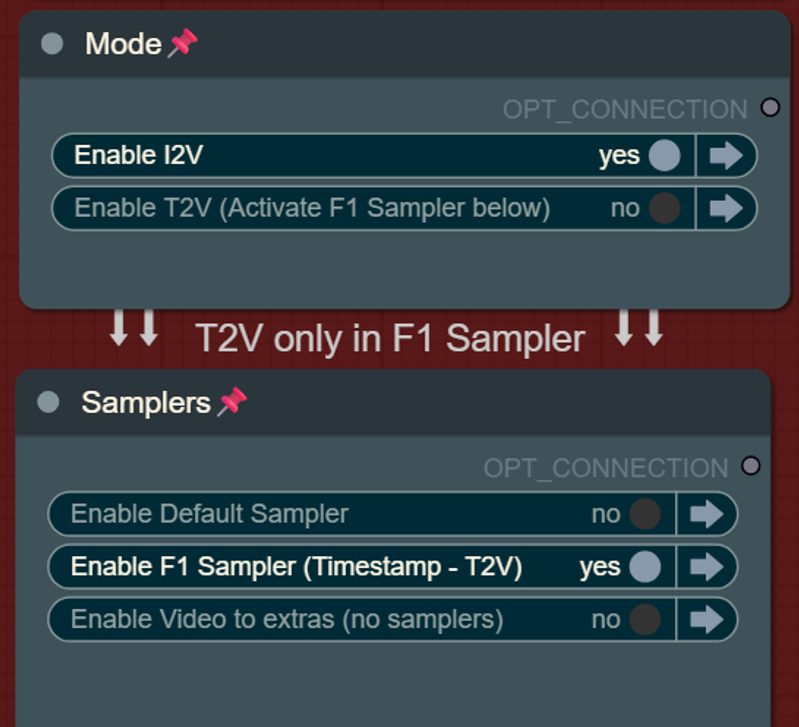
switch from samplers (default or F1)
switch for mode (i2v or t2v)
remove 5 frames (from the start for the non pingpong VHS, and from the start and from the end in the pingponged VSH) this is default at 40 frames for t2v
Reactor nodes for face swap/refine but those will slow down subsequent generations due to some kind of bug, feel free to delete reactor nodes if you feel like it...
Text to video mode with F1 Sampler:
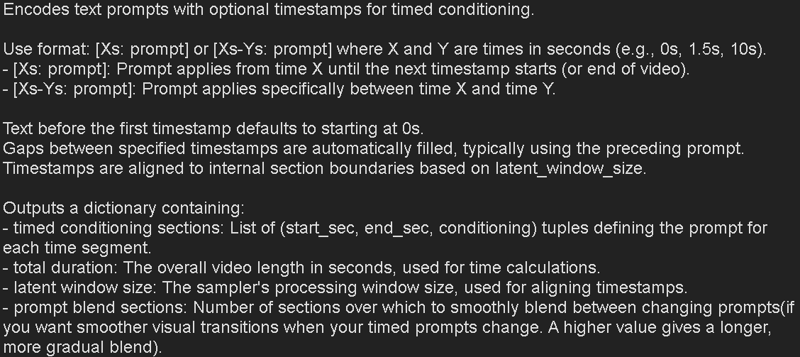
Hover the FramePack Text Encode (Timestamped) (prompt for F1) for seeing more info about the timestamped patterns for prompts:
* Please let me know if im missing any other custom nodes links so i can add them
Also, theres a bug with current wrappers, if you incrase CFG avobe 1 (default) inference time will by x2 slower.. the only way to fix the workflow, even restarting comfy, is to add a fresh sampler and move the connections.. sad but it is what it is..
Nodes:
Latest Kijai Wrapper version: https://github.com/kijai/ComfyUI-FramePackWrapper.git
F1 Sampler https://github.com/kijai/ComfyUI-FramePackWrapper/pull/14/files
You can also use:
https://github.com/ShmuelRonen/ComfyUI-FramePackWrapper_Plus
GIMMVF:
[https://github.com/kijai/ComfyUI-GIMM-VFI] (model with self download)
Model links:
https://huggingface.co/Kijai/HunyuanVideo_comfy/blob/main/FramePackI2V_HY_fp8_e4m3fn.safetensors
https://huggingface.co/Kijai/HunyuanVideo_comfy/blob/main/FramePackI2V_HY_bf16.safetensors
sigclip:
https://huggingface.co/Comfy-Org/sigclip_vision_384/tree/main
text encoder and VAE:
https://huggingface.co/Comfy-Org/HunyuanVideo_repackaged/tree/main/split_files
----
Description
FAQ
Comments (13)
Thank you for your work, I’ll join the testing and help with identifying issues!
It looks quite interesting, but I have a few questions.
I didn’t quite understand how t2v works — why does the video always start with a white frame when using t2v mode?
Also, I don’t quite get the difference between forward and backward. I might sound a bit silly, but I really appreciate the explanation.
you can change the color with the hex (#000000 for black 4example), but yeah, atm with that F1 sampler, bypassing the inputs will do the same, start from a gray color, but this way i managed to create the one click switcher, the only difference is that with this gray shape you can set resolution for t2v but you will have 40 frames of the colored shape (thats why i added the 40 frames trim for the t2v), while bypassing the imputs will give you only 5 frames of gray background but the resolution is locked at 512 if i remember... lets hope kijai merges the F1sampler and gets resolution inputs on the sampler itself, i saw a pull request in guthub but i dont remember witch one was.. xD
also for the F1 sampler is the only one that can create t2v, also theres a f1 bf16 model but ppl found out the regular bf16 model works even better in some cases... the only difference is that the batches are processed from starting to finish, while the defaul sampler runs backwards, so it starts creating the latest frames
Got it — thank you so much for your response and all the work you've done, everything's really working great.
I also have two questions for you, and I’d really appreciate it if you find the time to answer.
When I try generating something that takes more than 5 seconds at the upscale stage, I keep getting a killed message. Do you have any ideas what might be causing this? I'm attaching the logs and my setup:
Total VRAM: 24090 MB
Total RAM: 64188 MB
PyTorch version: 2.7.0+cu128
Set VRAM state to: NORMAL_VRAM
Device: cuda:0 NVIDIA GeForce RTX 4090 : cudaMallocAsync
Using PyTorch attention
Python version: 3.11.11 (main, Dec 11 2024, 16:28:39) [GCC 11.2.0]
Here the log:
Requested to load HunyuanVideoClipModel_
loaded completely 18108.7375 14550.85205078125 True
Received - Total Duration: 6.6000000000000005s, Window Size: 20, Blend Sections: 1
Total latent sections calculated: 3 (Duration: 6.6000000000000005s, Section time: 2.567s)
Latent dimensions: B=1, C=16, T=1, H=68, W=88
model_type FLOW
Moving DynamicSwap_HunyuanVideoTransformer3DModel to cuda:0 with preserved memory: 5.7 GB
Sampling Section 1/3, latent_padding: 1
Current time position: 0.000s
Selected active prompt index: 0
Blending prompts: Section Index 0, Blend Alpha: 1.000
Warning: Not enough history frames (1) for clean latents (needed 19). Padding with zeros.
100%|██████████████████████████████████████████████████████████████████████████████████████████████████████████████████████████| 30/30 [03:32<00:00, 7.10s/it]
Sampling Section 2/3, latent_padding: 1
Current time position: 2.567s
Selected active prompt index: 1
Blending prompts: Section Index 1, Blend Alpha: 1.000
100%|██████████████████████████████████████████████████████████████████████████████████████████████████████████████████████████| 30/30 [03:33<00:00, 7.11s/it]
Sampling Section 3/3, latent_padding: 0
Current time position: 5.133s
Selected active prompt index: 2
100%|██████████████████████████████████████████████████████████████████████████████████████████████████████████████████████████| 30/30 [05:16<00:00, 10.54s/it]
Final latent frames: 61 (Expected based on generation: 61)
Requested to load AutoencoderKL
0 models unloaded.
loaded partially 128.0 127.99981689453125 0
Killed
Second question — do you use the prompt blend section in the frame pack text encode node?
@micha112 you might be missing AutoencoderKL? ask deepseek about it
@micha112 if you hover the mouse over the prompt node header, you will see a little explanation of what those settings do, I added a screenshot on the workflow description
"I didn’t quite understand how t2v works — why does the video always start with a white frame when using t2v mode?"
follow the path out of the white box called "preview image"
you can remove the start_latent connection coming from vae encode (called latent).. to the framepack sampler.
that will remove it.
***edit**
actually found a better way.
unpin vae encode that connects to "get image size and count" and move it to the select image group on the left. it throws an error about the connection (Failed to validate prompt for output 256:) but it removes the white frame when in txt2img and then works as expected in img2vid.
doing that was the only way i found to be able to input the t2v size.. when kijai updates the nodes i will remove probably
@K3NK ah that enplanes it. bypassing vae encode locks it to 512x512. hopefully they add a way to do that without a start image.
Cluttered unintuitive condensation with locked nodes that further complicate understanding, and debugging.
You have unlimited space, you can just show how it flows.
yeah, i guess you can see that on the image.. thanks for the constructive comment, this is how i like workflows, not like you wasnt able to see the actual workflow in the image it before download... -.-"
All nodes are unlocked now, you should see my workflow as a "control panel".... You want Adobe Premiere UI to be "flowing" as well?
I know locked nodes mixed with no locked nodes can be a nightmare if you want to start move around stuff.
I primarily uploaded this workflow so I can link my uploads instead of using someone else workflow page..
Don't listen to these entitled shits whose 'feedback' somehow always seems to read the same - "I'm an ungrateful twat. I don't like something, therefore you did it wrong."
Thank you for freely sharing your work. And for what it's worth, I far prefer workflows that show everything upfront, visual "clutter" or not. I can't fathom how that would harm debugging efforts - it's always the visually streamlined, "simplified" workflows that I spend the most time digging around, expanding nodes and chasing shit down on. You also clearly show what you are offering in the description, what more do people want. Anyway, gripe over, thank you again for sharing.