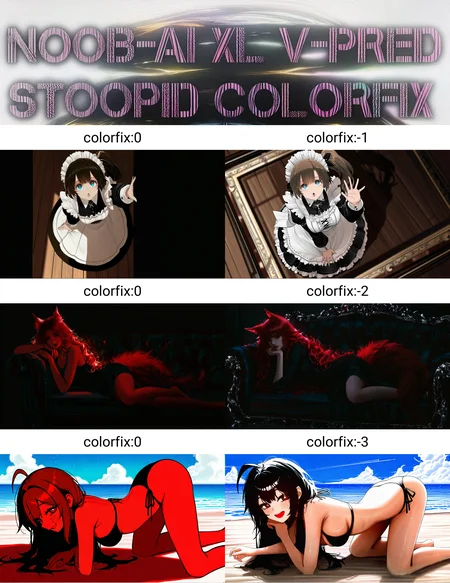
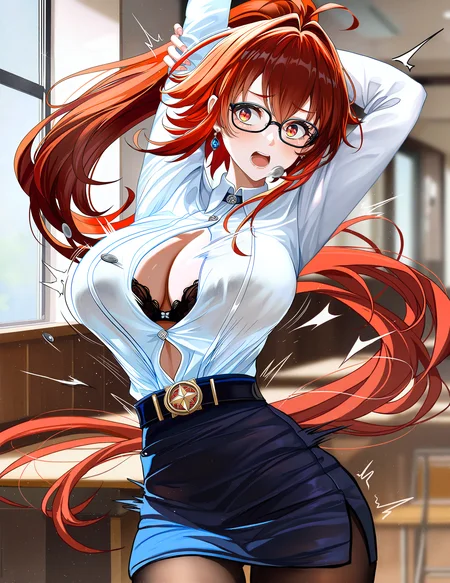

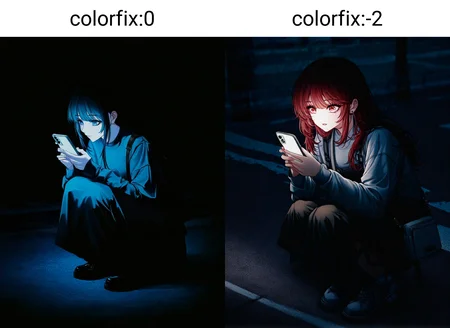

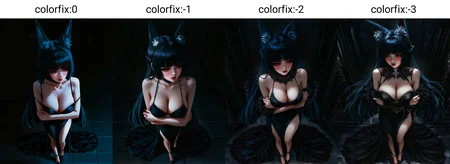


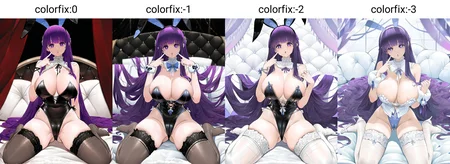


This lora embraces Noob v-pred oversaturation and cranks it to 11.
Use it with negative weight to cancel oversaturation.
No more red skins, black half of the image etc. Yay!
Version 2 is slightly less stoopid. It is trained as slider using images generated by v1. I specifically picked them it to cancel odd blues and hues. It seriously desaturates image, using it together with v1 leads to aesthetically better results. As v1 use with negative weight.
Also added a v-pred contrast slider because this was not really working well enough for me.
Since I had to use all 3 loras to fix base v-pred models now it is a toolset I guess.
Once again, it does not tweak saturation or adjust colors, it goes straight to the blank screen at positive. Yet if you find a way to use it as style it would be really cool.
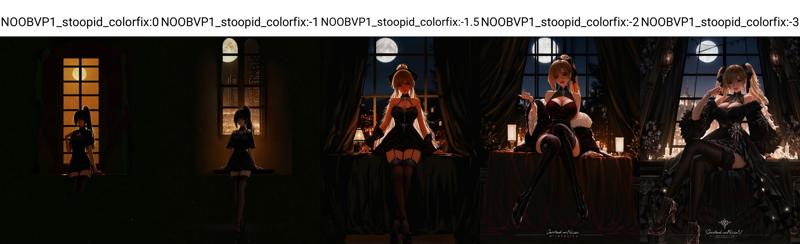 Noob v-pred is unfortunately known for saturation issues. I also noticed that even if not completely frying the image it still affects a lot of artist tags and destroys backgrounds. There are ways around it, but I've always added at least one style lora at low weight to get rid of those weird skin tones. But then I tried some @VelvetS loras and they gave me monstrocities or full on furries for no apparent reason 🤣 Turns out fried skin was picked as scales, fur etc. And this model know where to end that.
For over a month I was thinking in the back of my head: "Try this. Yes, it is stupid, but why not. Just do it." And I tried. And it worked.
And if it is stupid but it works... Let it be stoopid then.
Tips on usage:
Oversaturation is not distributed equally across model, so there is no single good weight. It is affected by color tags and even length of negative prompt. -1 is generally safe across the board, but on some severe cases I had to go for -6. Check comparisons to get a gist of it.
Simple prompts still tend to fall into same pattern blue theme > red theme > white theme etc. Prompt more, add various colors to the prompt. This innate feature of this model, no need to battle it.
Add sketch, monochrome, partially colored, to negative.
Last but not least.
Due to the way it works, at negative value this lora negates uniformal colored patches, effectively adding details. Completely random details. Consider massive duplications etc. To battle this use my Detailer lora. It stabilizes details greatly and is full on v-pred. Or use some other stabiliser you like, I never tested them since my detailer does that anyways and does not alter style in the process.
Description
Base version. Use with negative weight.
FAQ
Comments (14)
That's an interesting approach! I've struggled with overfitting myself. Using this LoRA with a negative weight seems to help mitigate it. I really admire your spirit of experimentation.
I don't quite understand, I've always used step 28-35, CFG 2-5, rescale cfg 0.5, and euler and dpm2pp series samplers work very well, I've never seen such reddish images as in the example images. Is this LoRA specifically for DDPM samplers?
Good for you I guess. I have reasons to not use such configuration. If you are ok with absent background and details then ok. But can you please try it with your config and report results? In one dark image that you shared I clearly see reddish skin.
@Volnovik I did some comparisons using the rgthree Image Comparer node. The settings that remained constant were long prompt, 0.5 rescale cfg, 4.5 cfg, 28 step for euler and ddpm, 35 step for dpmpp 2m and 50 step for ddpm.
For the Euler series, this LoRA changes the image, but it's hard to find any pattern. It seems to just change the image, and hard to say whether it's better or worse.
For DDPM and DPM++ 2M, the changes brought by this LoRA have a consistent pattern. I don't know how to summarize it. The changes in different colors are different, but overall it seems more...natural?
About twenty pairs of gens were tested for each sampler.
I also tested working with the my style LoKr, and the conclusion is same.
@Vecthral in it's core it should make model avoid base colors and main combinations + reduce patterns of constant color. Guess that's where "natural" thing comes from. Btw do you use detail daemon?
@Volnovik Just now there wasn't, but I quickly tried again with the detail daemon, and I believe the conclusion remains unchanged.
also, I suddenly realized that the effect of this LoRA is somewhat similar to increasing rescale cfg. I did a simple test comparing this LoRA vs rescale cfg 0.5->0.7, and I prefer the effect of this LoRA.
The training data is only flat color images? I am laughing so much, a simple solution for a complex problem.
It turned out to be way more then I expected
not joke, same in e-pred, although don't very obvious. NoobAI is very sensitive to colors at early sampling timesteps, often cause overshot. Seems noise offset. I can only train it with low saturation images. Otherwise the model feels a little bit burn.
The British Army have a saying; "If it's a stupid idea and it works, it ain't stupid."
During WWII in the North African campaign in the desert, a British soldier found a way to 'propel' a crate of handgrenades further than the enemy could throw theirs by having his mate pull the pin on one and toss it to him while he used a CRICKET BAT to 'propel' them toward the enemy. As a result, several LongRangeDesertGroup trucks carried a cricket bat, tucked away somewhere.
That man may or may not have been my great-uncle. Just sayin'
@Davros666 yup, that's why it is stoopid, not stupid😅
@Volnovik Indeed. Thank You.
"To battle this use my Detailer lora. It stabilizes details greatly and is full on v-pred"
Do you mean apply the detailer at negative to act as a simplifier and reduce details? And do you recommend V1, V0.5, or does it matter?
No, it reduces amount of slop by making small details look not like random stuff, but actual details that belong there. Also it helps "hold together" complex scenes. Use v1 at weight 1 for that.
But that's a cool idea, I'll try it later, wonder what happens 🤔
Details
Files
Available On (2 platforms)
Same model published on other platforms. May have additional downloads or version variants.