Note: Original GitHub here. This tool was created by lllyasviel
Note: If you're having problems with the motion in the outputs, try running your image through this GPT to get a great prompt, specifically written for FramePack.
This is probably the easiest way to get started with local video gen! It's a standalone app with a super simple interface, and it runs (slowly) on potato GPUs;
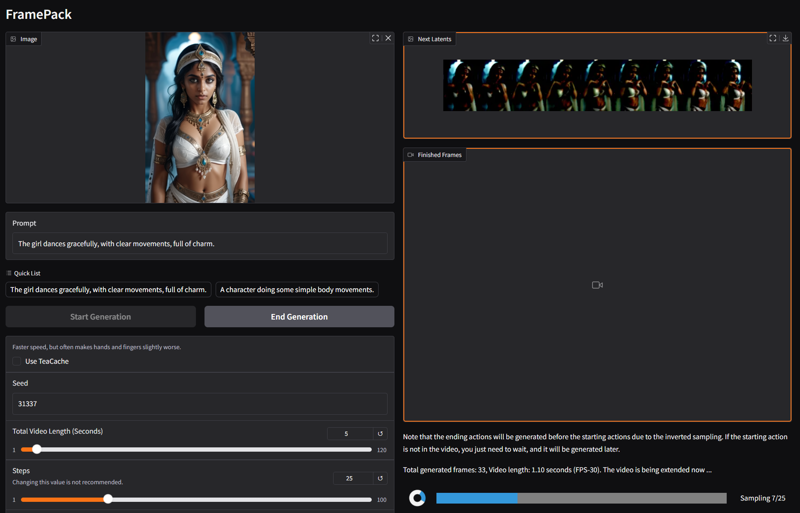
FramePack
Official implementation and desktop software for "Packing Input Frame Context in Next-Frame Prediction Models for Video Generation".
Links: Paper, Project Page
FramePack is a next-frame (next-frame-section) prediction neural network structure that generates videos progressively.
FramePack compresses input contexts to a constant length so that the generation workload is invariant to video length.
FramePack can process a very large number of frames with 13B models even on laptop GPUs.
FramePack can be trained with a much larger batch size, similar to the batch size for image diffusion training.
Video diffusion, but feels like image diffusion.
Requirements
Start with this repo before you try anything else!
Requirements:
Nvidia GPU in RTX 30XX, 40XX, 50XX series that supports fp16 and bf16. The GTX 10XX/20XX are not tested.
Linux or Windows operating system.
At least 6GB GPU memory.
To generate 1-minute video (60 seconds) at 30fps (1800 frames) using 13B model, the minimal required GPU memory is 6GB. (Yes 6 GB, not a typo. Laptop GPUs are okay.)
About speed, on my RTX 4090 desktop it generates at a speed of 2.5 seconds/frame (unoptimized) or 1.5 seconds/frame (teacache). On my laptops like 3070ti laptop or 3060 laptop, it is about 4x to 8x slower.
Installation
After you download, you uncompress, use update.bat to update, and use run.bat to run.
Note that running update.bat is important, otherwise you may be using a previous version with potential bugs unfixed.
To start the GUI, run:
python demo_gradio.pyPrompting Guide
Many people would ask how to write better prompts.
Below is a ChatGPT template that I personally often use to get prompts:
You are an assistant that writes short, motion-focused prompts for animating images.

When the user sends an image, respond with a single, concise prompt describing visual motion (such as human activity, moving objects, or camera movements). Focus only on how the scene could come alive and become dynamic using brief phrases.

Larger and more dynamic motions (like dancing, jumping, running, etc.) are preferred over smaller or more subtle ones (like standing still, sitting, etc.).

Describe subject, then motion, then other things. For example: "The girl dances gracefully, with clear movements, full of charm."

If there is something that can dance (like a man, girl, robot, etc.), then prefer to describe it as dancing.

Stay in a loop: one image in, one motion prompt out. Do not explain, ask questions, or generate multiple options.
You paste the instruct to ChatGPT and then feed it an image to get a prompt.
Description
FAQ
Comments (29)
Thanks @theally!
we love theally in this household
I grabbed this the moment it was wrapped. what a great tool. It even runs well on my 3080 gpu 10g vram
it runs on my potato PC :D
My first thought was that this upload is pointless, because the user will end up with updating the package using the
git pull && python -m pip install -r requirements.txt
But then another though popped up from my memory.
Iliya Svel is usually slow on updates (Omost tool looks abandoned). So, FramePack probably won't be updated soon.
after install you can update framepack from inside its folder by running the update.bat
Can it be adopted as an on-site generator pleaase?
[LEELOO HELP JPG]
Hey, it just uses Hunyuan behind the scenes, basically, which is available on-site.
@theally FramePack is Image to Image. Here we have Image to Image on Wan which shows bad results.
FramePack should be cheaper in Image 2 Image because of VRAM consumption reduction and much higher quality.
FramePack is not just a Hunyuan. It is Hunyuan + memory optimization.
@homoludens Yes and no. Yes, you're right it has additional optimizations, and that it's image2video. But it would be impractical for on-site use. On my 4090, it still takes 2.5 seconds per frame, it's horrendously slow, and the cost is based on the GPU time, not how little memory it consumes.
@theally I thought the cloud cost calculation involves the VRAM (8-12GB GPUs costs lower).
If GPU time has greater impact on the price, then I agree. FramePack is indeed slow.
@theally Funny thing... There are generative neural nets which was developed a priori for Enterprise Scale infrastructures (like Flux Pro) which are impossible to use at home.
Now we have a generative model which only possible to use with "Home-grade calculators".
@homoludens Potato PC's Revenge :P
Is it possible to get locally run LLMs to look at images and generate prompts?
Sure, you should check out this guide - https://education.civitai.com/civitais-quickstart-guide-to-large-language-models/
It doesn't specifically mention prompt generation help, based on images, but that wouldn't be too difficult to set up. I'll have to look into offline options!
@theally so far RTXChat and Deepseek (LM Studio) can't view an image file on my computer and do anything with it. But, there is an interrogator extension for A111 that describes images - it seems like it must be possible
ChatGPT can do this, and is actually really good. You can recreate the prompt suggested here in the guide to ask ChatGPT to specialize in analyzing and reverse engineering images into a prompt for you, or even ask it to analyze an image and create completely new image prompts that will align with certain parameters or aspects (composition, depth, resolution and art style etc). This is a great way to add more concepts and styles to your prompt library, and you can even ask it to convert natural language prompts to danbooru tags if your checkpoint/model handles those better.
@Retsubu for a few images I tried, it said it couldn't help me with that. One was pretty spicy but the others were really not, so I'm interested in what to do if that happens.
@fluornoy well openai wont help with anything nsfw or explicit, but if its posing or stylistic things you want help with, give it a non spicy photo that is close, then remove whatever you want to make it nsfw. my advice is its better to use for things like intricate outfits, backgrounds, facial expressions etc, if you want ideas for nsfw posing or prompts in general, danbooru is a much better place to find those. Unless you can get a locally housed LLM that has no restrictions and can receive images, which i havent used before. Alternatively, Grok3.0 is a bit more lenient, but still wont help with anything outright explicit or pornographic.
You misspelled lllyasviel in the title and description, just so you know (it might prevent people from finding this when searching).
The most stable program! Have you thought about improving it further?
i had to double my RAM, but works like a treat!
how much ram you had?
Is this a one click install download?
hello, I love thank you for your sharing, I have a question what the PC's config is or what graphics card you're using because I'd like to install FramePack thank you in advance
Just loaded this a few hours ago. Had a hiccup on the first run. It went to the last second and than it errored out. It may have been due to me checking the run window being impatient. Second run it ran flawless. Ive got to say the quality and ease is impressive. I can not wait to see where this goes. Thank you for this
Is it possible to use Loras with this?