


















This workflow is now discontinued as I will focus on other AI models.
I made a new worklow for HiDream, and with this one I am getting incredible results. Even better than with Flux!
It's a txt2img workflow, with hires-fix, detail-daemon and Ultimate SD-Upscaler.

HiDream is very demanding, so you may need a very good GPU to run this workflow. I am testing it on an L40s (on MimicPC), as it would never run on my 16Gb VRAM card.
Also, it takes quite a bit to generate a single image (mostly because the upscaler), but the details are incredible and the images are much more realistic than Flux (no plastic skin, no flux-chin).
For v.1.0: You can also use GGUF model files, just replace the "Load Diffusion Model" node at the beginning of the WF with the "Unet Loader (GGUF)" node. See below:
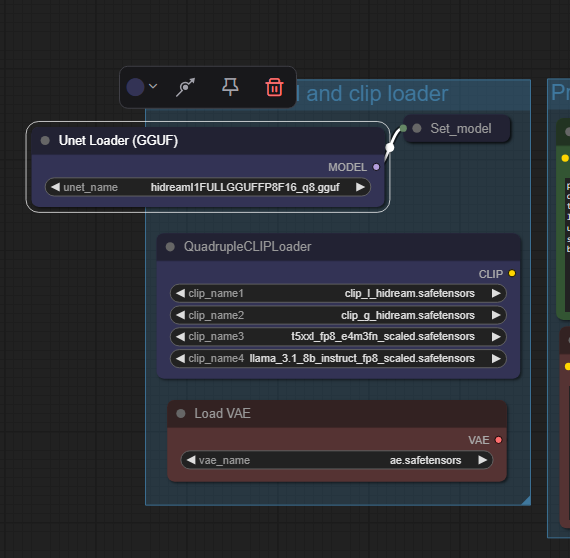 In v.1.1 the two model-loader are both available, you can choose which one to use just selecting the standard model or the GGUF one in the "Model switch" node.
On my RTX 4070 Ti Super with 16Gb Vram I can run the workflow with the Q8 GGUF model file. Results are excellent!
HiDream E1 (image editing module) - for version 1.1
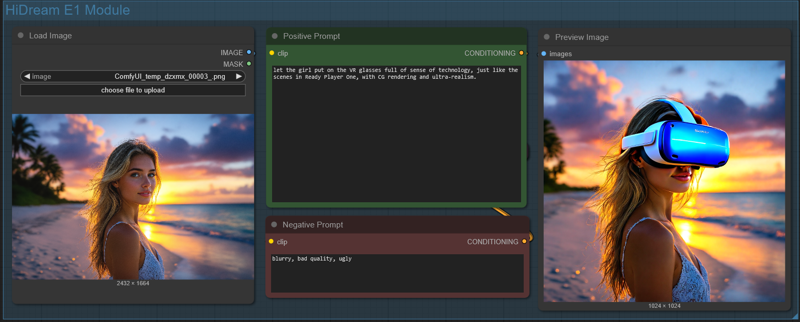 Just load an image and write what you would like to change in the positive prompt (you can also add a negative prompt). Due to model limitation, the image will always be resized and cropped to a 768x768 image (larger images will show a terrible lateral shift) and then resized to 1024x1024. It can't run in the Ultimate SD Upscaler, since the HiDream E1 model would overcook the image during upscale (so do not activate the Upscale Module!).
Results, for photo-realistic images are not that good, so do not expect any incredible output. But still, by using the right settings, you can achieve decent results.
 ==========================================================
⚡️ Buzz for the Best Images ⚡️
Every weekend, I will reward some Buzz to the best image added to the Workflow's gallery!
Description
This is a big update to my HiDream workflow. The new modules of this version are:
Img2img module
Inpaint module
Improved HiRes-Fix module
FaceDetailer module
An Overlay module that will add generation settings used over the image
FAQ
Comments (23)
Where would one add loras to the workflow? Thanks in advance!
I was planning to add a lora-loader node in this version, but there are so few loras yet... so I decided to wait. It should go right after the "Model switch" node, before the set_model node in theory.
Anyone else have SimpleMathFloat+ missing? I had to install LanPaint manually but I can't find this other one.
For anyone reading this in the future, you have switch comfyui_essentials to the nightly version, restart comfyui, refresh your browser, stand up and twirl around 3x, and then it'll work.
@ggkthx That's really annoying. It doesn't use proper versioning, so the nightly build is tagged the same as the last stable build.
LanPaint sometimes appears on the ComfyUI Manager list, sometimes It does not, so you need to install It using GitHub link in ComfyUI manager. This Is what I experienced in the many ComfyUI installation I did locally and on Runpod, while testing the workflow. About the simplemathfloat errore I Will check It out, I never got it during my testing.
@ggkthx Thanks. I am afraid that Essential nodes will not be updated any more as Matteo (the author) is not on ComfyUI any more since mid April. I will try to find an alternative to these nodes.
Thanks for your work here. I just wish that HiDream didn't suffer from the same plasticy looking skin that Flux does.
It Is a lot better than Flux, we just need to find the right sampler/scheduler an the right shift/cfg settings.
Dude! this workflow is insane! How do i add Loras to this thing? Its got everything but I don't understand how it works lol. its working fine on my 4080super. Just need to figure out how to add Loras!
I was going to add a lora-loader node, but there are not many LoRA yet for HiDream... The node should stay at the beginning, right after the model Is loaded... I will try to modify the workflow to add the LoRA node in few days as I am getting many requests.
Wish fulfilled! Download the new workflow file "HiDream Tenofas v.1.2_lora.json" available from 3.25pm (Central European Time), May 13th, 2025.
It's a very slick and elegant workflow. I do wonder, though, why you didn't include an FP8 model — it's much better than GGUF and only slightly worse than FP16. Plus, you can generate 1024×1024 images with 16GB in just 4–5 minutes.
Wait... the FP8 model should work with the "Load Diffusion Model" node, right? I did not test it, and you are right, I did not mention it as a possible alternative. I will test it and add some infos in the Workflow and in the description here. Thanks for pointing it out!
@Tenofas it works fine with fp8. I do crash every time i try to upscale the off the hi res fix though. I made another workflow just to upscale the hires fix. Maybe something to look into?
@aceflier72811 maybe the image After hires-fix and during upscaler gets too big and the Vram can't handle it... How much Vram do you have? HiDream is so demanding...
@Tenofas 4080 16gb so possible I will watch rivatuner graph and see where it ends up
Can't find the LanPaint_KSampler
https://github.com/scraed/LanPaint if your ComfyUI Manager does not show it, you probably need to update ComfyUI and the ComfyUI Manager. Or you can install LanPaint manually from the link I wrote above.
@Tenofas ComfiyUI and Manager run on the newest version.
@hannahthorn if you search "LanPaint" in the custom nodes listed in ComfyUI Manager you should find it quite easily. Try to install it from there.
@Tenofas Thank you, found it.