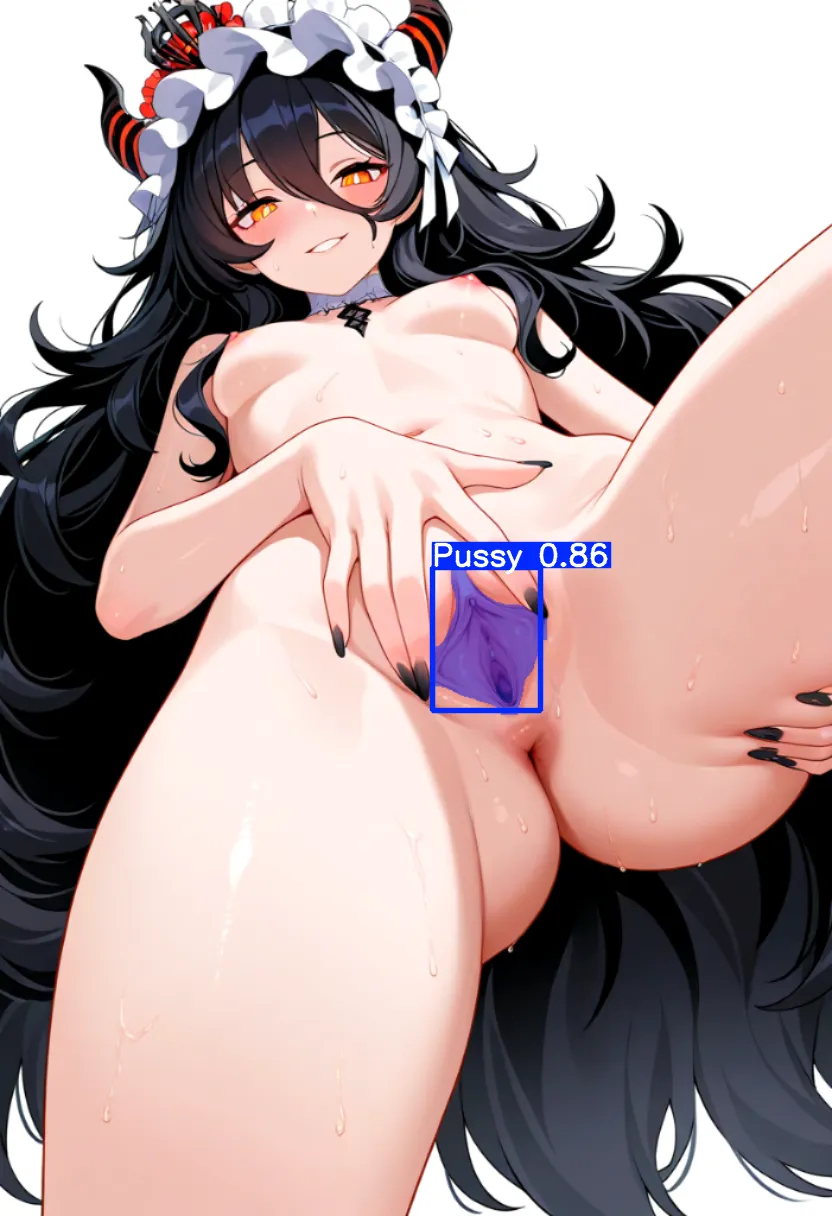







初心者が見様見真似で作ったので精度は期待しないでください。
使い方
「stable-diffusion-webui\models\adetailer」に2つのptファイルを置く
WebUIをリロード。AdetailerタブのADetailer modelにモデルが増えてると思います。
Please do not expect accuracy as it was made by a novice.
How to use
Put the two pt files in ‘stable-diffusion-webui\models\adetailer’.
Reload WebUI and you will see more models in the ADetailer model in the Adetailer tab.
This is a machine translation.
V5
ForgeのAdetailerでの動作を確認しています。comfyuiは申し訳ありませんが確認しておりません。
学習素材はv3・v4(旧作)をベースに、AI生成画像を追加した合計700枚程度のデータセットとなっております。
ただ旧作ではアノテーションにlabelImgを使用していましたが、v5ではlabelmeを使用してポリゴンでのアノテーションを行っています。割と雑にアノテーションしたかもしれません。
多分旧作より精度は高いですが、検出範囲が細かくなっていますので、旧作のような大き目の検出範囲が欲しい方は、Adetailerの機能を使って範囲を広げるか、旧作を使用してください。また、この画像が検出しない!などありましたら、Pnginfoを添えて画像をここにポストしていただければ、次回その情報を基にデータセットを作成するように心がけます。
作者はAI知識がほぼないド三流です。よってパラメータやアノテーションも正しいか分かりません(言い訳)
「使えたら儲けもの」の精神で使っていただけるとありがたいです。
We have confirmed that it works with Forge's Adetailer; sorry, we have not checked comfyui.
The training material is based on v3 and v4 (old work), with AI-generated images added, for a total data set of about 700 images.
However, the old work used labelImg for annotation, while v5 uses labelme to annotate with polygons. The annotation may have been rather crude.
It is probably more accurate than the old one, but the detection range is finer, so if you want a larger detection range like the old one, use the Adetailer function to widen the range or use the old one.Also, this image does not detect!Please post your images here with Pnginfo and we will try to create a dataset based on that information next time.
The author is a third-rate person with almost no AI knowledge. Therefore, I do not know if the parameters and annotations are correct.
I would be grateful if you could use it in the spirit of ‘Lucky if you can use it’.
*** Translated with www.DeepL.com/Translator (free version) ***
V4
自分用に作り直しました。
データセットを新しくし、横向きなどの素材を混ぜて再学習しました。
相変わらずクオリティには自信がありません。ご容赦ください。
通常はv3.0を使用し、上手く検出しない場合にv4.0のlastやbestを使用してください。
上手く検出しない場合はDetectionオプションの「Detection model confidence threshold」の値を低くし、「Mask only the top k largest (0 to disable)」の値をPussyと同じ数にしてください(例:1girlなら値を1にする等)
私はPonyモデルで動作を確認しましたが、SD1.5やAnimagineなどでも使用できると思います。
━━━━━━━━━━━━━━━━━━━━━━━━━━━━━━━━━━━━━━━━
I re-created it for my own use.
The data set is new and has been relearned with a mixture of materials such as horizontal orientation.
As usual, we are not confident in the quality. Please forgive me.
Normally, use v3.0, and if it does not detect well, use v4.0 last or best.
If it does not detect well, lower the value of “Detection model confidence threshold” in the Detection option and set the value of “Mask only the top k largest (0 to disable)” to the same number as Pussy (e.g., 1 for For girl, set the value to 1, etc.)
Confirmed that it works with the Pony model, but I believe it can also be used with SD1.5, Animagine, etc.
*** Translated with www.DeepL.com/Translator (free version) ***
V3
UltralitycsのYOLOv8モデルでアニメ絵をベースに、初心者が見様見真似で作ったので精度は期待しないでください。通常はpussy_best_v3.pt を使ってください。pussy_last_v3.pt は誤検出の可能性がありますが、うまく検出できないときに使ってみてください。
モデルによっては相性が悪いかも。
This is a machine translation.
I made this haphazardly by imitating without much experience, so please don't expect high accuracy.There are pussy_best_v3.pt and pussy_last_v3.pt, but usually use best. last may cause false positives.
Description
FAQ
Comments (16)
almost 2025 and still no adetailer for teeth.
i'm so disappointed.
don't mind at me.
thanks for sharing this is very usefull
Nevermind, I did reinstalled some things such as adetailer and suddenly it works fine. Not sure what it was for me as I did multiple things though.My forge seems to think these models are corrupted, renames them to (model).pt.corrupted and will not use them.
I use Forge version #2412
not working on webui, ntrMIXIllustriousXL_v40
know the installation location in the thinkdiffusion app?
Doesn't work (Pony, Autism, Perfect.)
Try a larger img, small object hardly detected.
For me it works really well if I lower the bbox_threshold / sam_threshold / segm_threshold. You have to find the sweet spot.
なぜかクリトリスの上にアナルが生成されます
Just seems to add an weird piercing hole (or extra anus?) above where the pussy is in straight shots. I think whatever data it trained on is a bit confused about a woman's pussy, piercing holes, and anuses. I think a separate one should be made for those who want piercing holes. As a general clean up for making a vagina look more like a vagina, could use another pass at training imho.
Bro outed himself without even realizing.
I've added the files to the appropriate folder (it were 4 files, not 2 by the way), but it's not reacting when generating images. What could be the issue?
hi does this work for realistic images?
Works perfectly, I used it with the ComfyUI FaceDetailer Node, but you have to find the right bbox_threshold/sam_threshold/segm_threshold and the corresponding right dilations. (For some small vulvas I had to put it to 0.07 lmao but it works really well)
A tip is to create a workflow for testing these thresholds before applying to the image that you want to process for reducing computational cost.
I wonder, do you use the two in a row or do you only use one?
@CuscusEnjoyer is right. Before using this (at least on ComfyUI), it's better to create a separated worflow to test the ADetailer and play with the threshold value until you get something that works. For me for example, the model was able to find small vulvas using a threshold from 0.01 to 0.03 depending on the image. It's kinda annoying that you have to do this, but I guess it's better than nothing
It seems to work very well, except for spread pussy. I think that it gets confused with the clitoris