


V2
This new version changes more the pictures but brings more realism and detail. You can look at examples and use them.
Although no keywords are necessary, you can use some in order to adjust the effects. For example:
sharp eyes, detailed eyes, detailed pupils, iris detail
This version still effects the composition, lighting, etc but has a greater effect on the actual picture (face can change for example). So, keep in mind, that this is not simply an eye-enhancing lora, this creates better portraits with a big focus on eyes.
Strength:
both positive and negative can be used
positive has a stronger enhancing effect on the subject
negative adjust the background too but it has a less stronger effect on the subject
both options can give very pleasing results, so you should experiment with it and see what works best for you
You can see the strenghts used in the gallery where there is a mix of positive and negative ones.
V1
This lora is based on almost 1000 images and it was created to improve portraits and eyes while keeping the main idea/concept of the image close to the original.
As you can see on the pictures, the lora finetunes some aspects in order to create more perfect portraits & eyes:
textural problems,
lighting,
color grading,
artifacts,
shapes,
details,
realism,
sharpness.
This will result in images with better lighting, color grading, texture, etc. which are affecting the whole image not just the eyes. See an example here: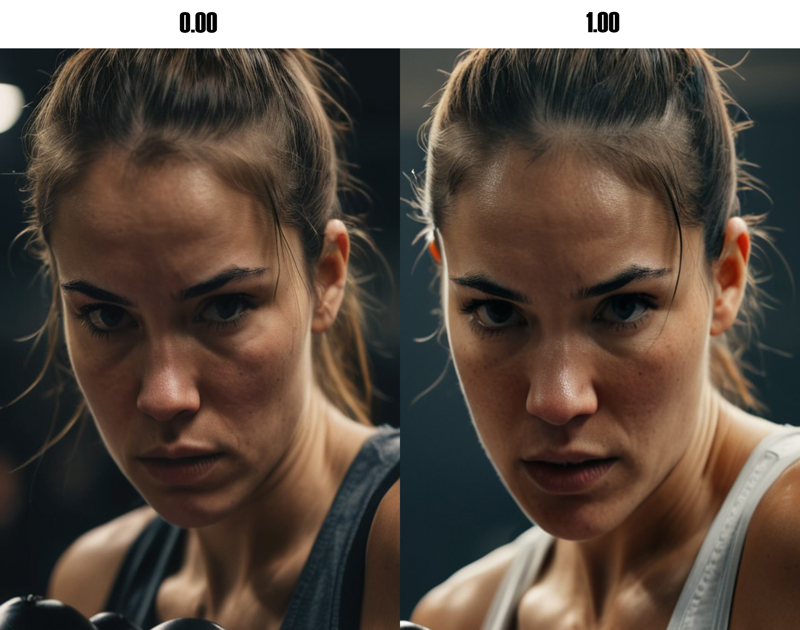
It is clear that the whole lighting changed to make the eyes (and the face) more prominent and visible. The changes in the texture, details and sharpness of the eyes, nose, forhead and hair enahances the original image greatly. This altogether pushes the determined look in the direction of being more pronounced, and eventually the feeling of image is enhanced as well. (even the little hair piece near the right eye seems more cooler ;-) )
The lora was trained with the tag 'eye_perfection' which I have not used for most of the images (except 1). Based on my experiments it is not necessarily needed BUT in some cases in can improve the results.
As always, can't wait to see how you use it, please share your results here. Good exploration!
Description
PONY version of v1.0
FAQ
Comments (9)
This is an amazing LORA! I didn't even need to use any trigger word. Keep up the amazing work!
thanks, glad you find it useful :)
When I used the SDXL 1.0 it is working great now. Thank you so much!!!
When I tried to use it on ComfyUI it said it was corrupt.
sad to hear that :( it works well on Civitai... but thanks for the info!
I use ComfyUI so maybe that is why? It is amazing work regardless. Great work
@dwolf05 might be, not sure... THanks!
I've used this new LORA a few times by now and this one is gonna be a keeper - no more eye gore! Thank you maxxxx_civitai for your work. :)
Trigger?
hi, my loras usually have no triggers, as you can see it from the description and the examples as well :)