


4 basic inpaint types: Fooocus, BrushNet, Inpaint conditioning, Noise injection.
Optional switches: ControlNet, Differential Diffusion and Crop+Stitch, making it 4x2x2x2 = 32 different methods to try.
I have always struggled finding the method I need, and building them from sketch always messed up my workflow, and was time consuming. Having 32 methods within a few clicks really helped me!
I have included a simple method (load or pass image, and choose what to segment), and another one that inpaints different characters (with different conditions, models and inpaint methods if need be). You can also add the characters LoRA's to each of them.
I have also added a workflow that is focused on inputs instead of the flow of the nodes, as to make it more friendly for users.
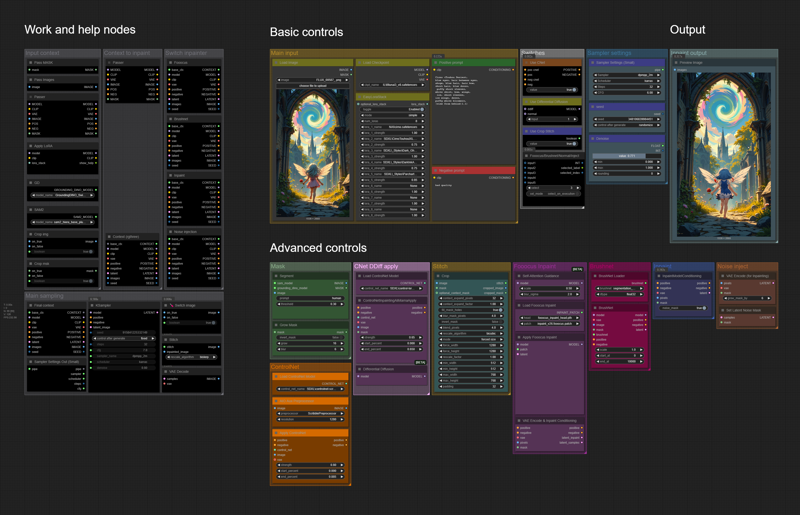 Basic controls
Main input
Load or pass the image you want to inpaint on here, select SD model and add positive and negative prompts.
Switches
Switches to use ControlNet, Differential Diffusion, Crop and Stitch and ultimately choose the inpaint method (1: Fooocus inpaint, 2: BrushNet, 3: Normal inpaint, 4: Inject noise).
Sampler settings
Set the KSampler settings; sampler name, scheduler, steps, cfg, noise seed and denoise strength.
Advanced controls
Mask
Select what you want to segment (character, human, but it can be objects too), threshold for segmentation (the higher the value the more strict the segmentation will be, I usually set it 0.25 to 0.4), and grow mask if needed.
ControlNet
You can change ControlNet setttings here, as well as apply preprocessor to the image.
CNet DDiff apply
Currently unused besides the Differential Diffusion node that's switched elsewhere, it's an alternative way to use ControlNet inpainting, for those who like to experiment.
You can also adjust the main inpaint methods here, you'll find Fooocus, Brushnet, Standard and Noise injection settings here.
You will need ControlNet and Brushnet / Fooocus models to use them respectively!
List of nodes used in the workflows:
comfyui_controlnet_aux
ComfyUI Impact Pack
ComfyUI_LayerStyle
rgthree-comfy
ComfyUI-Easy-Use
ComfyUI-KJNodes
ComfyUI-Crystools
comfyui-inpaint-nodes
segment anything*
ComfyUI-BrushNet
ComfyUI-essentials
ComfyUI-Inpaint-CropAndStitch
ComfyUI-SAM2*
ComfyUI Impact Subpack
Description
FAQ
Comments (22)
Can it work with flux?
I haven't tested to be honest, I don't know yet, but will give it a try.
I'm pretty sure that Brushnet and Fooocus inpaint doesn't work with Flux, but Noise Injection and/or standard Inpaint conditioning might.
If it doesn't work but you need it, hit me up, and I'll try and fix something for Flux as well.
@yorgash i'd also wanna use this with flux eventually
missing nodes RvTools
This needs ComfyUI-RVTools nodes.
For Flux I'm doing one from scratch, these nodes won't work for Flux sadly.
@yorgash thing is: rvage has deleted his github account
but someone reuploaded. haven't tested with your workflow tho.
@tazztone I have downloaded it myself 2 days ago or so again, though tbh you have to turn off safety settings in new ComfyUI to do so (on config.ini)
@yorgash i see. what is the github repo u downloaded it from then?
@tazztone If you uncheck safety level, you can find it in ComfyUI nodes manager and it will let you install.
u might not wanna use some discontinued nodes. anyway another issue: i have latest essentials nodes but still have error "Missing Node Types
When loading the graph, the following node types were not found
SimpleMathSlider+"
not the first wf that has this. sounds familiar to any1?
@tazztone I've found that if you clone manually https://github.com/cubiq/ComfyUI_essentials, it would have the SimpleMathSlider node in it, the version installed by node manager for some reason does not have it. (Check misc.py, it should have "class SimpleMathSlider" in it)
Last node I struggle to find is "Use CNet", has anyone faced the same issue?
@dusk20 Thanks for bringing it to my attention , I'll be doing a thorough investigation over the next few days of what's gone and what can I replace them with, since ComfyUI went on a rampage these past few weeks :D
@dusk20 That should be a simple condition switch IIRC, will look into it when I get home
@yorgash Thank you, I got it working by clicking Reload Node on it, and then refreshing. Not sure what was wrong with my setup, still new to ComfyUI :D
v1.2 is just a zip of screenshots - there's no workflow.
Drag and drop the picture into a comfyui session. It will open up the workflow there. Though this is a basic function of comfyui. I would highly suggest watching youtube videos from basic principles to get more acquainted and understanding the functionality of comfyui and its workflows. Starting from here might be a bit difficult.
@DontDeadOpenInside appreciate it! I've been using comfy for months, modifying workflows, etc, but somehow missed this feature.
I dont get it, I downloaded the 10 different versions of rvtools and replaced all the jacked nodes and comfyui just says "Failed to get node for group node 87 with link 171" and wont show me what node that is.
Pitty, seems like a handy workflow to use and disect and learn from but comfyui wont allow that to happen. And the author apparently abandoned it
same does not work. keeps asking for the nodes..
What's workflowUse CNet and wehe can i find it?