


Apply Differential Diffusion to 3 different areas.
Included in the workflow are two types:
RGB mask:
Load an RGB mask and separate it to 3 different masks, prompt those areas separately.
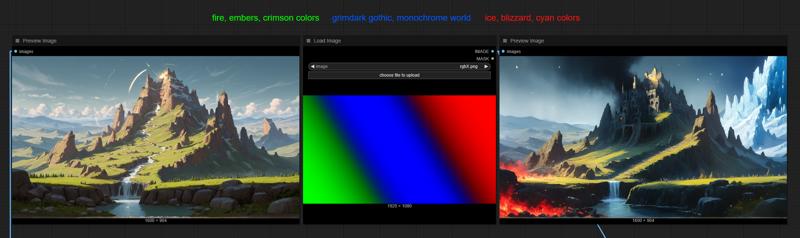
Depth mask:
Separates the input image into 3 different depth-masks; I set it to a general background (far), middle (medium-close) and foreground (close) masks by default. If you want to you can play around with the settings.
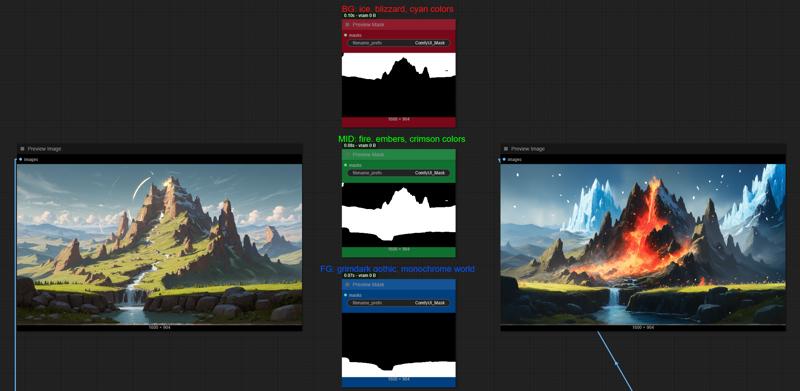
To swap between color mask or depth, you simply swap the magenta nodes' output with the regional prompting masks, then their combined masks (green at the bottom) to the input box' mask input.
Description
Should work with SD/SDXL models and branches.
FAQ
Comments (4)
Nice tidy workflow, good work and thanks for sharing. Got to try it out.
As I experimented before with regional conditioning, a (annoying) increase of calculation time showed up... so that I went to another direction with Detailing each mask as follow up steps...
what are your time measurements?
Thanks!
I'll run some measurements soon.
I expected 2 ControlNet + regional prompting to slow the sampling process. 30 steps 1920x1080 renders 18.55s (it was 8.01s without them). Though this difference is only really important if I do 1-pass only.
If I send it for a second pass though I won't give it the CNet + regional, maybe the latter one, but probably just a regular condition, so in the end it will render a 4K in say 78 seconds instead of 68.
I have an issue loading GroundingDino models,it doesnt load when I put the cfg file and the pth file in the gounding-dino directory. Is there any other steps requires me to do?