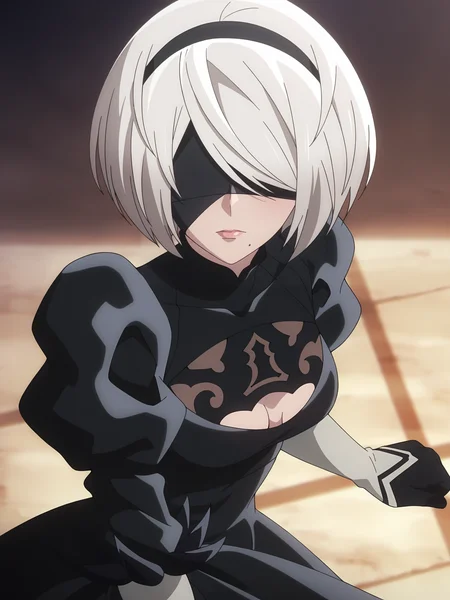
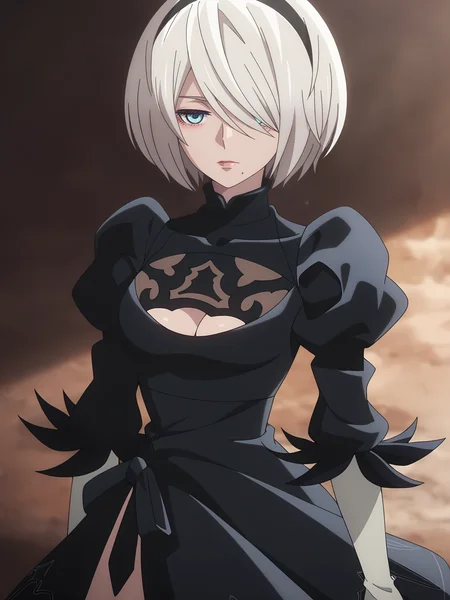
2B from Nier: Automata Ver1.1a
This LoRA was trained on 81 images of 2B from NieR:Automata. It's designed to capture her appearance and style accurately, and works well across different compositions and settings.
It also includes some images without her visor, so you can generate her with or without it.
P.S. You’re free to share merges or generated images using this model without crediting me, but commercial use is not allowed.
Description
FAQ
Comments (8)
Few tips:
1. Usage of underscores "_" with tags is not recommended.
User Manual for NoobAI ( NoobAI is a big finetune for Illustrious) mentions this:
"Prompt words should not contain any underscores"_". Influenced by websites such as Danbooru, the use of underscores "_" instead of spaces between words as tags has been circulated, which is actually a misuse and will cause the generated results to be different from using spaces. Most models, including NoobAI-XL, do not recommend including any underscores in prompt words.This misuse can affect the quality of generation at best, and even make the trigger word part completely invalid at worst"
2. 128/64 Dim / Alpha is way too high and results in unnecessarily big LORA file, from my experience 16/8 is enough in vast majority of cases (at least with anime characters), you can use 32/16 if you want to be save.
3. Majority of people train LORAs using base Illustrious-XL model (Unless you're training LORA for NoobAI or IL-XL V1), I guess it results in better compatibility with different checkpoints. Potentially there might be situations when training on non-base model might be better, but I haven't tested it. This tool can be helpful to check what settings other people use for LORA training
Thanks a lot for the tips, really appreciate it!
I didn’t know about the issue with underscores in prompt tags — I’ve been following Danbooru-style tagging until now, but I’ll definitely switch to using spaces from here on. That explains a few weird generations I’ve had.
Also good to know about the Dim/Alpha values — I was actually using 128/64 thinking more = better, but I’ll move down to 16/8 (or maybe 32/16 if needed) to keep things lighter.
Regarding the base model, I’ve mostly been using WAI NSWF to let people also generate that kind of content, but thanks for the tip
If you’ve got the link to that tool you mentioned for checking LoRA settings others use, I’d love to check it out!
Thanks again for the insight — super helpful. 🙏
@NeogenArt Link to the tool is attached as hyperlink in message above, but here is the direct link just in case - https://civitai.com/models/249721 . Regarding model, when you train model using base Illustrious XL it doesn't mean that you will need to use it with that model, I personally haven't generated any images with base Illustrious XL even though all my models trained using it, you will still use your LORA with WAI NSFW, but it will work better with other checkpoints too, because all checkpoints based on Illustrious XL 0.1.
Also this info might be helpful to you, It is the message I sent to person who asked me for advice with LORA training:
"By the way, these are good resources I used to learn how to train LORAs: https://civitai.com/articles/3522/valstrixs-crash-course-guide-to-lora-and-lycoris-training https://civitai.com/articles/138/making-a-lora-is-like-baking-a-cake https://civitai.com/articles/3105/essential-to-advanced-guide-to-training-a-lora https://rentry.org/59xed3 These are the programs I use for dataset creation: https://github.com/mifi/lossless-cut - for capturing frames from anime https://www.xnview.com/en/xnviewmp/ - to quickly crop dozens/hundreds of images. I also use it to look at my generated images, it's also far better at browsing folders with thousands of images than default Windows Explorer (Explorer sometimes takes several minutes before I can sort images, with such big folders) https://github.com/HaW-Tagger/HWtagger - dataset tagging, relatively big learning curve, but far better than anything else, I don't think I would be able to tag big datasets without it. Also uses hardware accelerated tagging, so it can tag hundreds of images under a minute. (I recommend WD EVA02-Large Tagger v3 tagger it's current SOTA), you can skip CUDA toolkit and CUDNN instillation, https://github.com/1038lab/ComfyUI-RMBG - currently the best background remover, useful if your dataset has the same annoying background to give some diversity "Remove tool" in Photoshop is pretty good at removing unwanted details."
Also what I've recently discovered, but used only in my last LORA is that you can combine booru tags into single one and it appears to improve performance of LORA and simplify prompting (I think this method works with Illustrious because it works with natural language), for example tags "cropped jacket" and "blue jacket" can be combined into "cropped blue jacket"
@MV_QT seriously appreciate you taking the time to share all this ❤️
By the way, just to share back something small in case it might help you too — I’ve been using FanCaps to grab anime frames (really fast and high quality), and Birme for quick batch cropping, super handy when dealing with a ton of images. Upscayl for upscaling bad quality images
Thanks again for being so open with your process and for sharing all this tools and guides — it's really motivating to learn from someone so experienced.
@NeogenArt Also you might not know, but when you tag images for LORA using tag like "2b (nier:automata)" you keep it as is, but when you're using this tag for image generation you add escape parentheses to tag like this - 2b \(nier:automata\). Be careful not to use "/" instead accidentally. It is because "(" and ")" symbols treated as tag strength in image generation programs. There is more detailed explanation in manual I attached in the first message in "Escape parentheses if necessary " part. Can't past it here because of broken formatting in this document.
By the way don't look to much into this manual if you aren't using NoobAI, cause some things there are exclusive to NoobAI, and won't work elsewhere
@MV_QT Ah, I didn't know that—thanks again!
I was aware that parentheses affect weight in prompting, but I don't really use them often since I usually stick to simple prompts.
As for the trigger word, I generally prefer using the name without parentheses anyway, but I really appreciate the tip!