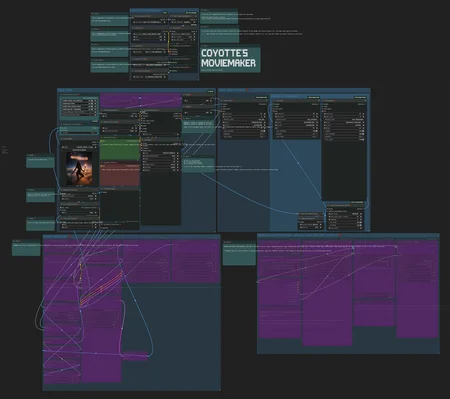
Update 29/03/2025: Added new features, some quality of life improvements, various optimizations.
COYOTTE'S MOVIEMAKER
This workflow's purpose is to create stunning videos with Wan 480p or 720p I2V.
Key features:
1) Upscaling and Interpolation to make your videos crystal clear and smooth.
2) Local sound generation that fits motions of your video. Turn up the sound when watching the previews on this page ;)
3) Extension of your video using the last frame. It's possible to make 10 second clips with this.
It uses ComfyUI's native implementation of Wan, not kijai's.
Make sure to read the notes I've left in the workflow - there are links to models and paths where you need to place them; tips and tricks I've noticed.
Description
FAQ
Comments (12)
it takes a very long time to process a negative and positive hint. Can I fix this somehow?
Apparently the newest TeaCache node version is working way worse than earlier ones. I've downgraded it (you also need to install 1.4.5 instead of newer ones) and replaced the workflow file just now, PLEASE REDOWNLOAD IT.
Thanks for feedback @kuaksu
Should this work with the 720p gguf model? just switch over the appropriate files to the 720p ones and go?
I'm having an issue when I generate audio where the generated audio will cut out halfway through the clip. How do I get it to produce audio for the entire clip?
Recently started to understand. Thanks for the workflow. Can you tell me if I need to reduce the image size before i2v to the one in which the video will be at the output. Or is it better to use an image in a higher resolution than the final video?
And what is responsible for "Upscale Image By" in this workflow, should I set it to 0.5 or 1? Is this an upscale of the original image?
Some things I wish I'd known:
- ComfyUI (0.3.27) Manager is an add-on that I installed via cloning ComfyUI Manager's repo to the 'custom_nodes' directory.
- The Manager can be used to download the missing nodes, marked by a red ❌ on each workflow node (module).
- The workflow itself (.json file) can be opened/loaded in ComfyUI.
- The workflow's .json contains 'id' key:value pairs that tell you the node # in an error ComfyUI may throw (helps to know which node is malfunctioning).
It works really well though once it's all set up! I'm coming from A1111, so ComfyUI and workflows are totally new to me.
-Updated comfy
- Loaded workflow
-Installed missing nodes thru manager , set models and verified correct paths
-Uploaded image
No visible errors
Click run
Red box error in top right of comfy -
"Error
Cannot read properties of undefined (reading '0')"
No visible errors in workflow. No errors in console. Just nothing happens.
Restarted comfy. Loaded workflow. Error when loading workflow: Link 394 is funky... origin 164 does not exist, but target 185 does. Link 383 is funky... origin 164 does not exist, but target 155 does. Link 375 is funky... origin 164 does not exist, but target 155 does. 399 is def invalid; BOTH origin node 85 doesn't have 399 and 85 target node doesn't have 399. 398 is def invalid; BOTH origin node 39 doesn't have 398 and 39 target node doesn't have 398. 397 is def invalid; BOTH origin node 51 doesn't have 397 and 51 target node doesn't have 397. 396 is def invalid; BOTH origin node 39 doesn't have 396 and 39 target node doesn't have 396. 395 is def invalid; BOTH origin node 49 doesn't have 395 and 49 target node doesn't have 395. 394 is def invalid; BOTH origin node 164 is removed and 164 target node doesn't have 394. 393 is def invalid; BOTH origin node 85 doesn't have 393 and 85 target node doesn't have 393. 392 is def invalid; BOTH origin node 237 doesn't have 392 and 237 target node doesn't have 392. 391 is def invalid; BOTH origin node 39 doesn't have 391 and 39 target node doesn't have 391. 390 is def invalid; BOTH origin node 39 doesn't have 390 and 39 target node doesn't have 390. 389 is def invalid; BOTH origin node 39 doesn't have 389 and 39 target node doesn't have 389. 388 is def invalid; BOTH origin node 85 doesn't have 388 and 85 target node doesn't have 388. 387 is def invalid; BOTH origin node 39 doesn't have 387 and 39 target node doesn't have 387. 386 is def invalid; BOTH origin node 51 doesn't have 386 and 51 target node doesn't have 386. 385 is def invalid; BOTH origin node 39 doesn't have 385 and 39 target node doesn't have 385. 384 is def invalid; BOTH origin node 49 doesn't have 384 and 49 target node doesn't have 384. 383 is def invalid; BOTH origin node 164 is removed and 164 target node doesn't have 383. 382 is def invalid; BOTH origin node 85 doesn't have 382 and 85 target node doesn't have 382. 381 is def invalid; BOTH origin node 39 doesn't have 381 and 39 target node doesn't have 381. 380 is def invalid; BOTH origin node 85 doesn't have 380 and 85 target node doesn't have 380. 379 is def invalid; BOTH origin node 39 doesn't have 379 and 39 target node doesn't have 379. 378 is def invalid; BOTH origin node 51 doesn't have 378 and 51 target node doesn't have 378. 377 is def invalid; BOTH origin node 39 doesn't have 377 and 39 target node doesn't have 377. 376 is def invalid; BOTH origin node 49 doesn't have 376 and 49 target node doesn't have 376. 375 is def invalid; BOTH origin node 164 is removed and 164 target node doesn't have 375. 374 is def invalid; BOTH origin node 85 doesn't have 374 and 85 target node doesn't have 374. 373 is def invalid; BOTH origin node 39 doesn't have 373 and 39 target node doesn't have 373. 372 is def invalid; BOTH origin node 39 doesn't have 372 and 39 target node doesn't have 372. Deleting link #372. splicing 62 from links Deleting link #373. splicing 62 from links Deleting link #374. splicing 62 from links Deleting link #375. splicing 62 from links Deleting link #376. splicing 62 from links Deleting link #377. splicing 62 from links Deleting link #378. splicing 62 from links Deleting link #379. splicing 62 from links Deleting link #380. splicing 62 from links Deleting link #381. splicing 62 from links Deleting link #382. splicing 62 from links Deleting link #383. splicing 62 from links Deleting link #384. splicing 62 from links Deleting link #385. splicing 62 from links Deleting link #386. splicing 62 from links Deleting link #387. splicing 62 from links Deleting link #388. splicing 62 from links Deleting link #389. splicing 62 from links Deleting link #390. splicing 62 from links Deleting link #391. splicing 62 from links Deleting link #392. splicing 62 from links Deleting link #393. splicing 62 from links Deleting link #394. splicing 62 from links Deleting link #395. splicing 62 from links Deleting link #396. splicing 62 from links Deleting link #397. splicing 62 from links Deleting link #398. splicing 62 from links Deleting link #399. splicing 62 from links Made no node link patches, and 28 stale link removals.
Now a bunch of things aren't connected. Click run,
errors everywhere.
CLIPVisionEncode
CLIPVisionEncode.encode() missing 1 required positional argument: 'clip_vision'
Pipe from "VAE Decode" to "Cut First # Frames" disconnects when I run. I have to manually reconnect every prompt (along with the upscale + interpolate nodes). Is cut first frames running prematurely or something?
How do I prevent it from saving an image along with the video file?
Downloaded workflow, put all models in correct order. But the Base video node needs to connect to an image? It got a red circle on image. It needs to be connected to something but i cant find where. Can anyone help please
how do I make longer videos?
I haven't changed any settings and out of the box, the video duration is 4 seconds.
How can I extend it?
Thank you for this awesome workflow! Any chance you'll update this for WAN 2.2?
Looks like we don't have an active mirror for this file right now.
CivArchive is a community-maintained index — we catalog mirrors that volunteers upload to HuggingFace, torrents, and other public hosts. Looks like no one has uploaded a copy of this file yet.
Some files do get recovered over time through contributions. If you're looking for this one, feel free to ask in Discord, or help preserve it if you have a copy.