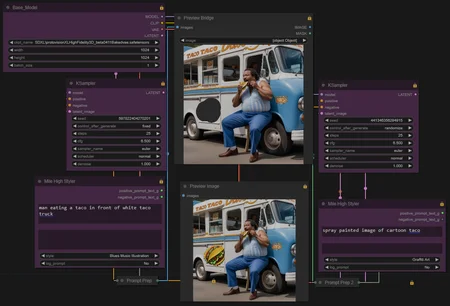

For those learning or want a REALLY simple workflow to inpaint, this is your ticket!
PREREQUISITES: In Comfy Manager, install the following
Nested Nodes
Impact Pack
Mile Styler
TinyTerryNodes
Efficiency Nodes
USAGE:
Choose base model / dimensions and left side KSample parameters
Enter your main image's positive/negative prompt and any styling
Render
In the top Preview Bridge, right click and mask the area you want to inpaint
Enter the right KSample parameters
Enter the inpainting prompt (what you want to paint in the mask) on the right prompt and any styling
Render
Description
FAQ
Comments (3)
Mile Styler not found not install?
can you show more examples? also, is this only comfy UI? i don't use that so idk what is what between these, but your main image shows comfy. So maybe that's the answer.
Why is it full of locks? Hoe to unlock sir?
Looks like we don't have an active mirror for this file right now.
CivArchive is a community-maintained index — we catalog mirrors that volunteers upload to HuggingFace, torrents, and other public hosts. Looks like no one has uploaded a copy of this file yet.
Some files do get recovered over time through contributions. If you're looking for this one, feel free to ask in Discord, or help preserve it if you have a copy.