
This is a series of Swin2SR upscale models that I have trained on various hires images that I generated, hoping to enhance skin textures instead of smoothing them out, especially in photorealistic and digital art styles. I have tested them in ComfyUI and they should be compatible with Auto1111 and other tools that support Swin2SR.
https://github.com/mv-lab/swin2sr
Versions
Three models are available. All of the models are available in both .safetensors and .pth formats.
custom x2
trained from scratch for 25,000 steps with batch size 16 on images that I generated
custom x4
trained from scratch for 28,000 steps with batch size 16 on images that I generated
not fine-tuned from the x2 model
DIV2K + custom x2
trained from scratch for 10,000 steps on the DIV2K dataset from the SwinIR repository
trained for an additional 40,000 steps on images that I generated
The x2 models can be applied 2 times (x4) with minimal loss of quality and can be applied 3 times (x8) with some visible blurriness. The x4 model can be applied 2 times (x16) with noticeable blurriness.
Quality
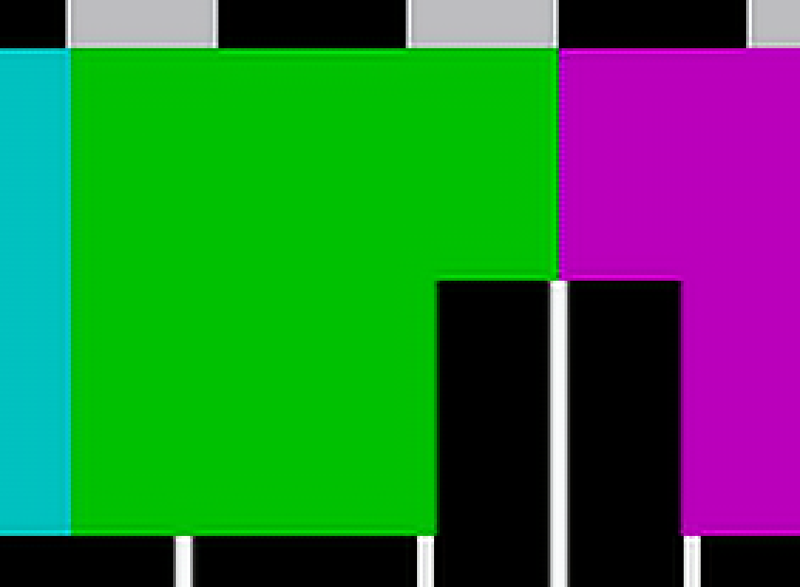
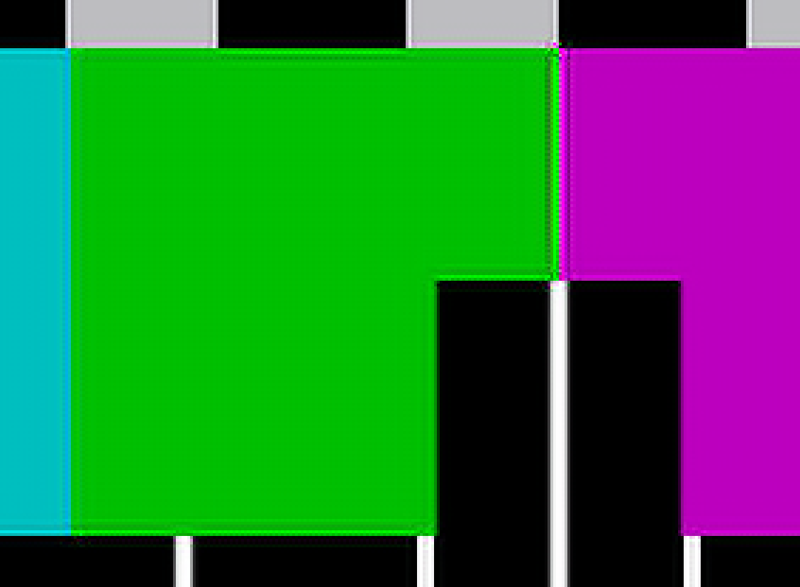
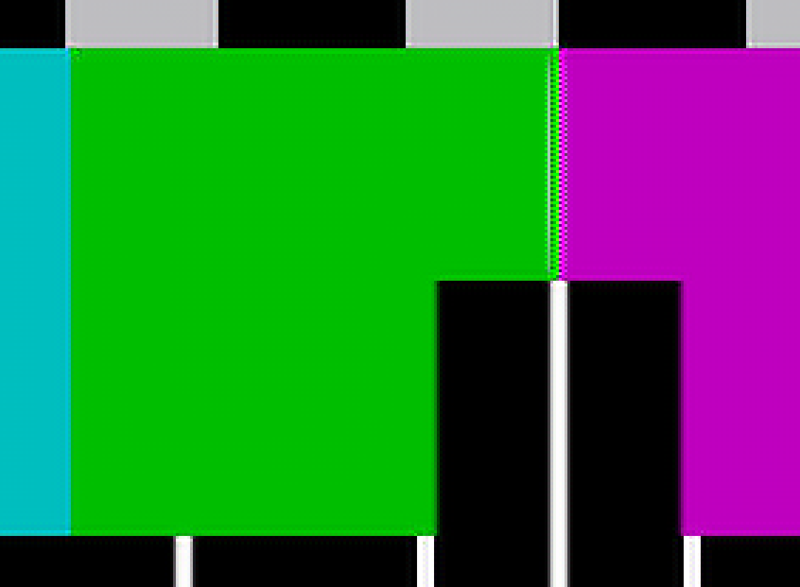
The PSNR of these models is good compared to the corresponding scores for the BSRGAN, SwinIR, and Swin2SR models released on their respective Github pages. The best upscale model that I tested is the SwinIR x2 model trained on images from Lexica, https://openmodeldb.info/models/2x-LexicaSwinIR, which still exceeds the scores for my models. However, these models produce fewer artifacts around corners in the test pattern. I am hoping to improve on these models more in the future and will be experimenting with a patch size of 64 as well.
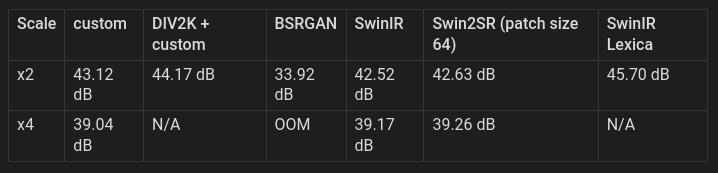
PSNR of 45dB is roughly equivalent to saving a JPEG with 90% quality: https://en.wikipedia.org/wiki/Peak_signal-to-noise_ratio
As I understand it, if you took an original image and saved one copy as a JPEG with 90% quality, then resized a second copy to 50% size and upscaled it using the custom x2 model, they should have the same loss of quality.
Most of the tests were run with a tile size of 256, except for BSRGAN. The test script for BSRGAN does not support tiling and ran out of memory for the x4 testing due to the size of the images. Real ESRGAN does not provide a test script, but I will include it if I can find one.
Comparison
Test pattern is from Wikimedia: https://commons.wikimedia.org/wiki/File:Philips_PM5544.svg
Custom x2:
DIV2K + Custom x2:
Lexica x2:
Training
All of these models use the Swin2SR architecture with a patch size of 48. They are trained on the same dataset of about 520 high-resolution images, generated by me using Flux.1 Dev and a hires workflow in ComfyUI. Low resolution images were created using bicubic interpolation.
The custom models were trained on a RunPod pod with 2x A40 GPUs with 96GB of memory in total, using a batch size of 16. The DIV2K + custom model was trained on an A6000 with 48GB of memory, using a batch size of 8.
Created by Thalis AI — dark fantasy, cosmic horror, and the spaces between.
☕ Support on Ko-fi — every tip keeps the radium gems glowing.
🌙 Join on Patreon — early access, prompt packs, and the deeper corridors.
🔮 Full catalog — 100+ LoRAs for Flux, Illustrious, and more.
Description
FAQ
Comments (5)
Great work! 👍 I did some tests with your custom x2/x4 versions. In comparison to my "standard" upscalers (UltraSharp/NMKD/ESRGAN/....) I am really impressed. Getting much more details and I really like that "natural" "photorealistic" look. I got just some minor problems upscaling small blurry faces - but I am pretty sure: no upscaler likes that 😉
Thank you. This was trained on AI generated images, but I tried to include a lot of hires skin. For the small, blurry faces, the best method that I have found is a face detailer with a low threshold. You may get some other shapes, but if they are very blurry, even a low strength detailer can often find a face somewhere in that blob.
@ThalisAI Yes of course - a face detailer mostly works fine (I used it often with Pony or SDXL). In my case I tested your upscaler with some really mean images - just for "science" 😉 Generally I did not use a face datailer with Flux. 99 % of my gererations works fine with a single path KSampler and a final 3x upscale. And here your upscaler works really well. The quality of the upscaled skin parts and faces is amazing, also the overall impression. I use your upscaler as a "default" now 😜😜
@arkinson Very cool, I am glad it is working well. I also do not often use a detailer with Flux, but I find that a little bit of hires (15-20 steps, 0.2 strength) can make it a little bit more crisp and add some nice details.
Simple and fast with no rough edges.