🚨🚨🚨MISSION CRITICAL: PLEASE READ🚨🚨🚨
NIGHTLY STATUS: Experimental (Low & High, I have another training I want to try so I'll be back to run it more in a day or 2)
You shouldn't have to edit the blocks anymore, but I think the model needs more training and is slightly underbaked still But I still only have one video and one sane brain that can spend so much time training and not genning/gaming.
2.2 wan training nightly! but if im being honest, its not ready so unless you don't mind experimenting with something unfinished you can try it out. I know nsfwsks is still the "trigger word" but honestly I think you just want really descriptive prompting (the more you describe features in the prompt, the better imo) tomorrows run will be with the correct timesteps, and maybe some cleanup of the dataset.
I do recommend at least trying a couple seeds as well, some seeds will be bad.
Help me continue to feed the open source AI porn community, please consider visiting my kofi and helping me out! anything means alot to me! https://ko-fi.com/cubeyai
OUTDATED INFO FOR OLDER setups:
you have to adjust the blocks, which I haven't experimented enough with, but I believe improves the quality, so if want a workflow with the adjustment, click here:
https://civarchive.com/articles/17635/22-block-guide-experimentation
\/\/\/\/ CIVIT GENERATION FILTER NOTICE \/\/\/\/
You're not allowed to make NSFW using i2v unless the image has been generated with a1111 or Civitai and still has the metadata. I'm getting reports that civit is blocking nsfw generations while some users seem to have no issue. It seems with the recent change that they also might be filtering real names used in prompts as well!!
_________________________________________________________________________________________________
2.1 Wan INFO:
><><seems to work fine with any 14B model still, skyreels V2, DF, Phantom and Vace, even causvid><><
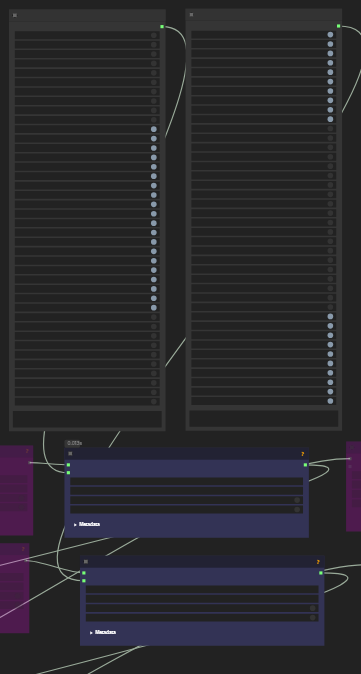
>>>>BLOCKS= Using WanVideoWrapper, you can edit the blocks that are used for inference. SET Blocks 0-19 as True and the rest as False for best use!<<<<
Hope you enjoy, please consider donating as literally anything helps me out.
This LoRA works best with 14B T2V or 480P I2V, results with 720P I2V are poor so I do not recommend it at this time under more experimentation is completed.
Strength= I like 0.9~ for loras on wan so far
Trained on a 4090 using diffusion-pipe for T2V. can be loaded as T2V of I2V lora. Its just a collection of nsfw videos, so while missionary seems good, it'll do doggy, cowgirl, and more (probably just not really good) seems to be good enough on first try but I still have seem some where a second run is needed. I literally can't train and test at the same time so most of what you see is just my couple attempts I ran. there's not enough time in the day and I only have one GPU. and I have more epochs to try but I figured I'd get this out for others to try and I'll try to keep this one updated with other epochs. success not guaranteed.
By using this LoRA model, you acknowledge that you alone are responsible for your creations, and like any powerful tool, it demands ethical judgment and responsible use.
The examples above are mainly just the default workflow with a lora node added. prompts should include nsfwsks and description of the action "penis goes in and out of vagina"
Description
IMPORTANT:
https://civitai.com/articles/17635/22-block-guide-experimentation
2.2 wan trained, but if im being honest, its not ready so unless you don't mind experimenting with something unfinished you can try it out. I know nsfwsks is still the "trigger word" but honestly I think you just want really descriptive prompting (the more you describe features in the prompt, the better imo) tomorrows run will be with the correct timesteps, and maybe some cleanup of the dataset.
The other reason im skeptical to post is because you have to adjust the blocks, which I haven't experimented enough with, but I believe improves the quality.
https://civitai.com/articles/17635/22-block-guide-experimentation
FAQ
Comments (47)
How do I get this workflow? ComfyUI doesn't reconise it if I open any .mp4 sample
The link in the model description
CubeyAI you mean image in article? If I click "Save image as..." it downloads png, and when I open in comfyui it says the image is not a workflow. I haven't notice any other links in model description
The workflow is on the right side of the interface, and you can see that there is one 'Attachments'
mezrus The link in the model description.The workflow is on the right side of the interface
EndTraveler oh, I see, thanks
CubeyAI Any set of usefull links to models used in workflow? found only this but it is under gate
mezrus I think I found that on civit
Thats awesome. Can we get a higher resolution for Wan? its only 480p
While it's the "480p" model, you can generate at any resolution with the 2.2 model
What does the block swap do exactly ? Is it just for vram management, also should it be used on all loras/workflow without tradeoff ?
It seems to be accounting for the MoE high/low noise model split. The correct approach is to train TWO LoRAs, one for high, one for low- which some people are doing here now!
It's a tradeoff for sure - it keeps VRAM usage in check to avoid OOM or fully unloading models, but copying blocks from and to ram types is of course, slow. Faster than fully loading/unloading full models, much slower than keeping full models in memory, which even on a 5090 is challenging.
blobby99 correct, but since that takes time, its not ready yet. (But also In a way, since it was trained on normal timestep range, it still works, but needs to be present in the low for full effect
playnproto266 in this case, it's not about VRAM management. We're actually freezing blocks to not apply the Lora to them at all during inference.
CubeyAI Interesting technique! So like a more involved block edit
playnproto266 yes
CubeyAI LOL. I'm newbee. Don't know what you guys are talking about. May I ask what does that "block" actually do?
mickyIammicky we don't actually know either.
I copy the file to the Lora folder, but it does not appear in Stable Diff, who can answer with the full installation instructions?
It's a video LoRA for Wan.
Not an image LoRA for Stable Diffusion. Just 0 relation whatsoever.
"who can answer with the full installation instructions?" ChatGPT, Google AI Studio, etc.
legend! 💖
can we get the work flow?
The workflow cubey is using was posted here
https://civitai.com/articles/17635/22-block-guide-experimentation
GREAT WORK!!!
IMPORTANT: INFORM ALL WAN USERS! I DISCOVERED HOW TO USE LORAS 'NSFW/SFW' IN WAN 2.2 T2V, GETTING THE FULL POTENTIAL OF "HIGH NOISE" AND "LOW NOISE." THE RESULTS WERE IMPRESSIVE!! I ran it on an RTX 3060 6GB, 32MB RAM, 480x480, length: 41, generation time: 5 minutes to generate each video. The quality is fantastic! For those of you with more powerful computers, the results will be even more incredible. I used the models: WAN 2.2 - Q4_1.gguf FOLLOW THE STEPS BELOW: 1: Don't use acceleration/enhancement LoRas (such as Lightx2v or other) on "high noise"; use only on "low noise" with strength 1. (I'm using this version of Lightx2v LoRa): lightx2v_T2V_14B_cfg_step_distill_v2_lora_rank64_bf16 2: Use 'NSFW/SFW' LoRas on both "high noise" and "low noise" models. On "high noise," use strength 2, and on "low noise," use half the strength, with strength 1. You can vary the strengths as you like, but always keep the "low noise" strength at half the strength of the "high noise." 3: Use these settings in KSamplers: "high noise": steps: 9 / cfg: 3.5 / euler/simple / start_at_step: 0 / end_at_step: 1 "low noise": steps: 9 / cfg: 1.0 / euler/simple / start_at_step: 1 / end_at_step: 10000 Note: To improve speed, I set the Windows system to "best performance," disable unnecessary background programs and applications, and lower the desktop resolution. This significantly speeds up video generation. I hope this helps.
I want to suggest giving the high-noise stage more steps (or "more steps for the high-noise sampler") to truly unlock WAN2.2's original potential, as one step is definitely too few.
FLOW0308 Its mostly right, you don't actually want too many steps of the high noise, 1 might not be enough but it depends on the sampler. more testing it needed but I might try these settings today to see what happens.
CubeyAI A step count of 1 is definitely not enough; at least 2 steps are needed to restore the high-noise's dynamic strength. Not including LIGHTX2V is fine, but 1 step for the high-noise is truly too few.
CubeyAI His settings aren't problematic; I actually set mine up the same way. I even sometimes add a third sampler, WAN 2.1, to try and restore the LoRAs' original functionality.
My main point is that 1 step for the high-noise is too little. I've personally tested it, and there's a significant difference between 1 and 2 steps. My other low-noise and LoRA settings are identical to my current configuration. The high-noise step count definitely doesn't need to be high; its purpose is merely to establish the framework for the entire dynamic action. The primary focus for denoising is on the low-noise stage. However, the high-noise is the main update for WAN 2.2 this time, so it should have at least 2 steps. This is what I've concluded from my tests.
Thanks that's actually a very good idea to get rid of lightx2v on the high noise, it makes sense since it's the low that clears the frames, now we can use cfg (and negative prompt ?) on the high noise and get better motion control (it's too slow motion at cfg 1), I don't even see that much of a difference on the gen time. But I'm not a fan of euler simple, it produce eratic movements, not sure if it's actually because of the sampler but using the same seed lcm simple gives me better results on coherence and motion
try lightx rank 16, it works much better, at high noise too
Can you share the workflow?
If possible, could you share your workflow? Thank you very much.
MikeyArtis +1
Can you share your workflow? I tried running with native nodes but it didn't work well because there is no good way to select blocks for loras in native wan nodes. So I left the lightx on the high noise model. What worked for me with this lora was to use the v.014 version on the low noise model and 0.08a on the high noise model.
Wow. 32 Megabytes of RAM? That's impressive. I didn't know they even made RAM sticks like that anymore.
Phraxas finally somebody noticed!
Phraxas Lmao this got me
doing more tests here I realized that the results are even more perfect using 3 or more steps in 'high noise'
aiv_creator YES
aiv_creator mind posting your workflow?
@FLOW0308 Did anything change from 5 months ago? Or are these still recommended settings to try?
I uploaded the model, but with any generation, blue pixels appear first from any camera, and then a picture with a gray background. What is the problem?
it is experimental, try another seed to be sure, maybe also provide more description to the AI for your prompt. Also make sure your disabling the right blocks per the linked bulletin.
Can anyone share a resource where there is complete information on how to animate in SD? I'm a newbie
This is not a stable diffusion lora. This is a wan video lora. Go to youtube and search for "comfyui tutorial" and "wan video tutorial"
Details
Files
22-nsfw-HIGH-e6.safetensors
Mirrors
22-nsfw-HIGH-e6.safetensors
22-nsfw-HIGH-e6(1).safetensors
22-nsfw-HIGH-e6.safetensors
22-nsfw-HIGH-e6.safetensors
22-nsfw-HIGH-e6.safetensors
22-nsfw-HIGH-e6.safetensors
22-nsfw-HIGH-e6.safetensors
22-nsfw-HIGH-e6.safetensors
22-nsfw-HIGH-e6.safetensors
22-nsfw-HIGH-e6.safetensors
22-nsfw-HIGH-e6.safetensors
22-nsfw-HIGH-e6.safetensors
nsfw-lora.safetensors.safetensors
22-nsfw-HIGH-e6.safetensors
22-nsfw-HIGH-e6.safetensors
22-nsfw-HIGH-e6.safetensors
5bzAzl6u.safetensors
Available On (1 platform)
Same model published on other platforms. May have additional downloads or version variants.