


This workflow is now discontinued as I will focus on Qwen Edit 2509 model and the workflow I did for these kind of generations.
With this workflow you will be able to generate a 3x3 grid with the same character face in 9 different poses and with small expression differences.
The workflow will output an upscaled image that can then be split in 9 different square image for LoRA training.
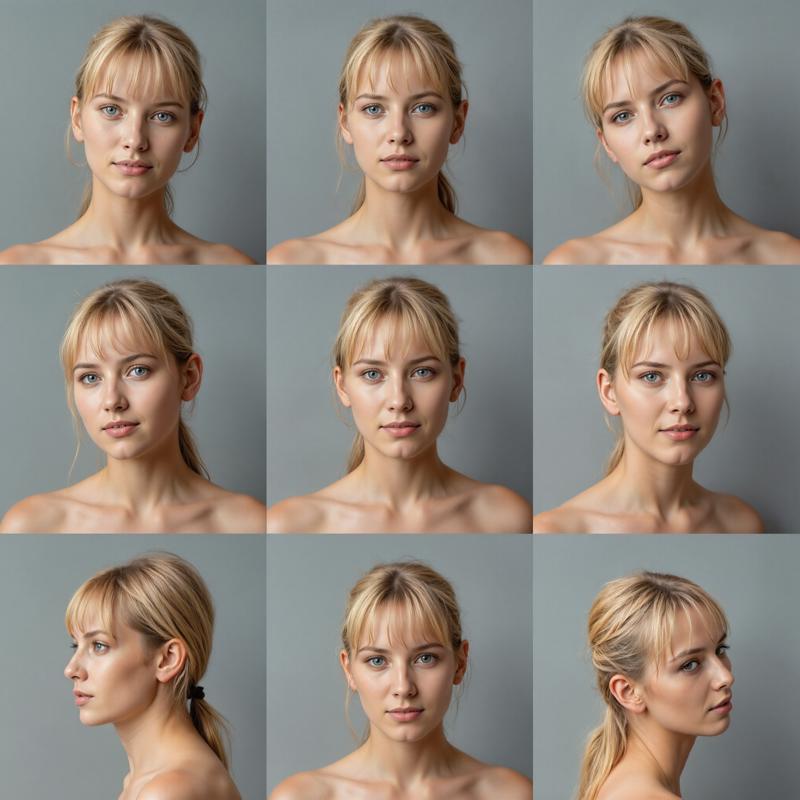 The workflow needs a reference image for the 9 poses in the 3x3 grid.
You can use the one I made for the workflow, but you can make up your and use that instead. Here is mine:
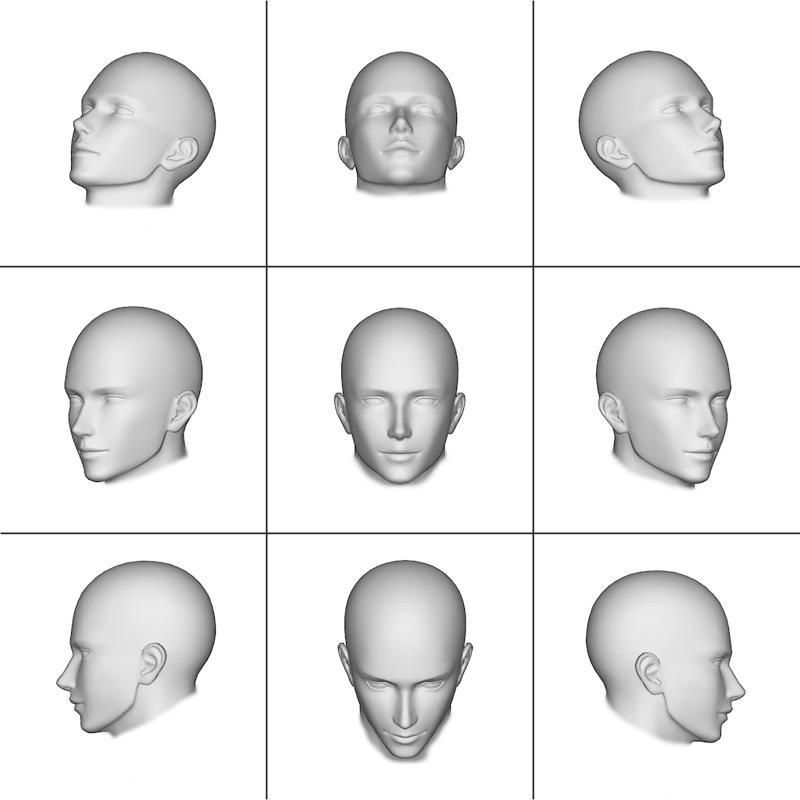 Please, use this link to download the above image in the correct resolution (1024x1024): Reference-Grid.png
I suggest not to change too much the prompt, just modify the description of the subject you want to be portraied (age, skin, physique, face, hair and eyes).
The workflow uses the FLUX.1 depth LoRA from Black Forest Labs:
https://huggingface.co/black-forest-labs/FLUX.1-Depth-dev-lora
Set the LoRA strength to 0.75, the FluxGuidance to 10.00. You can use also additional LoRAs' (for better skin details for example, or to obtain more faces from a previous character LoRA you trained)
If you have less that 24Gb Vram, it is suggested to use the GGUF Q8 model in place of the original Flux.1 Dev, as the workflow need a lot of Vram during the Adetailer part of the generation.
Enjoy!
Important: please, make sure you update ComfyUI, the Python dependencies and all the Custom Nodes before using the workflow.
P.S.
Please be advised that the Adetailer part of the workflow will take very long to complete the generation as it has to work on 9 faces and then again on 9 pairs of eyes. Also, the Upscaler may be slow if you want to use an upscale ratio of 2.0 or above.
Description
The new version v1.1 introduces a lot of changes.
First of all it automatically takes care of splitting the 9 images from the 3x3 grid output image.
Then the workflow applies a few enhancement to each one of the 9 portraits to reach more realism:
1) the 3x3 grid is upscaled first, before any other enhancement is applied;
2) then a skin lora is used to improve the detail of the skin;
3) ADetailer for eyes is applied after the skin lora;
4) last the workflow applies a FLUX-chin fixer, to avoid the infamous cleft-chin that many Flux images have.
FAQ
Comments (37)
Any chance you'll make an illustrious or SDXL version of this workflow?
As soon as the first KSampler is hit: mat1 and mat2 shapes cannot be multiplied (2500x64 and 128x3072)
What 3x3 grid reference image did you use? Ok, I added a link to the right reference image since CivitAI resized the one I posted in the description of the workflow. Try with the one I shared on imgur and let me know.
@Tenofas The 1024x grid solved the issue, thanks.
I want to install ComfyUI, but when I install ComfyUI_LayerStyle in Manager and restart it, ComfyUI freezes.
Deleting ComfyUI_LayerStyle fixes the freeze.
Did you update ComfyUI and its Python dependancies? They updated ComfyUI many times in the last 2 weeks, and some custom nodes too, so you need the latest versions to be sure it works. I am testing the workflow with the latest changes to make sure everything works fine,
Also, LayerStyle nodes were recently split in 2 different custom nodes, ComfyUI Layer Style and ComfyUI Layer Style Advance. The Advance nodes have the LayerMask: SegmentAnythingUltra now. https://github.com/chflame163/ComfyUI_LayerStyle_Advance
So try to install both these custom nodes by the same author.
So, took me about an hour to fix all the missing nodes (teacache/pulid) and models. Now when I run it, it literally just crashes Comfyui.
got prompt
Loads SAM model: Z:\NewComfyUI\ComfyUI_windows_portable\ComfyUI\models\sams\sam_vit_b_01ec64.pth (device:AUTO)
model weight dtype torch.bfloat16, manual cast: None
model_type FLUX
INFO: Created TensorFlow Lite XNNPACK delegate for CPU.
WARNING: All log messages before absl::InitializeLog() is called are written to STDERR
W0000 00:00:1742496149.251683 12232 inference_feedback_manager.cc:114] Feedback manager requires a model with a single signature inference. Disabling support for feedback tensors.
# 😺dzNodes: LayerStyle -> PersonMaskUltra V2 Processed 1 image(s).
Using pytorch attention in VAE
Using pytorch attention in VAE
VAE load device: cuda:0, offload device: cpu, dtype: torch.bfloat16
Requested to load FluxClipModel_
loaded completely 9.5367431640625e+25 9319.23095703125 True
CLIP/text encoder model load device: cuda:0, offload device: cpu, current: cuda:0, dtype: torch.float16
clip missing: ['text_projection.weight']
Requested to load CLIPVisionModelProjection
loaded completely 12469.569035339355 787.7150573730469 True
Requested to load AutoencodingEngine
loaded completely 6316.553977966309 159.87335777282715 True
Z:\NewComfyUI\ComfyUI_windows_portable>pause
Press any key to continue . . .
PS Z:\NewComfyUI\ComfyUI_windows_portable>
Sorry for formatting. CivitAIs code preformatting doesnt work.
Seems to be an issue with this:
https://i.imgur.com/IwTIwQi.png
When I change to a different model, comfyui doesnt crash, but I do just get other errors.

Got it working, no idea how lol. New issue. The layermask, even at .05 confidence, doesnt capture the entirety: https://imgur.com/a/fJC5bJg
Fixe by enabling all options except background, and setting confidence to .26
The original crashing of Comfyui was do to using pulid_flux_v1 instead of 0.1.9.
LOL, bro. What is going on here?
@singularity42 Are you sure about the workflow? This node is not in the Consistent face 3x3 generator... maybe you are using the FaceReplicator workflow. Also, this is part of the Flux Redux model.
@singularity42 if you had a previous version of PuLID, trying to install the new Pulid_for_FLUX_II may give you problems. Check here: https://github.com/lldacing/ComfyUI_PuLID_Flux_ll/
@singularity42 wrong settings in the nodes before these... can you screenshot from the "FLUX models loader" group to "Workflow settings" group?
@singularity42 also... what kind of reference 3x3 grid image did you use?
@Tenofas Thanks for the replies!! Your workflow is missing many nodes, and many are old or unused, as well as others having been renamed.
1 - I am using v1.1 - consistentFace3x3_v11.zip - Here is my workflow as it is now: https://pastebin.com/rcYBiir1
2 - I did not have a previous version of PuLID - Fresh portable version - Fresh Install
3 - See attached workflow
4 - I used your reference image linked here: https://imgur.com/a/EZIAZwV
@singularity42 "1 - I am using v1.1 - consistentFace3x3_v11.zip - Here is my workflow as it is now: https://pastebin.com/rcYBiir1"
This is not the Consistent Face v1.1 workflow... it is the Face Replicator one!
With this wf you should not use that 3x3 grid reference image!
PuLID needs some model files to be installed manually.
Just a couple of nodes were renamed recently (TeaCache is one).
@Tenofas Ok, I am quite confused. When I click download on the model page it says consistentFace3x3_v11.zip
When I unzip it and import into ComfyUI it still says consistent face workflow. How can it not be, its the only dowload. Thanks.
Nevermind. Im an idiot. I have no idea how I could possibly have mixed up to zips lol. Ok, trying again.
Hi wondering if anyone could help me.
When generating pictures, most results have been somewhat similar, in a sense of the woman being skinny, tighten up hair, and similarities on facial features. I've been trying completely different prompts, messed with guidance/samplers/schedulers and the seeds are randomized, however not much luck.
Could this be due to the 3x3 reference image?
If anyone has got some tips to get a variety on the people generated i would appreciate.
I'm still learning so forgive my ignorance.
Yes, it could also be the 3x3 reference image but the settings could have more importance.
I see, thanks.
would you have any recommendations on the settings, for the sampler, scheduler and the flux guidance ?
@maximatmen191 1) try changing the Flux-depth Lora strength (between 0.50 and 1.00). 2) Flux guidance could go as low as 2.2 but if you want to follow the prompt you should increase it to 10.0 or even higher. 3) Try to give more details in the prompt about the character appearance. 4) Try with deis/ddim_uniform, it works very well with realistic portraits.
@Tenofas Got it, will keep trying, many thanks for your replies :)
Hi, there is red circle at ksampler's scheduler input, i tried other schedulars (karras, normal, simple, etc.) it still red circle. how do i solve this problem thanks.
The best way is to convert the input to widget, so you select the scheduler directly in the Ksampler node. Unfortunately, the Scheduler and Sampler selector nodes may break due to ComfyUI updates. I will probably stop to use them in my future workflow, they just give troubles.
@Tenofas Thank you, i'll try
Can I give it a reference picture? Because I want to use a face that I am satisfied with as a reference to generate other angles. If so, how can I do it?
Use my other workflow: FaceReplicator.
FaceReplicator where can I download it?
Damn, I guess CivitAI blocked it... I can see it but probably just because I am the author... Try to see if you can open it here: https://civitai.com/models/1260380/facereplicator-for-flux otherwise you will need to download it from my Patreon (it's free!): https://www.patreon.com/posts/facereplicator-1-123919854
What if you want a full body character?