UPDATE: Improved notes and user experience. Let me know what you think.
Also I will be tipping Buzz to everyone who upload and tags the model, show me you beautiful work! :)
V1.5 720P is out: information on previous version right after.
I've added ComfyUI-MultiGPU, and it's a game-changer! This advancement allows you to run Hunyuan at resolutions that were previously impossible. Performance on my workflow was already solid, but with this addition and with sage anttention enabled I managed to get these generation times
3090 24 gb of ram. 97 frames, 24 fps, two LoRAs loaded.
720x480 217 secs ( 3.6 minutes )
960x544 362 secs (6 minutes)
1240x720 800 secs (13 minutes)
Credit to firemanbrakeneck for teaching me how to install sage, this is the guide you need but it is a pain in the ass.
Full credit to Silent-Adagio-444, the mastermind behind this plugin, who also helped me implement and fine-tune it for my workflow.
I'll keep the instructions as simple and brief as possible. You'll need to experiment with the node settings depending on your system.
Instructions:
Install ComfyUI-MultiGPU via Comfy Manager or Git.
install ComfyUI-GGUF (this is required!)
Download the GGUF version of the LLM from this link and place it in the Unet folder.
Set up UnetLoaderGGUFDisTorchMultiGPU. I have it set to 4.5, but if you have a lower VRAM card, you may need to increase this number. Experiment to find the best value for your system.
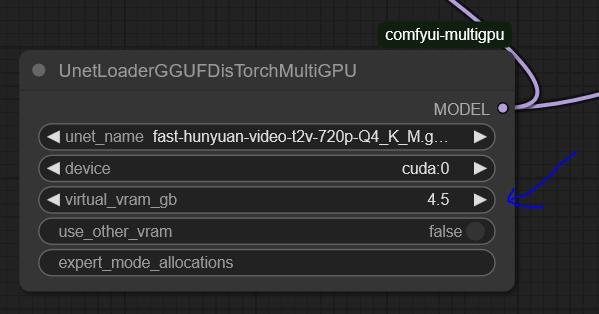
the settings here are optimized for my system: RTX 3090 (24GB VRAM) and 64GB RAM.
You'll need to tweak the settings to find the optimal configuration for your hardware.
For 720p, I use Fast Hunyuan GGUF Q4_K_M.
The less VRAM you allocate, the slower it will be. No free lunch!
Find the optimal balance for your setup.
General info about the workflow and the previous version:
Hi everyone, Bizarro here after countless hours of optimization, I’m happy to share the workflow I’ve been using to extract maximum quality and performance from Hunyuan.
Credit where it's due, this workflow is based on This youtuber workflow I’ve been tweaking settings for weeks to get the best quality possible.
I’ve also finally solved the issues many had with multiple LoRAs! 🚀 You can mix up to three LoRAs without losing quality and even put several characters in the same scene. It works best with two, but I managed to do three in the example (Bizarro LoRA, Wonder Woman LoRA, and Thanos LoRA).
Clarification: I got a bit lucky with the example generation was the first attempt actually I have since discovered it is hard to juggle the LoRAs for consistent results. the Workflow is very fast and the results are pretty great. I will add more examples as I create them. The workflow is great for combining a Lora style with a Lora character as well.
You have to work properly with the prompt make sure you describe the characters, for instance "a Caucasian male" clothes, body size etc, where the character is situated in the frame.
This workflow is highly optimized for a 3090 and can generate 97 frames at 960x544 in less than eight minutes. If you’re using a card with less RAM, try using a different smaller GGUF version or and reduce quality to 480p.
[For more experiments follow me on X
I ramble all day about video generation and also create funny videos.]
This is the GGUF version I’m using, and you can get it here: here:
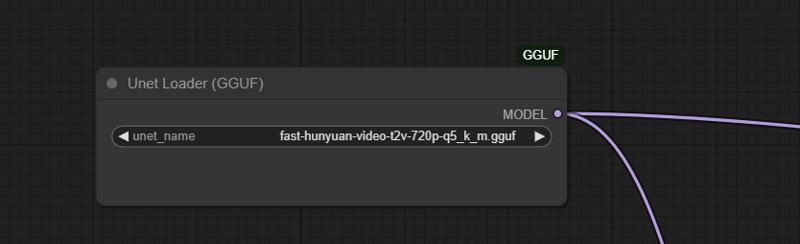 I tried many LoRA nodes, but they were all really bad. The final breakthrough came when I found this node:
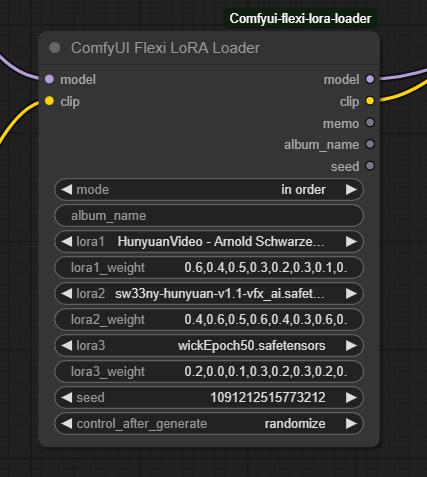 Make sure to set the mode to "In Order." Just select the LoRAs you want and describe each character in detail using the proper trigger words.
Multiple LoRA weight values correspond to different steps in the denoising process, controlling how much influence the LoRA has at each stage. Higher weights in early steps shape the overall structure, while later weights refine details. This allows for more nuanced blending, ensuring that a LoRA’s effect isn't applied uniformly but adapts dynamically throughout the image or video generation process.
It works really well with two characters, but if you’re patient, you can make it work with three as well.
This will work not only for characters but also for all kinds of loras.
This works not only for characters but for all kinds of LoRAs.
I’d love to see what you come up with!
Love,
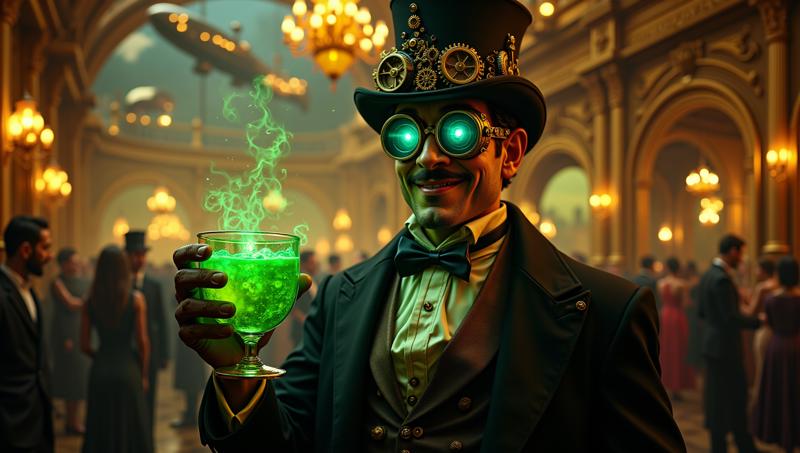
Mr. Bizarro
Description
FAQ
Comments (43)
How does the Lora weight parameter work?
@mckenna Well, I'm seeing Loras blend in with the default settings. I used Asmongold and Ana De Armas in a conversation, and the faces are definitely getting mixing up.
@Melty1989 I am not sure why but it doesn't work well with all loras (maybe depends how they where trained) I tried and sometimes there definitively is some mixing of faces. but works very good to mix styles with characters. also make sure to describe well each character
@mckenna Yeah it doesn't seem to play well with all loras. I did try detailed descriptions but no dice. Asmongold looked like he had some of Ana De Armas' genes lol
@Melty1989 well, he could use some ana de armas genes... I notice it helps also detailing here each character stands and changing the order of the loras
Yea i gave this a quick try solely for the potential of being able to have 2 lora characters in a scene. i tried many different orders to lora loading and order of characters in prompt. no luck. it's all mixed similar to other workflows. If it only works with specific lora's that is unfortunate
@zengrath maybe when we get img to vid, that combination with the loras will help solve this
@Redbird I have a good feeling it'll morph faces and mix them during course of video. we already see it with current methods. but we'll see. while i do hope official img2vid works better then current lora methods and all, it likely won't be perfect
bros come check the latest examples, I been getting better results will update description soon.
@mckenna you said you got better results, what did you end up doing?
@ablestable69420 being very smart with prompting and changing the values of the lora loader a bit, new version coming out soon with detailed explanation.
It's great, very fast!
But how are the pesos of the Loras configure?
@mckenna he means the weights. Translation error from spanish probably.
@thefoodmage you can modify the lora weigths by changing the numbers for each block
Has anyone tried a multi-character Lora for Hunyuan yet?
I did, but I could not keep the characters from bleeding together, even with verbose captioning. I had to end up doing separate LORAs. I kept dimension/rank at 32 though and didn't try increasing it to 64 or higher though.
I think if someone trained a lora for 2 characters it would work way better, so if you train the office, make sure to train all characters interacting with each other.
Or a simp;ler one, train Tifa and Cloud interacting with each other.
@entmike2 @Redbird Yeah, I've got one running now. Trying a Flux type caption where each character has the same call plus a unique for each. 220 images plus the txt is going to take a while. 4090 is producing around 1 epoch every 14 minutes. I'm going to run it to 100. I kept the rank at 32 with a tr of 2e-4.
@passhornet5266570 Sounds cool, would love to see what happens
I have and it oddly worked with two women, but not a woman and a man.
@ablestable69420 Yeah, this one kind of almost worked. What I am seeing is there needs to be a specific wording setup in the txt file to be able to call each. I'm going to run another one this weekend with a repeating unique string for each. Not sure if it will ever work 100%
I just tried 3 Office Space LORAs but the characters all bleed together. I am probably doing something wrong but I kept all the workflow params as-is aside from changing the LORAs but it is not working for me.
Keep up the good work, though!!!
it really depends, I already discovered it will not work for say two girls. you need to add a good description that includes physical and location of the character. also a bit of luck...
I'd guess they are too similar by default, the Marvel characters look so different with their clothign etc that it helps hide the bleeding
@Redbird it really depends on the lora but also help when the characters are noticeable different.
I have tested some of this loras and they are pretty bad. I dont know if the training technique was different but not the same as wander woman or Sydney sweeny loras for example that play very well with my workflow.
Thank you for providing download links to models and nodes that you use. Too often people assumed everyone has everything downloaded or that the comfyui manager always has what you need (it doesn't and often removes things that were once available).
Gladly I am happy it helps!
My queue is stuck at 0% on a RTX 4090. I see this error: clip missing: ['text_projection.weight']
Do you know how to fix?
find dual clip loader. it is not loading probably cos you dont have the file or you need to reselect.
@mckenna I have clip_l.safetensors selected for clip_name1 and llava_llama_fp8_scaled.safetensors selected for clip_name2 and hunyuan_video selected for type in the DualCLIPLoader node.
I'm still getting the error?
Is it because of clip-vit-large-14, if so, where did you download your clip files from?
@armaishiphop824 sound like you have it set right make sure the files are in there. other than that I have no idea....
@mckenna It seems to be the clip_l.safetensors file that's causing the issues for me. Do you know where you got that file from?
Could you please give me a link to it?
@armaishiphop824 is the standard one try to redownload sometime gets corrupted. https://huggingface.co/calcuis/hunyuan-gguf/blob/36057fc624c822df91c13d487c9202c420426ae9/clip_l.safetensors try this one.
@mckenna It still doesn't seem to work for some reason. :/ And the error only seems to appear when clip_l.safetensors is selected in clip_name1.
@armaishiphop824 not sure what may be wrong but you do need triton to use teacache, if you dont know how to install you can get rid of teacake node in a 4090 will be fast anyways.
Wow, this is pretty awesome. I have a 3090 as well. These are the best results I've seen. It is taking about 8 to 9 minutes.. but for video of 960x544 this is definitely doable. Not sure how you did, but this video is nearly Youtube ready.
Thanks a lot, I think further tweaks can get this maybe to 6 or seven minutes for me is around 8.5. I quick upscale in topaz and you can really use it.
@mckenna Yes, the upscale helps a lot. I dont have Topaz,. I use VideoProc , which does an ok job.
@trashkollector175 Well 1.5 is coming out soon and I managed to get it to 720p for 99 frames :) stay tuned my Fiend.
I am getting 960x544 in 6 minutes currently on my 3090 with 2 pass, which is preferable as in 50 seconds you can see 80% of what the final result will look like and discard if necessary
This is the best workflow for me..EVER! i have been trying so many workflows on this website and others..and they all were just a big waste of time. while others were good..the rendering time was really absurd. Your workflow is right on the spot! I still need to doo some tweaks and see how i can use my favorite loras and in which order for the best results! But overall this workflow is a goldmine! Thank you !
Well that's mean a lot! I put a lot of hours on this o I am happy its being used. If you got some nice results please post and tag my model so I can see. New version coming out soon. you can get away with 720p on a 3090.