Adjust the brightness level of the images generated by SDXL.
Darkening in the negative direction.
Brightening in the positive direction.
Recommended range: -1.5 to 1.5.
The example image has undergone refinement
IN WEBUI, You need to go change the settings, go to Extra network in settings, check the box for Always show all networks on the Lora page.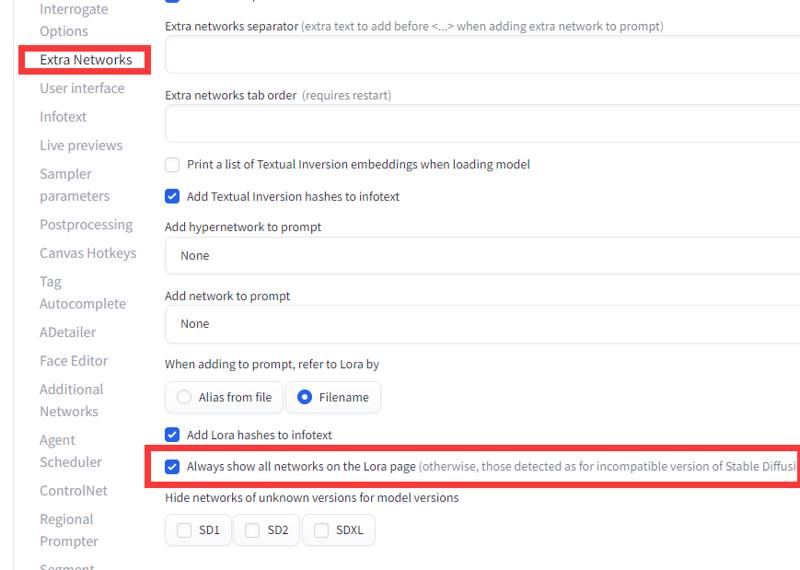
Description
FAQ
Comments (6)
It goes in LORA dir right? I put it there doesnt show up. CivitaiHelper dfinds it. I tried restartig it redownloading it and renaming it. Just doesnt show up.
Same here
For webui, open settings, go to Extra network, move to the bottom, and check Always show all networks on the Lora page, then you will see it.
Same here
Ok will try. But what kind of network is it then?
Edit nvm:
[x]Always show all networks on the Lora page
(otherwise, those detected as for incompatible version of Stable Diffusion will be hidden)
To have this LoRA show up in the LoRA tab of A1111:
1) Load any SD1.5 model
2) Go to LoRA tab, search for this LoRA and click the "Edit metadata" button in top right of its card
3) Change "Stable Diffusion version" from SD1 to SDXL