


Split Screen | Concept LoRA
READ BEFORE USE!!!
Weight can go from 0.9 up to 1. I recommend 1. Works with almost every Style, every Character and Photorealistic Models.
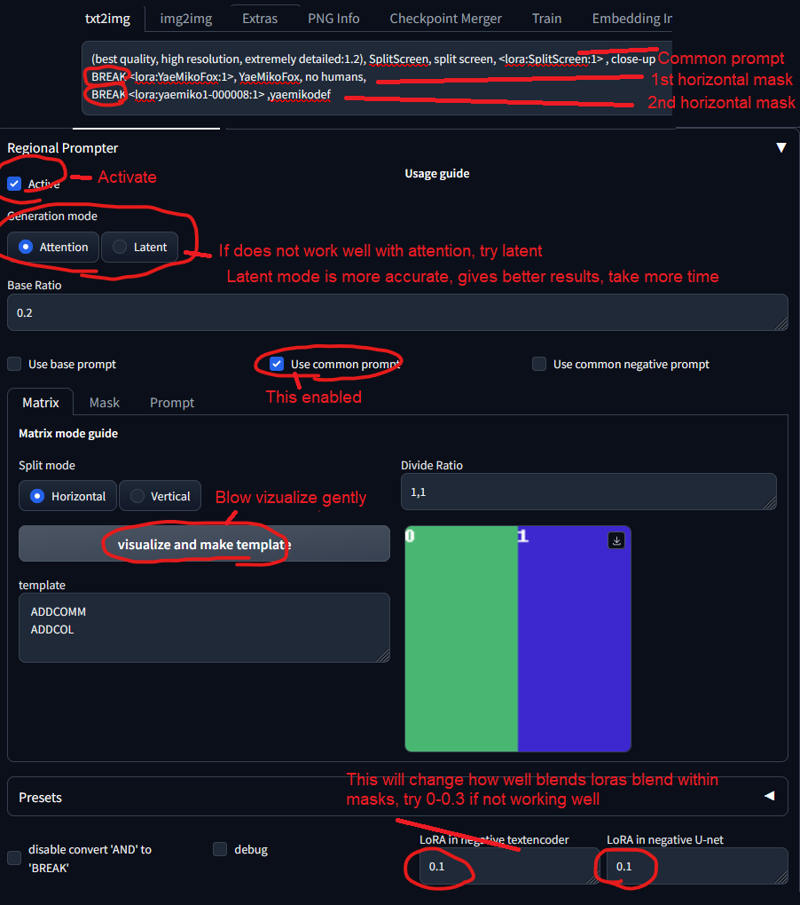
This Model has to be used with Regional Prompt, If you want your Character accurate. See Preview Images for Prompts. You need this Extension and these Settings:
(put 0.5-0.6 weight to Splitscreen Lora, if its too much. Common prompt doubles it)
Trigger Word:
SplitScreen, split screen
Helping Prompt:
close-up
How to use LoRA's in auto1111:
Download LoRA
Copy the file to
stable-diffusion-webui/models/loraSelect your LoRA and use the triggerword
Make sure to change the weight if needed (by default it's
:1)Have Fun!
Description
FAQ
Comments (2)
Details
Downloads
1,088
Platform
CivitAI
Platform Status
Available
Created
7/25/2023
Updated
9/26/2026
Deleted
-
Trigger Words:
SplitScreen, split screen
close-up
"Read Description!"
Available On (1 platform)
Same model published on other platforms. May have additional downloads or version variants.