












This workflow is now discontinued as I will focus on other models.
Version 6.0
The new Flux Modular WF v6.0 is a ComfyUI workflow that works like a "Swiss army knife" and is based on FLUX Dev.1 model by Black Forest Labs.
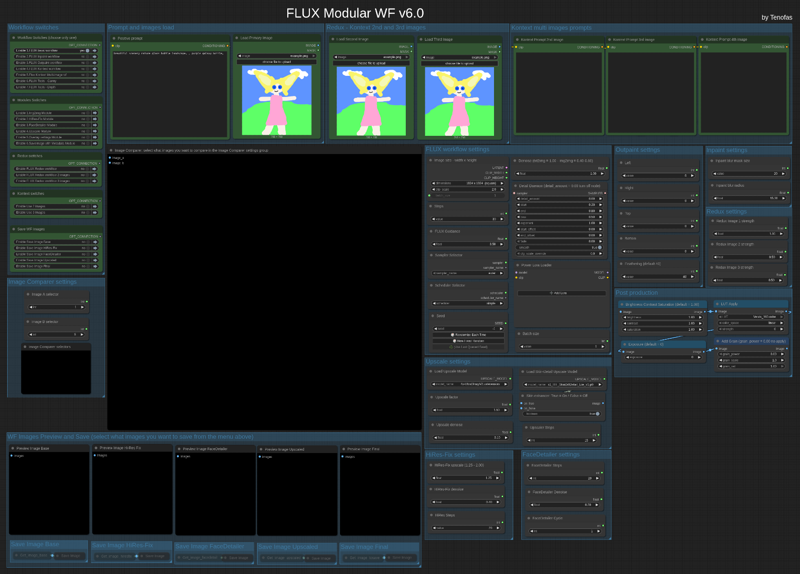 The workflow comes in two different edition:
1) the standard model edition that uses the BFL original model files (you can set the weight_dtype in the “Load Diffusion Model” node to fp8 which will lower the memory usage if you have less than 24Gb Vram and get Out Of Memory errors);
2) the GGUF model edition that uses the GGUF quantized files and allows you to choose the best quantization for your GPU's needs.
Press "1", "2" and "3" to quickly navigate to the main areas of the workflow.
You will need around 14 custom nodes (but probably a few of them are already installed in your ComfyUI). I tried to keep the number of custom nodes to the bare minimum, but the ComfyUI core nodes are not enough to create workflow of this complexity. I am also trying to keep only Custom Nodes that are regularly updated.
Once you installed the missing (if any) custom nodes, you will need to config the workflow as follow:
1) load an image (like the COmfyUI's standard example image ) in all three the "Load Image" nodes at the top of the frontend of the wf (Primary image, second and third image).
2) update all the "Load diffusion model", "DualCLIP LOader", "Load VAE", "Load Style Model", "Load CLIP Vision" or "Load Upscale model". Please press "3" and read carefully the red "READ CAREFULLY!" note for 1st time use in the workflow!
In the INSTRUCTIONS note you will find all the links to the model and files you need if you don't have them already.
This workflow let you use Flux model in any way it is possible:
1) Standard txt2img or img2img generation;
2) Inpaint/Outpaint (with Flux Fill)
3) Standard Kontext workflow (with up to 3 different images)
4) Multi-image Kontext workflow (from a single loaded image you will get 4 images consistent with the loaded one);
5) Depth or Canny;
6) Flux Redux (with up to 3 different images) - Redux works with the "Flux basic wf".
You can use different modules in the workflow:
1) Img2img module, that will allow you to generate from an image instead that from a textual prompt;
2) HiRes Fix module;
3) FaceDetailer module for improving the quality of image with faces;
4) Upscale module using the Ultimate SD Upscaler (you can select your preferred upscaler model) - this module allows you to enhance the skin detail for portrait image, just turn On the Skin enhancer in the Upscale settings;
5) Overlay settings module: will write on the image output the main settings you used to generate that image, very useful for generation tests;
6) Saveimage with metadata module, that will save the final image including all the metadata in the png file, very useful if you plan to upload the image in sites like CivitAI.
You can now also save each module's output image, for testing purposes, just enable what you want to save in the "Save WF Images".
Before starting the image generation, please remember to set the Image Comparer choosing what will be the image A and the image B!
Once you have choosen the workflow settings (image size, steps, Flux guidance, sampler/scheduler, random or fixed seed, denoise, detail daemon, LoRAs and batch size) you can press "Run" and start generating you artwork!
Post Production group is always enabled, if you do not want any post-production to be applied, just leave the default values.
Old version: V5.0
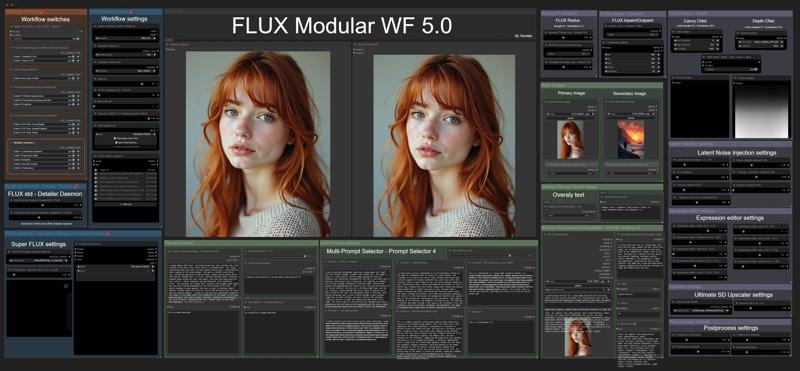 You can use the original model files or the GGUF versions.
There are two different basic workflows for generating an image: the standard FLUX workflow (with the optional Detailer Daemon nodes) and the Super-FLUX workflow (inspired by Olivio Sarikas' workflow). The Super-FLUX wf just split the total steps into three distinct sampler generations (1/3 of the total steps on each sampler) bringing more details to the image (sometimes even too much!).
The FLUX tools are all available: Redux (IP-Adapter), Inpaint/Outpaint, and Depth/Canny (ControlNets).
Prompt management is extremely powerful: you can use JoyCaption 2 for captioning an image and generate a detailed prompt; there is a local LLM (running on ComfyUI itself!) for LLM prompting generation; you can keep up to 6 different prompts for easy and quick use; last but not least you can create an image-database of your most used prompts: save the images you like in a specific folder, and use them as prompt-database. Just upload the image you want and the prompt you used for that image (and all the metadata saved with it) will be available for your next job.
The Modules available are the following:
1) Latent Noise Injection - improve the details of the image;
2) Expression Editor - to modify the expression of your subject in portrait images;
3) ADetailer - to improve quality and detail of hands, eyes, and faces;
4) Ultimate SD Upscaler - to upscale your images with the upscale models you like;
5) Postprocess - the final retouch to your images: saturation, contrast, sharpen, grain, and apply LUT.
The workflow needs ComfyUI with Python 3.11, as the latest version of ComfyUI is based on Python 3.12 and some custom nodes are not working with 3.12. On my YouTube channel, you can find a workaround if you have windows_portable ComfyUI with Python 3.12 and want to revert back to 3.11.
If you have trouble (Out of memory errors) with the original FLUX Dev model, I suggest you to try the GGUF version of the model: Q8 is almost the same as the original one, Q6.K or Q4.K are good alternatives.
Use the following keys to navigate the Workflow: "1" for the frontend; "2" for the explanation notes and links to models to download; "3" for the backend (usually you will need this just for the first use).
How to use the workflow
The first time you upload the workflow you will need to install 35 custom nodes (unless you use some of them already for other workflows or you already used my old workflows like the v.4.3).
I suggest installing one custom node at a time, restarting ComfyUI to make sure the installation was successful, and then installing the next custom node.
Once you have the workflow ready with all the custom nodes, you will need the models files (unet, vae, gguf, clip, clipvision, stylemodel, upscale model, sam model, bbox detector, LUT...). In the workflow's notes (press "2") you will find all the links if you need to download them or if the ComfyUI Manager does not have them available for installation (always check ComfyUI Manager first!).
Before you run the workflow, you need to do one last thing: upload the images for Input Images (Primary and Secondary) and the Prompts & parameters DataBase group. You can use any image you want to run the workflow, it's just because those nodes need an uploaded image to work. Otherwise, the workflow may get stuck.
The Worflow video-guide on my YouTube channel:
Coming soon...
Important
If you like my workflow and you want to share images you create with it, I would really appreciate it if you post them in the Gallery below, just click on "+ Add Post" button.
Thanks
Tenofas
Description
This version has just a fix to the Save Image nodes that in some installation had trouble working due to some other nodes were updated.
FAQ
Comments (30)
Bugs so far:
1) Joycaption doesn't work, probably due to nodes that have been changed yet again, judging by the value type mismatch:
- Exception Type: AssertionError
WARNING: DreamInputText.IS_CHANGED() got an unexpected keyword argument 'value'
2) Same bug as in version 5.0, easily fixable, fixed myself. On first generation samplers in standard/super flux grow in size overlapping with each other.
Sampler in standard overlaps with super group. This results in standard/super toggles not working correctly. Standard toggle also affects super toggle.
Testing the workflow further.
how did you fix?
@voxefx788 First of all, update ComfyUI, Python dependencies and all Custom Nodes. Then go to this link: https://github.com/EvilBT/ComfyUI_SLK_joy_caption_two/blob/main/readme_us.md#installation and follow all the step by step installation instructions for JoyCaption 2. There are some files you have to download manually.
@Tenofas
i followed your youtube tutorial to set up comfyui for your workflow. joycaption works fine, just not in your workflow.
@voxefx788
if you're asking about overlapping groups, just move them apart
@Tenofas Still no luck, on the bright side the update fixed the save file issue and the scheduler node that was always red? Joycaption refuses to work.
@voxefx788 Joycaption may need some manual download... let me check
Great work agin. thank you very much. I spent a bit of time looking at sd 3.5 which is nice but unattended. flux is much more supported by the community. i had to unininstall and reinstall some nodes to get the workflow work, but that's life with comfyui :-)
Has anyone had issues with slider controls in nodes no longer working, and then just disappearing altogether? I can still set the slider values by using the Properties menu item for the node, but it isn't as much fun when you do it this way. All my nodes are updated, and I'm using Python 3.12.
when using superflux with a batch of 4 and a depth map it only does one image. it doesn't create 4 like it usually does and it process the image automatically
I am afraid that batch generation can not work if you use depth... I will take a look at this.
can you update the image preview chooser node with this https://github.com/chrisgoringe/cg-image-filter the previous one doesn't work for me anymore, and this is from the same developer. replacing the node with the image filter brings a pop up in the screen to choose which images you want to proceed with.
Also i believe flux fill can work with loras but i think its not connected to the lora loader in the workflow
I will give it a look, thanks!
First of all, I want to say thank you for version 4.3 of the previous WF; it works perfectly and has everything needed to work with Flux. It's the best thing available on the internet, without exaggeration. But why is this new version necessary if 4.3 is perfect?
I just added a few new things in v.5 and make the UI more clean and easy to use.
Thanks for great work! You haven't added a Florence module in this version. It was useful. Why?
There is a JoyCaption2 module in place of the Florence one
Many nodes are still not working even after successfully installing all the custom nodes. I believe this may be due to the recent shift of the ComfyUI Essentials nodes to maintenance mode. Could you please update this workflow? This workflow is a core part of my ComfyUI setup, and I truly appreciate your help. Thank you!
Hello! I was using this Workflow a lot, but now it says that I'm missing the Advanced Lying Sigma Sampler, but it's installed :/ Any idea on how can I replace this node or make it work?
Try to update the Detail Daemon Custom nodes.
@Tenofas Thanks for answering! Unfortunately, it's still the same. It's strange because I know it's installed—both manually and through ComfyUI Manager—but it's as if Comfy doesn't recognize it, and it's a vital node in this workflow :/
This is how it looks right now:
https://ibb.co/HTcX3q9C
@Madxis I see... anyway, is the Detail Daemon node working? Because at the end they do the same thing, there is no reason in using both. So, if one is not working you can use the other. Results should be the same.
I believe that they are updating the Custom nodes repo managed by the ComfyUI Manager, and not all nodes are updated at the same way. I am having trouble recently with rgthree nodes too.
@Tenofas I replaced it and now it goes through there! But now it stops at 'Scheduler selection and steps.' It's something I noticed in the workflows—since everything was updated, everything has to be connected to everything else:
https://ibb.co/yF74JJ2G
I used it last week and it was working perfectly—I don't know what happened these days.
@Madxis I am afraid every update of ComfyUI may broke the wf. Some more than others... I am planning to re-write the workflow sooner or later...
@Tenofas Thank you so much! Even if it takes time for you to do it, I’ll wait for your workflow—it’s the one that gives the best results :) It’s a shame these things happen with every update
Best workflow in town! Had to install as prompt reader via git clone reverse but then it worked. A bit slow on my runpod a40 instance but doable :) quality has it’s price (runtime)
Yes, on a A40 it may be slow, even if you get 48Gb Vram. I usually work on Runpod with L40 GPU. BTW... I am working on an updated version, hopefully will be read in 10-15 days.
@Tenofas will try the L40 but need to analysis cost/performance ratio. Oh I love to hear that <3 can’t wait to see what you are working on :)
Thx for keeping us up-to-date bro!