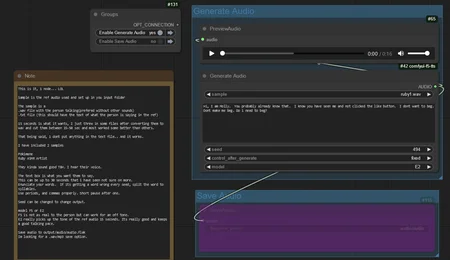
Using
https://github.com/niknah/ComfyUI-F5-TTS
Text to speech in comfy UI
Features
generates audio from a text prompt
custom voice from 15 seconds of talking audio.
Included simple flow with just TTS saving audio
Included advanced flow with lipsync video loader and face restore after.
Included 2 face video samples to test on
Included 3 voice samples
pokimane - Streamer
https://www.instagram.com/pokimanelol/?hl=en
Ruby - ASMR Artist
https://www.youtube.com/@rubybubyruby
Voice samples must go in the input directory directly. No subfolders.
To make your own sample just get a .wav of the voice you want. Cut it to 15-50 seconds
Put it in the input directory, then make a empty .txt file with same name as the .wav and it should populate in comfy node when you refresh. Thats it.
Notes
Audio can be saved as sets
voice.wav
voice.txt
voice.emotion.wav
voice.emotion.txt
Using just the voice.wav as sample, These can be called in the prompt with
{main} or {emotion} before the text allowing you to change tones.
This can be used to store many people in 1 set, allowing talking between people.
talkset.jenny.wav
talkset.jenny.txt
talkset.molly.wav
talkset.molly.txt
Called with {jenny} or {molly} before the text allowing you to change people.
Description
FAQ
Comments (3)
Hey rocky, quick question, you said it needs 15-50s of an audio sample you want, does this clone voices then i'm assuming?
Just tested out the simple nodes doing just tts and it worked well after I reread the readme a few times.
Create a F5-TTS folder in your comfy input
Take the voice of a person and load it as a wav
Have a .txt file with the same name- BLANK. I tested it with the transcription text and it sounded better blank and then transcribed by the computer
In the checkpoints folder of comfyui create a F5-TTS folder and put the safetensors model file and vocab files of F5 or E2 tts and rename them both so that the txt and model files match eachother- I couldnt find the VOCAB file for E2 and tried to use the one for F5 but that failed
The f5 versions worked decently quick on cpu
Also I had to go into the utils_infer.py file and set it to "cpu" bc I am on an old macbook air.
ill check the advanced workflow next, then emotions, and then do the lipsync video one.
Thanks for all of your help and work!
I've made a variation on this that allows for transcription of video or audio files into it. All glory to you for getting this going it's a lot of fun to tool around with, made a buddy of mine crack up a few times.
Looks like we don't have an active mirror for this file right now.
CivArchive is a community-maintained index — we catalog mirrors that volunteers upload to HuggingFace, torrents, and other public hosts. Looks like no one has uploaded a copy of this file yet.
Some files do get recovered over time through contributions. If you're looking for this one, feel free to ask in Discord, or help preserve it if you have a copy.