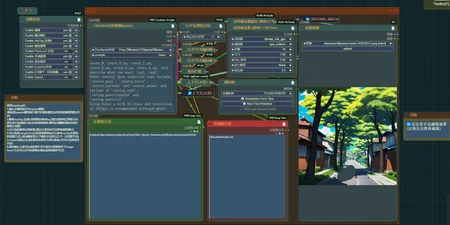
This is my first time creating and exporting a workflow, and this workflow is primarily focused on inpainting.
这是我第一次制作与导出的工作流,这个工作流为inpaint为主.
使用inpating时:
1.确认主模型是否为inpaint模型;
(假如是inpaint模型就不要开启重绘模型,如果是普通模型建议开启)
2.解除JoyTag (反推),将原图反推成tag,然后复制到正面提示词里在进行加减提示词;(如:将某物移除,便把该词删除或移动到负面提示词里)
3.自行选择遮罩处理类型;(建议不要同时开启两种遮罩模式)
4.自行选择sampler方式;(如果想要修改可以参考comfy处理里的搭建方式),(添加噪波是为了模拟文生图方式,不一定需要开启)
5.Impact是防止生成的部位有误作为再次修复;(可自行选择是否开启)
6.最后确认为是否生成的图片可以保存;(里面使用了Image Saver节点可以点开按需修改或改成其他保存节点)
The following is the AI translation:
When using inpainting:
Ensure that the main model is the inpainting model.
(If it's the inpainting model, don't enable the re-drawing model. If it's a regular model, it's recommended to enable it.)Remove the JoyTag (reverse inference), revert the original image into tags, then copy them into the positive prompt for further adding or subtracting prompt words. (For example: to remove something, delete the tag or move it to the negative prompt.)
Choose the masking method (It's recommended not to enable two masking modes simultaneously.)
Choose the sampler method (If you want to modify it, you can refer to the construction method in Comfy processing.) (Adding noise is to simulate text-to-image generation, but it's not necessarily required.)
Impact is used to prevent errors in the generated parts, serving as a re-fix. (You can choose whether to enable it.)
Finally, confirm whether the generated image can be saved. (The Image Saver node is used here, and you can open it for modifications or change it to another saving node.)
Description
Looks like we don't have an active mirror for this file right now.
CivArchive is a community-maintained index — we catalog mirrors that volunteers upload to HuggingFace, torrents, and other public hosts. Looks like no one has uploaded a copy of this file yet.
Some files do get recovered over time through contributions. If you're looking for this one, feel free to ask in Discord, or help preserve it if you have a copy.