
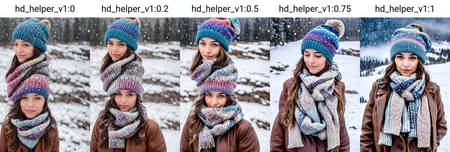
High Definition without high res fix. Generate images 1024x1024 or greater directly. No upscaling or special highres fixes needed.
This is an experiment I have been working on that frankly turned out way better than I expected. Attach it to a model and it allows you to generate images much larger than you normally would be able to, directly. No more double heads, huge foreheads or multi layered scenes when going over 768 px.
This initial release will be improved upon. It was trained at 1024 px at various aspect ratios to expand the knowledge of the model out to there. I should be able to take it out quite a bit farther in the next versions. It is created with a training trick I have been experimenting with to rescale the contextual awareness of a model without changing its knowledge.
Description
FAQ
Comments (28)
有点东西,存着没错的
Hey, this looks great but it messes up the colors. Take a look here: https://imgur.com/a/tVWgFtc
Using lower strengths <0.5, the color issue does go but then the image composition isn't great.
Interesting. Which model are you using? Are you using any other LoRAs?
Using juggernaut final, in the pictures I was using the add detail lora but even without it, I have the same issue. But the issue seems to be intermittent.
I find with more LORAs I have to turn down the CFG scale to prevent "image burn"
Same problem using xxmix9realistic model on CFG of 8. I am mixing other loras but everything looked fine until I added this and suddenly colors blown way out of control. Would love to jump to 1024 but may be waiting until I move to SDXL for that. Love your other loras btw @Ostris. Appreciate the work you do.
yeah i have same problem, when i add this lora, i get weird color in background, most of time green
Love seeing more of these. Could you post more comparison or range (-3/3) examples when you find the time?
really really amazing work, thanks a lot, hope you keep updating it and add improvements and hope you continue your revolutionary loras concept, hope you add another versions, maybe one focus on full body portrait, and another one on half body portrait, and may be one for cars and another objects somehow.
Oooh yeah such a tool for e.g. "Objects" (e.g. when you want to avoid characters) would be pretty helpful.
Is this a Lora or a Lycoris? Its listed as Lyco but I loaded it as a Lora and it works?
Ne new version of Automatic1111 updated their code to LoRAs and they now support LoCON, the plugin should no longer be needed on that software.
@Ostris So you dont need teh LyCo extension? I've noticed in extra networks, whatever appeared there also appeared in Lora
@jcatsuki Correct. I personally moved all my LyCORIS files over to the Lora folder but I believe it scant the LyCORIS folder as well even without the plugin.
@Ostris I see... Good thing they made this way. It's confusing somewhat because im using comfyui too, and comfy uses just lora (idk if lyco works in comfyui lora). Not to mention they use the same file extension together with the checkpoints/models.
Any recommended weight for this one?
In general, 1.0 is good when going to 1024x1024 natively. but that can be adjusted up or down slightly as needed
Fascinating concept, thanx.
This is easily the best LORA I've used. I used to hires fix every pic. Now I use this, and my processing is probably 60% faster (40% less time to render), and I can run wild aspect ratios like portrait 16:9 with a low error rate. before 16:9 was giving maybe 50% good results, now its closer to 80%. Thank you for making and sharing this amazing tool!
You are welcome! Thank you for sharing your experience with it.
I'm using with 0.65 weight. It's working fine for me.
I tried to use this with the civitai create function, and it gave me an error. Completely refused to generate any images. I tried a few different models and weights, didn't work.
so with this i can bypass the highres fix step? the point is to make generations faster? what does changing weights do?
The idea was to be able to bypass the high res fix need. It is really designed to work at a weight of 1. Though a slightly lower or higher weight may still yield good results.
can you explain how this is to be used? like how much weight should we add?
also would you make this for sdxl?
Details
Files
hd_helper_v1.safetensors
Mirrors
hd_helper_v1.safetensors
hd_helper_v1.safetensors
hd_helper_v1.safetensors
hd_helper_v1.safetensors
hd_helper_v1.safetensors
hd_helper_v1.safetensors
hd_helper_v1.safetensors
hdhelperLYC.safetensors
hd_helper_v1.safetensors
hd_helper_v1.safetensors
hd_helper_v1.safetensors
hd_helper_v1.safetensors
hd_helper_v1.safetensors
hd_helper_v1.safetensors
hd_helper_v1.safetensors
hd_helper_v1.safetensors
Available On (1 platform)
Same model published on other platforms. May have additional downloads or version variants.