
This workflow is intended to allow video generation with the incredible Hunyuan Model with 12gb vram (tested on 4070). Workflow isn't fancy, as I hate those workflows. I perfer simple workflows you can easily adapt to your needs.
With this workflow, you can generate your videos at a lower resolution (720x416 in my tests), then upscale to 1080p and generate new frames to result in a higher resolution, longer video. This also includes the ability to use wildcards and combination prompts.
Required models
Hunyuan BF16 or Hunyuan FP8 or Hunyuan Fast
Foolhardy Remacri 4x (or your favorite upscaler)
Workflow include a optional node to hook to a local instance of Ollama if you wanted to generate prompts with LLMs. (Disabled by default)
Workflow based on https://civarchive.com/models/1048302/hunyuanvideo-12gb-vram-workflow?modelVersionId=1176230
Description
Initial release
FAQ
Comments (86)
nice, can't wait to try this.
edit: is hunyuan fast the fp8 model but with the fast lora built in?
I'm not sure. I would assume so?
Great workflow, thank you for sharing. Just a side note for those who might wonder, "Shift" does not appear to work, at least with the fast model. I have not tested with other versions of the model but with the same seed, I keep getting the same gen regardless of the number. Same thing happened with the other 12GB workflow posted here. I've only gotten shift to function using the Hunyuan Video Wrapper nodes from Kijai.
Interesting, I'll take a look. Have you seen improvement in the quality when "shift" is working as expected? As in, is it worth spending time on?
@TalesfromOurDigitalLives Hard to tell to be honest as I have low VRAM (12GB) and kinda gave up trying to figure it out. Even without shift, I'm still managing to get great outputs so I'm not mad. I have to say, your workflow's output quality is much higher than what I was using, even at low res, so thank you again for sharing! <3
please include a hd screenshot of the workflow so we can see what it includes before we download
Will do
it is a really good workflow, but for me, it is impossible to make it work with HunyuanVideo LORAs
Hey @catfirmed . Here is how you would do it. Note that I've mostly used the bf16 version, unsure about the others.
You can chain your LoRAs like this:
the random/variation prompt is genius, thankyou. The upscaler also helps a lot
Error while deserializing header: MetadataIncompleteBuffer and Load Diffusion Model is circled in purpoe. So I did a sha256sum on hunyuan_video_720_cfgdistill_bf16.safetensors and it matches. So the model is not corrupt. I also downloaded the Fast version but it cannot be selected from the node, looks like something is hardcoded somewhere... maybe? I'm running an RTX 4090 on Linux
Just wanted to say this is probably the best workflow for Hunyuan right now, Thank you!
This workflow works pretty well and fast for me, so thank you a lot!
It's a bit off topic, but what model do you use with ollama (uncensored ?) ?
They seem to be using this one https://ollama.com/abedalswaity7/flux-prompt based on their workflow screenshot https://civitai.com/images/48139045
I have a question regarding prompts for the style of the generated video. A lot of times the generated characters have a anime/cartoon style even if i dont prompt for it. Is there a way to force a realistic style? So far i tried with prompts like "ultra-realistic", "photorealistic" or simply "real", but the result is still sort of anime-ish. Any tips or do others experience the same?
Well done! Takes about 6 minutes on my 4070 Ti Super.
Same on my non-super 4070ti
Oh, then I guess it's not normal that it takes 3 hours on my 4080 Super. I hope I can find a solution for that. :(
@BadToxic did you find the issue and fix?
@nicetry20010 Strangely after a pc restart and closing absolutely everything reduced the time to 6-8min (and I guess I reduced the steps a little). It seemed like it depends on my RAM usage (not GPU or VRAM). And if only a little bit more is in use the duration increases dramatically. Especially closing Chrome did most magic in my experiments. XD
I ended up using ComfyUI in Edge now, so I can close Chrome when needed. ^^'
Thanks. It's a great workflow which work pretty well in My Macbook.
Works great on my 4070 Ti. Only question is when I prompt walking towards the camera, they start forward for 2sec then walk backwards
The combine node has pingpong enabled. Turn it off to avoid the video looping back on itself
@TalesfromOurDigitalLives Just found out about this on the Civi discord lol. Been use to it being off by default when I load VHS Combine. Thank you!
I'm getting
Cannot execute because a node is missing the class_type property.: Node ID '#113' in all the set/get model/vae and the manager doesn't find any missing node.
Nice work! However I'm getting an error at the interpolation step:
"FILM VFI
The following operation failed in the TorchScript interpreter. Traceback of TorchScript, serialized code (most recent call last): File "code/__torch__/interpolator.py", line 15[...].
Any ideas? Thanks
False alarm- it worked the second time around. But the final VFI output is slowed. Any way to prevent that?
How do I turn off the random prompt? It is largely useless. Is there a way to just write in a prompt like normal?
Just type your prompt in that box. If you don't use wildcards or combination prompts, it will act just like a regular prompt.
@TalesfromOurDigitalLives same problem. can't modify source node contents...
@TalesfromOurDigitalLives i see, the random prompts node is editable, just not source.
@TalesfromOurDigitalLives tx mate..perfect
great workflow, thanks for uploading.
dumb question:
new to comfyui. workflow runs well. how can i get longer video, and/or increase resolution? i tried changing a few items that i thought might make the changes but they had no affect on end video...
I believe right now, 5 seconds is the limit.
@scooter_de i modified node emptyhunyuanlatentvideo to width=512, height=960, length=128 and got an 8 sec video in 15minutes on rtx 4090.
@scooter_de attempting length=256 now.
@tedbiv I saw the option too and increased the number as well. I have a 3060 with 12gb RAM. Let's if it can do it. It takes a while, the machine has only 32gb RAM and is 7 years old :-).
@scooter_de length=256 crapped out. out of memory. i'll try dialing down resolution...
@scooter_de 13 sec video, 32 minute initial processing, length=201... not too shabby.
@tedbiv I'm at 121 frames now. Still processing. What new resolution did you try?
@scooter_de tried 480x960 and 640x480, went back to 512x960. seemed best. i'll have to mess around.
I'm getting the warning(?)
python[1200633]: clip missing: ['text_projection.weight']Anybody else the same? Any ideas on how to avoid it?
I do not, and have stuff running for the night, but I think I know what would cause it.
On the far left is the block [dual clip loaders]
The first clip file is one you probably already have: clip_I.safetensors
The second one is one I had to download online and add to the clip folder: llava_llama3_scaled.safetensors
I think this is where I got it from....maybe...possible. I had to download quite a few items and had to restart my computer to get my GPU to play nice.
@robertsAmechE I noticed this is not specific to this workflow, but happens also in others. I now remember that I read about it a while ago. It seems to be an issue with ComfyUI. So far I haven't seen any issues with it. But I'd like to know what this warning is about. :-D
Getting OOM on 3090 though i am using fp8 fast model
Upscaler and frame interpolation nodes are not compatible with AMD ROCm. Will use it as a template to find replacement nodes.
If you get it working, can you post?
i think this is my new favorite toy... :)
Hi, thanks a lot for sharing. Where do I have to put "film_net_fp32.pt" for "FILM VFI" node?
It should download it automatically if I remember right
@TalesfromOurDigitalLives What if it doesn't? Mine gives me error saying it can't download. I have the .pt, and I'm trying to find out where it is too...
@musigreg369 - I had the same issue. It had downloaded the version of the file from dajes, however, this was causing a padding error.
Instead, I manually downloaded it from Huggingface and placed it into the ComfyUI/custom_nodes/comfyui-frame-interpolation/ckpts/film folder.
But, I'm also experiencing an issue where ComfyUI stops working while processing the very last video (FILM VFI node), but produces no error message.
Very nice ...thank you for posting.
Wow! Smooth as silk
This works great but I can't get the Loras to work. I'm new to Comfy and simply tried setting the lora node to always and tried on trigger but it never fires. Is there anything else I should do?
Did you try other loras and their trigger words, if applicable?
@GitarooMan I did. Doesn't seem to be working for any of them. I'm new to Comfy UI, do I need to add a prompt to the lora itself or somthing?
Hi im new in this and im load your workflow and i get info about missing of this few: FILM VFI
Display Any (rgthree)
VHS_VideoCombine
OllamaGenerate
DPRandomGenerator. From where i have to get them?
You should install the comfyui manager, which would make it easy to download missing nodes:
https://github.com/ltdrdata/ComfyUI-Manager
@TalesfromOurDigitalLives Great :) Thank You very MUCH :)
hello, New in this. can i use this workflow to image to video? (maybe a stupid question)
only workflows that actually works for me, and i have a 4090 too..
4080 mobile 12Gb. Doesnt work, No errors. Just crash and thats all. Othew workflows gives allocation
Hm. FastVideo works.
Where is it crashing? For me, it dies just as it's processing the final video. There was an issue with film_net_fp32.pt, however, downloading the version manually from huggingface and placing it in the appropriate folder fixed that error (relating to padding), however, now it just stops. This is on the FILM VFI process.
Tested on a RTX 3080 with 10Gb of VRAM, and 48Gb of RAM. Works fine, but randomly throws an "OutOfMemoryError: Allocation on device" error. I tested with 97 frames (first generation is estimated at 2:30 hours, but if I stop it and try to generate another one, it runs in 30 - 20 minutes (times will be random 😂)) and 121 frames, with 2 hours of work (I have not been able to reduce this time). The tested resolution is 416x720. I used the bf16 model and vae, and a fp16 clip.
Use the fp8 model, or a gguf, why would you use bf16, that's optimized for 24gb vram
Good afternoon. Could you please tell me how to enable LoRA? What should be connected and to what? I used another workflow, but it was already connected there, but I can't understand how to do it here.
Hello, I got it to work like this.
https://i.postimg.cc/26kfmdvq/Captura-de-pantalla-2025-01-29-120118.png
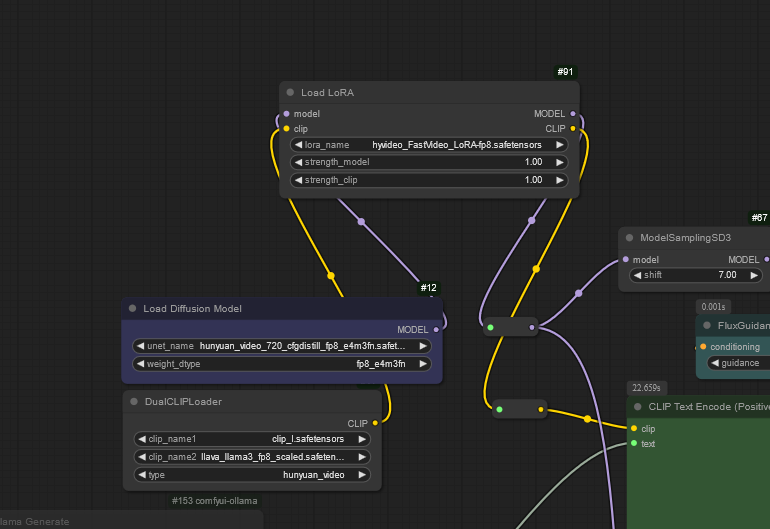
click on it, bypass, and bypass again worked for me.
"replication_pad3d_cuda" not implemented for 'BFloat16'
Does anyone know how to solve this issue?
reinstall comfyui. You could try to update pytorch too.
update your pip and embedded pytorch
I'm loving this now I've got things working, but would it be possible to add a TEXT box so it's not all random?
Thank you for your work, it is appreciated :)
You can add it anytime, just add a simple clip text encoder in the "yellow" line
You can type whatever you need into the random prompts text box.
can it use for 8gb vram?
Didn't try, but I doubt it.
I wouldn't
Is it possible to use more than one Lora at the same time? If possible, how do I do it?
yes, just add more "load lora" and put them between "load diffusuion model" and "Dual clip loader" then connect everything in series. you can add as many as you like until your gpu reaches it's limit
Hey, I finally found something working on my pc, have the 4070 super too and getting really good results, thanks!
One question, how do I load correct character models? I tried a couple but they do not seem to work, only one worked with hunyuan title in it, I can't just use a normal lora but hunyuan loras? they are not that common sadly :(
Some config to don't go to 100% gpu use with 3090?