
Update! (Well, not really, i just think adding a new embedding here is a better idea 😅)
n0t3xt: a quick attempt at a negative embedding to remove any text and signature. Does not work perfectly, but still, it helps.
raf1n33:
painterly, watercolor (medium), limited palette, vivid colors, no lineart, chromatic aberrationsFor an upcoming test, i wanted to group together some words to facilitate weighting them as one.
UnNamedN3g:
This is a fully experimental negative embedding for UnNamedIXL. It was built by manually piecing together the first 16 tokens from 3 ACTI negative embeddings (neg_realism512, FastNegative V2, bad prompt), together with tokens for "boring, 2d, cg". This gives nice results but will tend to push the character to the center plus facing viewer.
PS: it does not yield good results on-site :-(
S0ft:
lineart, thick lineart, painterly, painting /(medium/), realistic, cartoon, western comicsSo, those keywords may not do much on some models, especially anime heavy ones, but since i worked on a V2 of AnBan Shin based on a more western look, i made this embedding for my own usage (thanks @Ssssslippery for the trick!)
cr1sp:
vibrant, stunningly beautiful, crisp, detailed, sleek, ultramodern, subtle shadows, high contrast, cinematic, ultra detailed, intricate, professionalI have been using the same set of key words to help generating better stuff using HoJ, i have been tired typing or copy/pasting them, so, here is an embedding 😅
F4st:
dynamic pose, interesting angle, eye catching composition, depth of field, forced perspectiveWants a dynamic pose for your character and don't want to bother remembering a good combination of prompt to get it?
Just try F4st!
Lower the CFG to 4 for more creativity, put just this embedding in the prompt, the character and the background and run a few generation with random seed 👌
Can be great to get a first good step for ControlNet or as-is 😉
Previously:
So, i like the idea behind PonyScores, which help me not bother with remembering all the needed tags to be added for a good picture... and since i started playing with Illustrious, i created these helper embedding for a quick prompt :D
IllusP0s:
masterpiece, best quality, amazing quality, very aesthetic, absurdres, newestIllusN3g:
bad quality, worst quality, worst detail, sketch, censored, watermark, signature, artist nameIf you want to give it a try, just add both of those at the beginning of your positive and negative prompt and don't bother more than that, it should do the trick :D
PS: in ComfyUI, once the file is in the embedding folder, you may need to restart ComfyUI to have it detect the embedding in the CLIP Text Encode nodes:
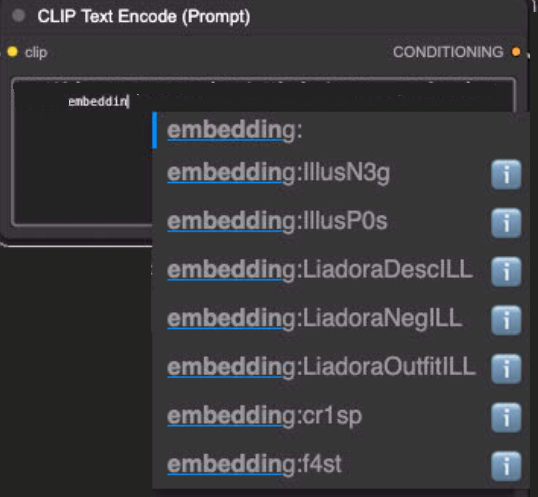
Description
Negative embedding! This goes in the negative prompt!
FAQ
Comments (25)
Haven't tried yet but I will soon (1-3 days, due to Christmas!). Will update with how well it goes.
So question: Does the respective pos/neg LORAs have to be in the prompts, or just the command words?
And if they have to be active, are both LORAs in positive, or one in pos, one in neg?
Or am I an idiot and these loras actually belong in the EMBEDDINGS folder, and you just use the command words to 'trigger' them?
Indeed! Those are embeddings! No LoRA stuff here (impact on the Unet), they just add "words" to the prompt (impact on CLIP).
Just pop both files in the embeddings folder, trigger them like you would any other embedding (just IllusP0s or IllusN3g in Forge/A1111, embedding:IllusP0s or embedding:IllusN3g in ComfyUI), one in the positive prompt and one in the negative prompt, and you are good to go :D
Check the posted pictures :D
Thank you for this embedding <3
You are welcome! It's really simple but it helps a lot ^^
Hey there! I hope this isn't a silly question... but how did you get the dataset for these embeddings? just asking since I'm currently trying to figure out how to train my own quality embeddings :>
Hello! Not a stupid question at all! 👍 So, the trick is... i did not use any dataset 😅
This embedding is just a merge of tokens, really, the most basic possible embedding. To make it, i used this extension for A1111. You feed it a prompt, less than 75 tokens, and it will create an already parsed result of it as an embedding. You can then use this embedding as-is in other prompt.
Like i said, here, it's a VERY simple embedding made just for my own lazyness, but surprisingly used by quite a few people :D
@n_Arno Gotcha! Thanks for the answer! <3
@n_Arno Do those tokens count towards your limit when you use the embedding? For example, if the embedding was a prompt that contained nearly the limit of tokens, and then I load that embedding in a new prompt, will i only have a few new words to work with before they're ignored?
@modelmixing from my understanding, it depends on how it was "merged" when using the embedding merger tool. A basic list of tokens with comma will count the same in the end. If you leverage the "magic trick" of mixing tokens using the plus sign, it reduces the number of token. All embeddings are technically a sum of tokens.
Here for IllusP0s for example:
>>> from safetensors.torch import load_file
>>> e = load_file("IllusP0s.safetensors")
>>> e["clip_g"].size()
torch.Size([15, 1280])
>>> e["clip_l"].size()
torch.Size([15, 768])
There is 15 tokens (a word is often split between 2-3 tokens).
Question!: Should these work for all Illustrious checkpoints, even the ones that have different quality tags from most? I only generate on-site btw (if that makes any difference) ^^'
So, what this embedding does is to aggregate a few quality tags together to facilitate prompting, nothing more, nothing less.
Indeed, if a checkpoint is requesting other tags in the prompt, it may not be enough. But in truth, except for very advanced "trained" models, the "quality tags" requested are more a suggestion on how to better achieve similar results that the author. Base illustrious "quality tags" are still bake in the text encoder and using those in positive/negative prompt should be enough to get good results regardless.
For example, i have seen that not using any quality tags in positive prompt still give good results, especially when prompting a male character as "masterpiece, best quality" tend to make the models generate more female characters. And with low CFG, negative prompt is not as important either.
So, from my experience, use what the model ask for in positive prompt, drop IllusN3g in negative prompt and that should be enough, even in the on-site generator :D
@n_Arno Ohh, this is helpful! Thank you so much! ^^
This is the stuff right here. Bombarding the prompts (especially the negative one) with hundreds of words isn't ideal. SDXL and its derivatives can usually understand what you want just from the positive prompts.
It's like telling someone "Turn right onto the yellow road. Do not turn left or go straight onto the blue, red, brown, purple, white, gray, black, or green gravel, dirt, or rocky roads."
Instead of "Turn right onto the yellow asphalt road. That road is also a two-lane road and there's a bus stop right next to where you should turn."
Yes and no. It does not make sense to have a giant negative window like many use, but to work without negatives is also bad. A healthy mix the the best. "Juice" is the best to use so your "masterpiece" in positive and "worse quality, bad quality" in negative, because Pony as also Illustrious have those tags to differentiate the quality of pictures used.
Both approach are "correct" in the sense that an SDXL model is using Classifier Free Guidance:
- The positive prompt is used to create the "Condition" which drive the result
- The negative prompt is used to create the "Un-condition" which is removed from the result to help drive it further in the right direction.
The negative prompt can be left empty and the uncond will generate "something" random that is not the positive prompt (normally) which is still a way to guide it. But for example if the training dataset includes some elements you don't want appearing in your results, using those words in the negative prompt helps a lot.
In any case, with low CFG, the influence of the negative prompt is less taken into account (until CFG = 1 where the uncond is disabled).
But indeed, since both Pony and Illustrious use quality/scoring tags in their training dataset, adding the bare minimum in the negative prompt allows removing "bad results". On the other side, some positive quality/scoring tags may be a bad influence too! Using "masterpiece, best quality" tend to generate more feminine characters. For male characters, avoiding those helps (and adding 1girl in the negative too!)
Amazing embedding, my go to for illustrious
Thank you 😊💕
I've been working on shortening my prompts and removing as much 'purple prose' and repetitive tokens as I can, and these embeddings are a big help.
Embeddings still count toward the token counts, but they greatly help keeping it short and "human readable" 😊
For example, when doing some "typical" characters that don't need a LoRA, having them "packaged" in an embedding is a nice way to build prompt more easily.
these are just that purple prose but compressed lol
@spunkymcgoo Not even compressed, just pre-processed 😅
I could do a version where the generated embeddings are already added altogether as a single embedding, reducing the number of tokens, but i am unsure of the result.
@n_Arno 这和我学到的知识冲突?embedding不是将大量提示词合成为一个单一的提示词吗?它难道不是只占用一个提示词所需的令牌吗?😨还是说embeding只是一个添加固定提示词的词组的快捷指令?
@xiaoyinbi Sorry for replying in english, but you can find more information about what are embeddings in this article: https://civitai.com/articles/16118/general-discussion-about-embeddings
@n_Arno 没关系,谷歌浏览器可以自动翻译(。・ω・。)