









Support me at: https://ko-fi.com/makina69
Quick tips on the easiest way to start your Flux journey from my experience so far:
Forge - this has the familiar WebUI A1111 style if you just can't be bothered to learn comfy.
github.com/lllyasviel/stable-diffusion-webui-forge/releases/download/latest/webui_forge_cu121_torch231.7z
To unzip 7z file: www.7zip.orgStart > Command Prompt as Administrator then go to the unzipped folder and run update.bat then
run run.bat to start the webui.Get the checkpoint flux.1d fp8:
huggingface.co/lllyasviel/flux1_dev/blob/main/flux1-dev-fp8.safetensorsClip_l & t5xxl_fp8_e4m3fn & put them in /models/textencoders of your Forge directory
huggingface.co/comfyanonymous/flux_text_encoders/tree/mainPut this in /models/vae: huggingface.co/black-forest-labs/FLUX.1-schnell/resolve/main/ae.safetensors
Realism Lora, put in /models/lora - civitai.com/models/631986/xlabs-flux-realism-lora
This is optional, you can use your own favourite upscaler. ESRGAN/4x_NMKD-Superscale-SP_178000_G.pth · uwg/upscaler at main (huggingface.co)
Put in /models/ESRGAN
Below is the usual settings I use: (Use LMS for best skin texture)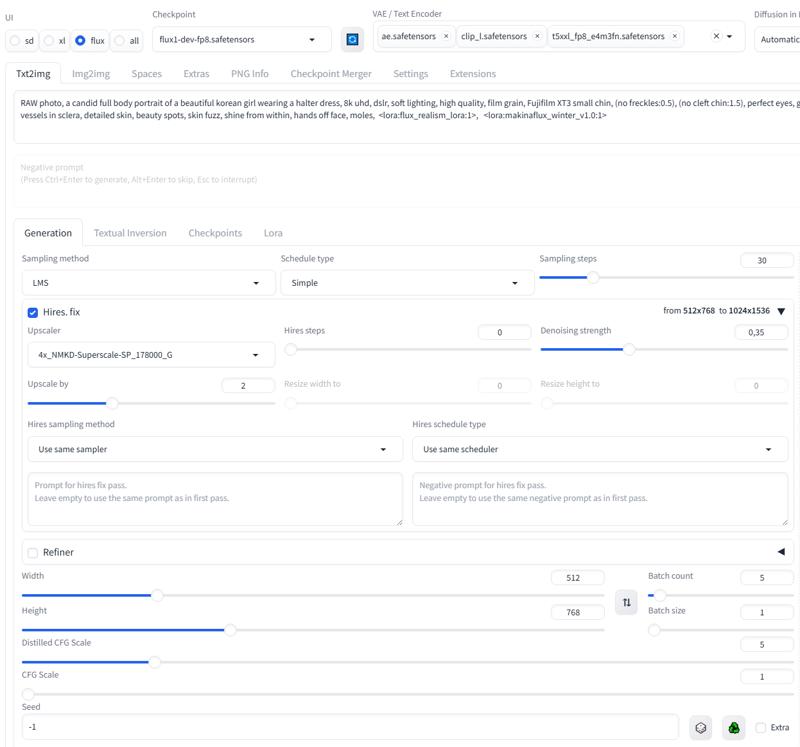
Description
FAQ
Comments (5)
chaewon plz!
the accuracy is good, however, could you retrain with higher quality image? cause the result looks blurry
this is one of my early flux lora. I will update eventually. In the meantime you can try using sampler Forge Realistic (slow)
https://ko-fi.com/s/000dba0eff
yeji flux v2
@Makina69 thank you so much <3