

















Important Note:
Comfy Sigma Portable - is a portable standalone package based on comfyUI and designed for beginners. Main moto - easy to unzip, easy to use. Comes with easy to understand interface designed for people who struggle with comfyUI.
Highly Optimized:
-Uses T5 XXL at FP8 from SD3 (4.5GB).
-PixArt Sigma at FP16 (1.2GB).
-Can run on 8GB cards.
-Can run on 6GB using NVIDIA shared memory.
-Portable, no installation needed.
How to Use:
Unzip downloaded archive "Comfy Sigma Portable v01.zip", using WinRAR or similar soft.
Run "run_nvidia_gpu.bat", after loading browser will open automatically.
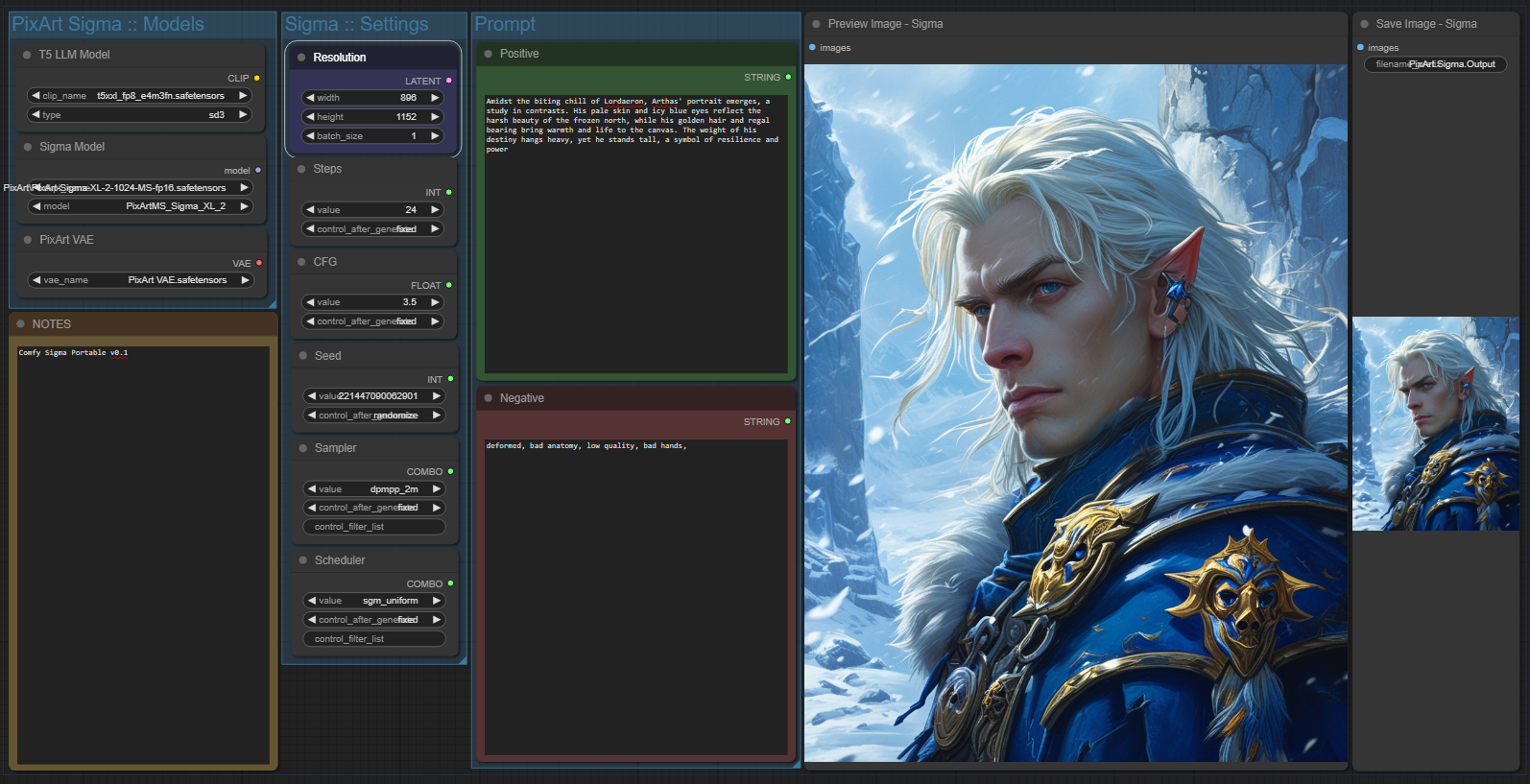
You need to move "Workflow.png" inside ComfyUI window and drop it.
Re-select models if needed and run the test prompt.
Find your images at "Comfy_Sigma_Portable\ComfyUI\output\"
FAQ:
Q: Cant open the *.zip archive using build-in windows tool!
A: I've had to use more efficient compression method,
Use WinRaR or 7zip to extract this archive.
Regular windows zip archive function will struggle.
https://www.win-rar.com/download.htmlQ: I have an error: KeyError: 'model.diffusion_model.input_blocks.0.0.weight'
A: Looks like you skipped Step 3 and not using correct workflow,
Please, you need to move "Workflow.png" inside ComfyUI window and drop it.
Workflow is coded into picture.
You can contact me at civitai.com/user/Temp or reddit.com/user/-Ellary-
Description
v0.1 Portable and Easy
FAQ
Comments (39)
Wonderful!
Leave a comments if you have a question or a problem, I've tried to make it problem free as much as possible.
Windows cannot open the folder.
The Compressed (Zipped) Folder 'C:\Users\*****\Downloads\comfySigmaPortable_v01.zip' is invalid.
@ninjasaid13 use WinRaR or 7zip to extract this archive.
Regular windows zip archives function will struggle.
https://www.win-rar.com/download.html
I'm new to this, but I have a question about the model. Is this model mostly for portraits? I'm having trouble getting proper hands, and full body shots with poses.
@AiFaNcY It is for everything, it is a base general model, but it is really small 0.6b, smaller than SD1.5 0.8b, this is why it struggles a bit with hands and is a bit messy, it will be better if properly fine-tuned in future. Right now use old tricks - prompt something about boots and legs to get full body shots, describe different action and camera positions, right now it will be kinda not ideal, it doing its best.
@Temp Got it. I can't wait for the updates. it's so good with the close up shots. Thanks.
Can you explain the different models? And why are there 2 model parameters on in the "sigma model" node?
@DELOUSE_MY_AGENT5985 Sure, second bonus model is a finetune of PixArt Sigma.
You can find it at CivitAI by name, it a bit better at photos and more realistic paintings.
Thanks, works out of the box like a charm. Tried pixart a couple of times in the past in my regular comfy but outputs very skewed all the time.
It's as others have stated countless times, it's a potent model.
"Just like the simulations."
Windows cannot open the folder.
The Compressed (Zipped) Folder 'comfySigmaPortable_v01.zip' is invalid is the error message I get when tried to open the folder.
Use WinRaR or 7zip to extract this archive.
Regular windows zip archives function will struggle.
https://www.win-rar.com/download.html
@Temp Thanks!
Does anyone know how fast it will generate an image given a 4070 laptop with 8GB?
Around ~25-30 sec. per 1024x1024 picture.
Any plans to support AMD GPUs?
I'm afraid it is based on ComfyUI portable and right now it have no AMD support implemented =(
I was able to run it on AMD on my Linux machine. So it is possible.
What I did is I used my existing Comfy installation. Installed ComfyUI_ExtraModels custom node. Installed requirements from Pixart Sigma github page but without xformers and gradio. Then I copied model, clip and VAE from this archive. Loaded workflow and it worked.
@San4itos sounds like a legit option for a regular comfyUI setup!
Just click, it's that simple.
Edit: Works great now that I got the proper workflow loaded :)
Q: I have an error: KeyError: 'model.diffusion_model.input_blocks.0.0.weight'
A: Looks like you skipped Step 3 and not using correct workflow,
Please, you need to move "Workflow.png" inside ComfyUI window and drop it.
Workflow is coded into picture.
@Temp I have a rtx 3070 ti, so should be all good there. I just now tried one of the pony realism models and that one seems to work just fine. I noticed also that the models that came in the archive is only a little over a gig?
Helps to read the notes.. The issue was that the right workflow was not loaded.
@boxman222 got it! I will add your problem to FAQ to help people with same problem.
@boxman222 models in this archive converted to fp16 to save vram.
This is a fully fledged comfyUI setup, with right workflow (+ all correct weights) you can use models from:
SD1.x, SD2.x, SDXL, Stable Video Diffusion, Stable Cascade, SD3, PixArt Alpha, PixArt Sigma, HunYuan DiT.
It's working and i'm experimenting with it, I would really appreciate a fast overview of the different models available and various settings to get the most of this. As for now i'm not able to get quality like that of the online collab test
Well, you can use samplers that take 2x time to get better results - DPM++ SDE for example,
Check models at CivitAI, there is like 2-3 finetunes that perform a bit better at something.
Quality may be different cuz of weights, usually online services run FP32 models, this archive uses FP8+FP16.
They are way more smaller, but they can fit in regular 8GB cards.
wondering if you installed xformers in this portable version. It is recommended from the sigma developers and also really helpful for low vram people
Nope, clean comfy pipeline without xformers, you can install it and let me know if it any better,
for me it was zero difference in speed or vram, so i dropped it for simplicity.
@Temp I'm not using this portable version, because i did a custom install with a conda env. But i'm saying it would be good for people that don't know how to handle all this, to have the recommended settings. And xformers is recommended by the developers. Please include it if you can. Pixart sigma developers put it in the requirements file. I have 6gb vram. Speaking from personal experience, for me it is a huge difference when i use xformers and when i don't. Loading times are way much faster with xformers for me. I have installed xformers. I'm using the latest xformers with torch 2.3.0. I installed it like this : pip install torch torchvision torchaudio xformers --extra-index-url https://download.pytorch.org/whl/cu121. I also put xformers in the requirements file to be sure it was installed.
@ReyArtAge will check it out if it any better.
I have heard xformers==0.0.26.post1 wheel can build in windows, but I couldn't get it going without WSL. gl
@EXDYSA wsl has nothing to do with xformers
Does anyone have an img2img workflow?
major problems if you update comfy. DO NOT UPDATE if you unzip this thing. Keep is as a seperate install from your main comfy installation. appears to be issues with animate diff and a few other nodes that makes it not function if you try updating.
Please update this with a variant that has the dynamic prompts nodes and the manager nodes. I tried to manually install them in here and it just doesn't seem to work for some reason.
No need, Comfy officially supports this model, use it as a regular model, flux or sd3.5 etc.