 Your contribution is greatly appreciated and helps me to create more content. If you like my model, please consider donating: https://ko-fi.com/aoi_android
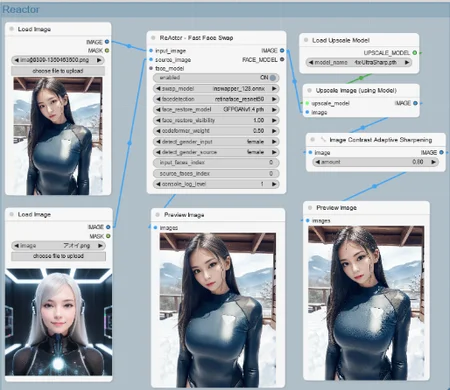
Face Swap for img
[github]
https://github.com/Gourieff/comfyui-reactor-node
This is a simple workflow for face swapping.
Contains Reactor and Loop.
#############################################
When introducing Reactor
If you encounter an import error, please see below.
Please perform Troubleshooting I and IV.
The reactor requires something called Insightface.
[JP]
シンプルな顔の入れ替え用のワークフローです。
Reactor と Roop が入っています。
##############################################
Reactor導入時に
import errorが生じた方は下記
TroubleshootingのⅠとⅣを実行してください。
reactorにはInsightfaceというものが必要です。
####################################################
【Troubleshooting】
🦊I. (For Windows users) If you still cannot build Insightface for some reasons or just don't want to install Visual Studio or VS C++ Build Tools - do the following:
(ComfyUI Portable) From the root folder check the version of Python:
run CMD and typepython_embeded\python.exe -VDownload prebuilt Insightface package for Python 3.10 or for Python 3.11 (if in the previous step you see 3.11) or for Python 3.12 (if in the previous step you see 3.12) and put into the stable-diffusion-webui (A1111 or SD.Next) root folder (where you have "webui-user.bat" file) or into ComfyUI root folder if you use ComfyUI Portable
From the root folder run:
(SD WebUI) CMD and
.\venv\Scripts\activate(ComfyUI Portable) run CMD
Then update your PIP:
(SD WebUI)
python -m pip install -U pip(ComfyUI Portable)
python_embeded\python.exe -m pip install -U pip
Then install Insightface:
(SD WebUI)
pip install insightface-0.7.3-cp310-cp310-win_amd64.whl(for 3.10) orpip install insightface-0.7.3-cp311-cp311-win_amd64.whl(for 3.11) orpip install insightface-0.7.3-cp312-cp312-win_amd64.whl(for 3.12)(ComfyUI Portable)
python_embeded\python.exe -m pip install insightface-0.7.3-cp310-cp310-win_amd64.whl(for 3.10) orpython_embeded\python.exe -m pip install insightface-0.7.3-cp311-cp311-win_amd64.whl(for 3.11) orpython_embeded\python.exe -m pip install insightface-0.7.3-cp312-cp312-win_amd64.whl(for 3.12)
Enjoy!
II. "AttributeError: 'NoneType' object has no attribute 'get'"
This error may occur if there's smth wrong with the model file inswapper_128.onnx
Try to download it manually from here and put it to the ComfyUI\models\insightface replacing existing one
III. "reactor.execute() got an unexpected keyword argument 'reference_image'"
This means that input points have been changed with the latest update
Remove the current ReActor Node from your workflow and add it again
🦊IV. ControlNet Aux Node IMPORT failed error when using with ReActor Node
Close ComfyUI if it runs
Go to the ComfyUI root folder, open CMD there and run:
python_embeded\python.exe -m pip uninstall -y opencv-python opencv-contrib-python opencv-python-headless
python_embeded\python.exe -m pip install opencv-python==4.7.0.72
That's it!

V. "ModuleNotFoundError: No module named 'basicsr'" or "subprocess-exited-with-error" during future-0.18.3 installation
Download https://github.com/Gourieff/Assets/raw/main/comfyui-reactor-node/future-0.18.3-py3-none-any.whl
Put it to ComfyUI root And run:
python_embeded\python.exe -m pip install future-0.18.3-py3-none-any.whl
Then:
python_embeded\python.exe -m pip install basicsr
VI. "fatal: fetch-pack: invalid index-pack output" when you try to git clone the repository"
Try to clone with --depth=1 (last commit only):
git clone --depth=1 https://github.com/Gourieff/comfyui-reactor-node
Then retrieve the rest (if you need):
git fetch --unshallow
Description
FAQ
Looks like we don't have an active mirror for this file right now.
CivArchive is a community-maintained index — we catalog mirrors that volunteers upload to HuggingFace, torrents, and other public hosts. Looks like no one has uploaded a copy of this file yet.
Some files do get recovered over time through contributions. If you're looking for this one, feel free to ask in Discord, or help preserve it if you have a copy.