WAN2.1 to WAN2.2 LoRA Converter
V2 (AIO)
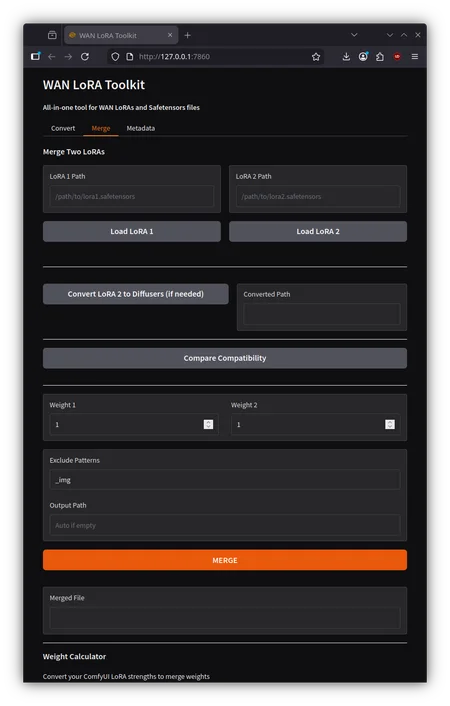
Ability to merge WAN2.2 LoRAs with converted WAN2.1 LoRA
Merge WAN2.2 LoRAs with any WAN2.2 LoRA
View, Edit, Delete or Add metadata for any LoRA or base models
in merge tab, use the 'LoRA 2 Path' filed for WAN2.1.
A simple tool to convert WAN2.1 LoRAs for use with WAN2.2 models.
Before converting, experiment with the LoRA strength. Generally, high noise requires double the low noise to replicate similar LoRA behavior. In some cases, I had to set high noise as high as 3.0, and in others, 1.7. For low noise, I used values from 0.75 up to 1.25. These weights are important to determine if you want to bake it with the converted LoRAs.
What It Does
- Converts format: Kohya -> Diffusers key naming
- Removes incompatible keys: Filters out WAN2.1 CLIP Vision layers
- Bakes in strength: Create high/low noise versions with pre-baked weights
Installation
pip install gradio safetensors torchUsage
python app.pyOpen http://127.0.0.1:7860 in your browser.
Quick Guide
Single Output:
1. Load your WAN2.1 LoRA
2. Check the auto-detected settings
3. Optionally set a strength to bake in
4. Click Convert
High/Low Noise Versions:
1. Load your WAN2.1 LoRA
2. Go to "High/Low Noise Versions" tab
3. Set strengths (Experiment to find out what strength works best for high noise and low noise)
4. Click Create
The tool outputs:
- lora_high.safetensors
- lora_low.safetensors
Notes
- Original files are never modified
Description
All-in-one