
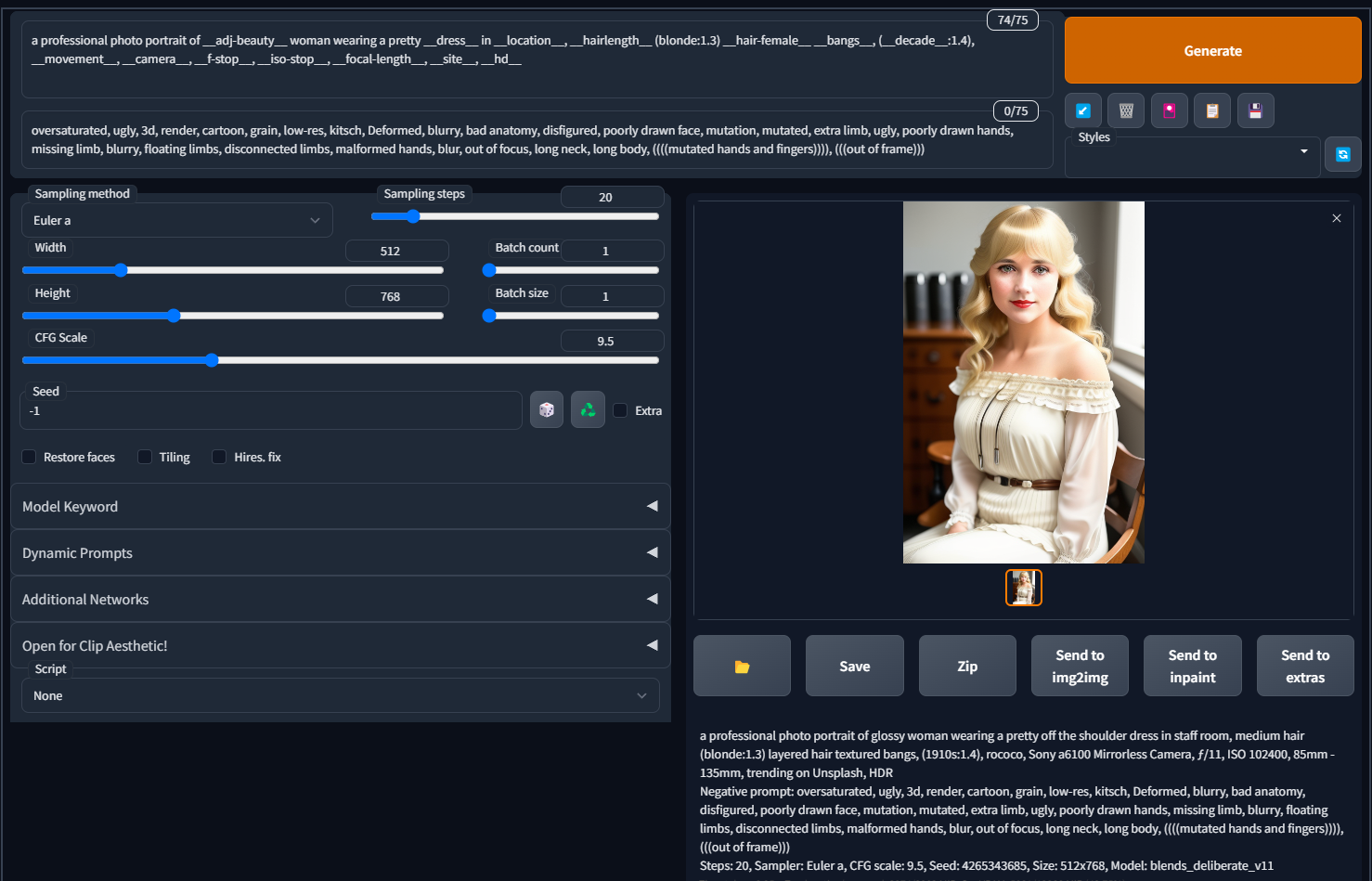
A collection of over 200 wildcards, with some of them generated with the help of ChatGPT. Includes both NSFW and SFW wildcards. A wildcard is a text file with tags/words inside them that is randomly chosen, allowing for a more dynamic prompting experience. This is especially useful for batch processing.
Requires the Dynamic Prompts or the Wildcards extension to use these.
More information on how to use wildcards can be found on my Github page.
I also recommend the extension, a1111-sd-webui-tagcomplete, which makes it easier and quicker to add wildcards, loras, Danbooru tags, and more. It works on Automatic1111, Forge, and SD.Next.
You can create your own wildcards using ChatGPT (or any other free AI service such as Gemini, CoPilot, Meta.AI, etc.) by telling it something like this:
Give me a list of all the different types of dresses for women. Make sure you list each one on its own line, alphabetical order, in lowercase, in singular form, and that there are no duplicates. Do not number each line.
Description
FAQ
Comments (25)
Nice. Will try and did into these over the weekend.
You know, there is extension like this:
https://github.com/butaixianran/sdweb-easy-prompt-selector
Which is more convenient than wild card in txt.
It also supports pick a tag randomly, like a wild card, which is showed in its japanese video. I just too busy to translate it.
nice extensions! by any chance could you translate to Simple Chinese?
not support img2img?
From my understanding that extension doesn't allow for autocomplete using the autocomplete extension. It also doesn't allow for inspiration images should you use your wildcards to create them with the inspiration extension. I am not sure if you can make a lora-randomizer with it either, would need to test myself. Cool extension though.
Smart using Chat GPT.
I've been using to to spit out dynamic prompts full of beautiful women. ie { woman 1 | woman 2 } etc and chat gpt does the rest.
U R my hero!!!
man you are the TURE hero
I got this and the webui extension.
Where do I put this folder to be able to use it and what do I click to activate it?
You need the Dynamic Prompts or Wildcards extension to use these, not webui. There's nothing to click to activate, you call up the wildcard using underscores in the prompt, such as __dress__ or __artist-fantasy__. Detailed instructions are found on my Github page: https://github.com/mattjaybe/sd-wildcards
@ArtificeAI Thanks for the info bro
Sorry for the ignorance, but what exactly is a wildcard? what do you use it for?
Ty :3
Check out my Github page, which explains what a wildcard is and how it works, along with a screenshot example: https://github.com/mattjaybe/sd-wildcards
@ArtificeAI thanks!
Short answer for those visiting:
Wildcards, along with the right extension, basically provide a list of prompt elements or keywords that can be randomly selected by simply entering the name of the wildcard set. It allows you to add versatility and, oftentimes, detail to your renders with minimal effort on your own part.
@Anistasiata thank you <3
Thanks for uploading this. Looking forward to updates.
Would you include types of nudity? Something like: Full nude, upper nude, etc..
I went to your github page, thank you for this. My question so its clear. I see the __dress__ and then under the photo I see what was inferred by the prompt. So instead it says ___Sexy off shoulder dress__ you didnt pick the sexy off shoulder? The prompt picks it randomly? Is there a way to ensure a certain prompt?
Yes, correct, '__dress__' invokes the wildcard text file, dress.txt, and randomly chooses the keywords inside there. If you want to ensure a certain prompt, either modify the .txt file, or create a new one yourself. If you add custom.txt and invoke it with '__custom__' in the prompt, any keywords you add in there will ensure you get your own certain prompt. You can create as many wildcards as you want.
Late reply, but you could always scan the wildcard .txt file for the prompt you want and then input that randomly. If I'm not mistaken, all that the selection of "sexy off shoulder dress" from __dress__ does is plug the words "sexy off shoulder dress" into the prompt.
So in theory if you just typed it out yourself, using the wildcard file for inspiration, it should have the same effect.
how to use wildcards?
See install and usage instructions on my Github page: https://github.com/mattjaybe/sd-wildcards#information-on-dynamic-prompts
@ArtificeAI where to install the plugin to EasyDiffusion? There is no such way: \stable-diffusion-webui\extensions\. My version of python does not start the build Automatic1111.
Thanks for sharing !