
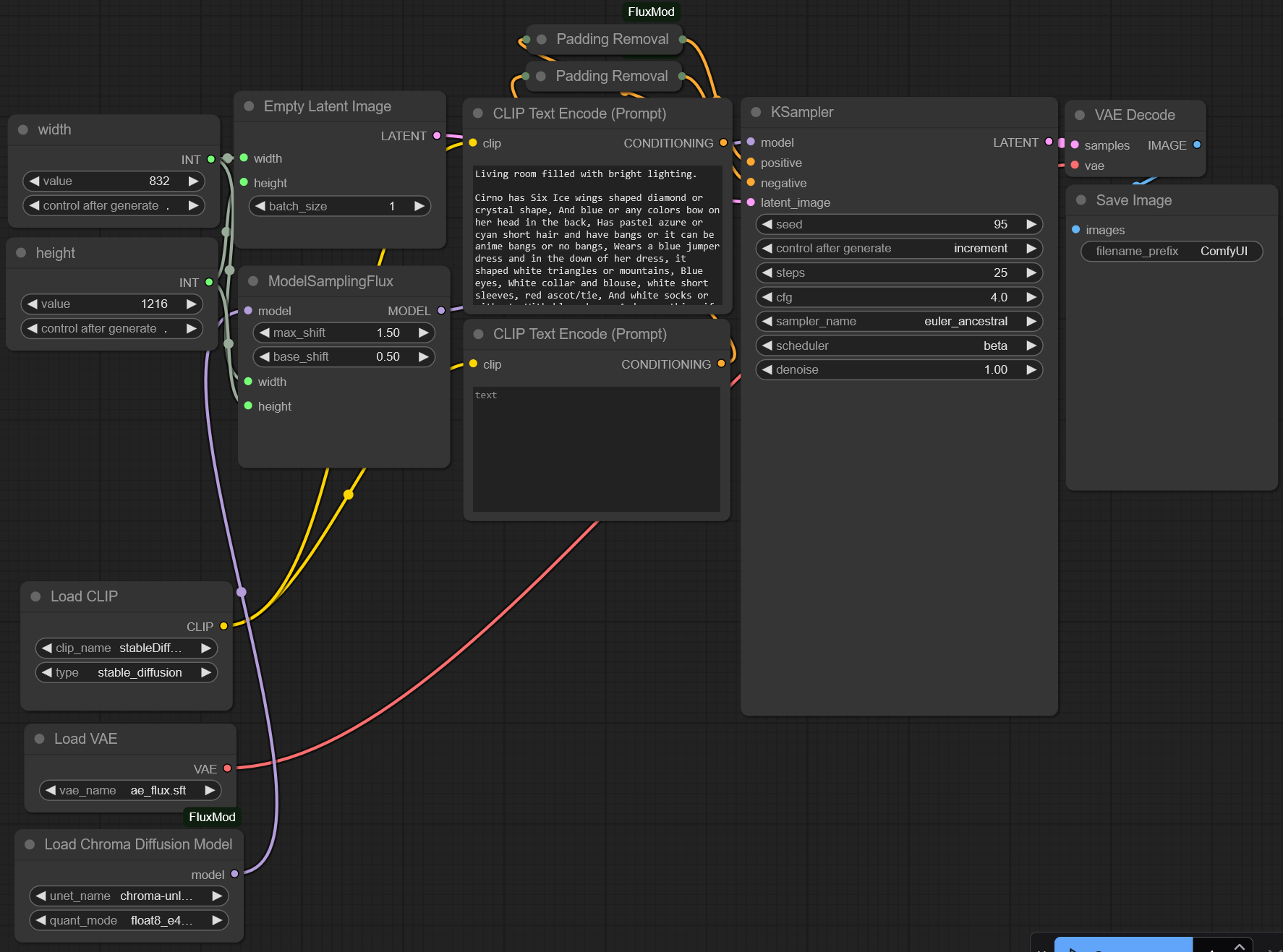
Basic ComfyUI workflow for Chroma Diffusion
Necessary extension, put into "ComfyUI\custom_nodes" folder:
https://github.com/lodestone-rock/ComfyUI_FluxMod
Models folder same as for Flux:
"ComfyUI\models\unet"
"ComfyUI\models\clip"
Chroma GGUF models run same as normal ones, use "Load Chroma Diffusion Model" and "Padding Removal" custom nodes with T5 text encoder only.
Checkpoints for GPU's with high VRAM:
https://huggingface.co/lodestones/Chroma/tree/main
Checkpoints for GPU's with medium VRAM:
https://huggingface.co/silveroxides/Chroma-GGUF/tree/main
T5 text encoder (e4m3fn preferred for medium VRAM):
https://civarchive.com/models/497255?modelVersionId=568405
Suggested parameters to use:
I prefer euler ancestral with beta scheduler as it follows prompt better than just euler beta or other combinations as I experimented.
It produces a lot of dots look like trypophobia hell and noise clusters at image edges. So "ModelSamplingFlux" with "max_shift" = 1.5 "base_shift" = 0.5 improves quality pretty much.
Other parameters same as for Flux:
good results at 25 steps with CFG 4.0-5.0, faster at 20 steps
Description
v 1.0
FAQ
Comments (2)
"Do not follow instruction bellow if you want to use Chroma!"
Can you resolve the confusion. On the page of this mod it is stated that one should not follow the installation instruction if he/she plans to use the Chroma model.
hwo to fix?
ChromaPaddingRemoval
'attention_mask'