Flux.2 Klein 9B UPDATE - SEE VERSION DETAILS
QWEN IMAGE EDIT v2511 UPDATE - SEE VERSION DETAILS
Firstly, this is a concept that Qwen Image Edit (and Flux.2 Klein 9B) can do already, kind of. It's pretty good at Outpainting by using the prompt Remove the white parts. You can even add a context image, but for Qwen Image Edit it's not great/doesn't work the best. Look at the examples for ideas of what it can help with. This was trained exclusively on photos, but seems to work for anime as well. Trained using Runpod with help from the Ostris Tutorial Here.
Suggested prompt for all uses: Remove the white parts, use the image for context.
For Uncropping/Outpainting: The intended purpose is to take a cropped image, expand the canvas size higher than the actual image and fill it with white. Use that as Image 1.
Use the image of the persons head as Image 2. I suggest an image of a head that cropped to a square. Maybe rotate it so it makes sense if it were transferred onto Image 1 directly.
If the image quality or even backgrounds are too different between the two images you may need to add additional context like hair color, location, etc, but less details is better in my experience. If you'd like a more unified quality, I had success using this with this Upscale LoRa. You could try other colors but I have not tested with/trained on anything but white.
For Inpainting: You can use photoshop or the white paint from the built in Comfyui Mask Editor, see the below example: 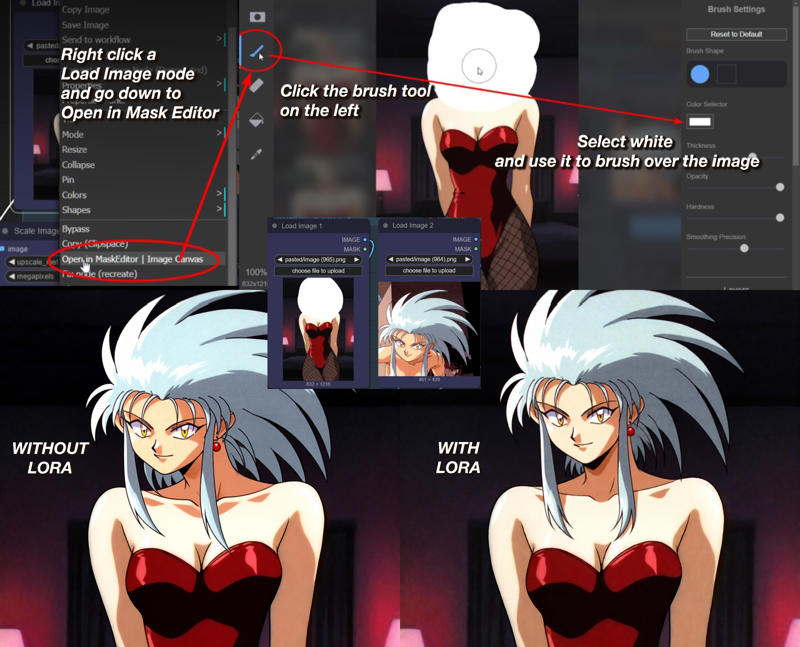
Description
Suggested tags: remove the white parts, use the image for context
Suggested strength: 1.0
Flux.2 Klein 9B is already very good at doing this without this LoRA. I was quite amazed when testing on/off how many results looked fine without the LoRA. This LoRA still has its use cases in my dataset creation workflow and I spent time and money on Runpod making it so I'll still release it, but feel free to try it with/without. Also tested with colors besides white and it worked fine. My workflow is embedded in all the images again.
Examples generated using flux-2-klein-9b-fp8.safetensors and corresponding fp8 text encoder at around 4-6 steps. Also Flux 2.Klein i2i prompting guide is helpful.
If you are using 9b-base, in my workflow change sampler to euler and increase number of steps.
FAQ
Comments (24)
4b please🥹❤️,my poor device runs the 9b too slowly😭
Man your device must be bad, I'm on 8GB VRAM and its pretty fast 😭. If its any consolation the model can do this without my LoRA just try a different seed lol
@cranpeach The editing ability of 4B is far inferior to that of 9B. It doesn't seem that simply rolling different seeds can solve the problem 😭. Moreover, I don't know why it's so slow. When I use 9B to edit two images, it takes about 100 - 150 seconds. If it's three images, it may take over 150 seconds. This is really slow for me. Even the simplest single - image editing takes one minute 😢.
@shigjfg yeah that's my problem with 4B as well, not worth my time or money when 9B is the better model
Has anyone made a workflow for Flux Klein? With this Lora, I'm not able to get it to work and it would solve something I've been trying to do for months XD, namely replacing specific anatomical parts.
I have manually gone in and re-attached the workflow to all of the example images so you should just be able to drag any of my images into comfyui. Unless you mean some kind of automated adding of white parts workflow, in which case no, but I have considered it.
@cranpeach I tried with the one in the images and I managed to get good results. After doing some tests with cfg and step I still haven't managed to completely transfer the textures.
This is great !! Please also create a 4B version please!
Thanks for the effort! I cant understand how you get those great results. The face, ALWAYS changes a lot for me. I would really love the easiest PASTE face swap, tried Qwen2511, flux, and flux I get a bit closer without mangling the rest of image, any help? please :)
While I agree these image models do tend to change the face a bit, I've been able to get decent results so I'll give some suggestions. Both images should be good quality. Image 1 shouldnt be too far zoomed out and be using a ImageScaleToTotalPixels node set to 1.0 to make sure the image isn't too big. Image 2 should be a cropped square of only their head, preferably in a similar orientation to image 1 as if you were pasting it right on there. You can try a different prompt like "Remove the white parts, replace the face in image 1 with image 2". My workflow is embedded here, just drag n drop into comfy: https://civitai.com/images/118382203 You will need the models listed in the Version details.
thanks do you have a workflow to use your lora to modify a picture without using a second image ? (short/long hair, color of clothes...). thanks
If you need to use my workflow for that, you can disable the 2nd image by selecting the components related to the 2nd image and hit Ctrl B to bypass them - there are some in the subgraph that need to be bypassed or you'll get errors. I honestly suggest not using my lora or setting it's strength to zero as Klein 9B is very capable without it, just use prompts "make her hair x" and see what happens
Thanks. Is it necessary to use a mask? By masking the hair or the areas to be modified or where I want to add or remove an object? How do I do this?
i have this eror "Prompt outputs failed validation: ImageScaleToTotalPixels: - Required input is missing: image"
https://civitai.com/images/123143546 here is a workflow with the 2nd image bypassed with Ctrl B
@gandolfi2004987 I've had a lot of luck just using prompts instead of masking when needed. Tell the model to do something and see if it will let you.
@cranpeach thanks for your help and thanks for your lora
EDIT: Works perfectly, really cool! :)
ORG: I couldn't see a workflow that shows how to create any of the examples? The anime girl workflow is not complete and I couldn't get it to work?
So I didn't provide any of the input images so without those you wouldn't be able to recreate any of the examples. Most of the images have workflows, just have to drag them into Comfyui.
@cranpeach Ah, I guess that's a fair point, but most importantly, CIVIT did not register the images as having workflows, that's why people are missing them! :D I just downloaded the clown image and it indeed has a workflow in it. I'm not using it for women though but good to have a starting ground for the inpaint!
GOD BLESS YOU MAN!!!, I SWEAR THIS IS THE BEST LORA EVER, with some adjustment it can easily change clothes face anything into reference
Thanks
Details
Files
uncrop_F2K9B.safetensors
Mirrors
uncrop_F2K9B.safetensors
KLEIN_Uncrop.safetensors
uncrop_F2K9B.safetensors
uncrop_F2K9B.safetensors
uncrop_F2K9B.safetensors
uncrop_F2K9B.safetensors
uncrop_F2K9B.safetensors
uncrop_F2K9B.safetensors
uncrop_F2K9B.safetensors
uncrop_F2K9B.safetensors
KLEIN_Uncrop.safetensors
uncrop_F2K9B-mid_2106308-vid_2620761.safetensors
uncrop_F2K9B.safetensors
uncrop_F2K9B-mid_2106308-vid_2620761.safetensors
86-uncrop.safetensors
uncrop_F2K9B.safetensors
uncrop_F2K9B.safetensors